Page 1 of 3
[Solved] "Un-closable" "Restore Windows" Message
Posted: Sat Aug 18, 2012 6:01 pm
by djjimmer@hotmail.com
Iv'e had the OO Apache 3 since it became available & last week I got this little window that appeared saying:
RESTORE WINDOWS
The application “OpenOffice.org” unexpectedly quit while trying to restore its windows. Do you want to try to restore its windows again?
(Button 1 on left says) "Don't restore windows" (Button 2 on right says) Restore Windows
There is no response from the 2010 Macbook Pro (17" Monitor) Notebook computer, when either button is pressed.
I can not close this notification message and it appears as soon as I use O.O.
The program still functions normally as far as I can tell. but this notification window is highly annoying. What is needed to stop this?
Thanks in advance, Jimmer Mackinnon
Re: "Un-closable" "Restore Windows" Message
Posted: Sat Aug 18, 2012 10:16 pm
by MrProgrammer
Re: "Un-closable" "Restore Windows" Message
Posted: Sun Aug 19, 2012 3:14 am
by djjimmer@hotmail.com
Everything I read gets me nowhere. I have just spent the last 2hours trying to make anything I am reading work.
I am not a computer genius. I am NOT understanding when I try. It seems if I get one thing right, the instructions do not take me any further.
I have said aloud a dozen times now, "OK SO WHAT NEXT?!?!" I feel like giving up.
I am so frustrated!
Can someone tell me in some simple terms what to do?
I think all the wizardry jargin is for real geeks. Unfortunately, and I can not relate to 90% of what all these explanations are saying!
Re: "Un-closable" "Restore Windows" Message
Posted: Sun Aug 19, 2012 6:34 am
by djjimmer@hotmail.com
I now have almost 5 hours into trying to get to where these "Instructions" are trying to get me to.
It just goes round & round Over & over to nowhere.
I can NOT find this on my computer
/Users/<User Name>/Library/Application Support/OpenOffice.org/3/user
I guess I can not fix this problem
I can not find anyone here that will help me.
Re: "Un-closable" "Restore Windows" Message
Posted: Sun Aug 19, 2012 7:32 am
by RoryOF
I have no Mac experience, but this extract from a previous posting ought start you
lgusaas writes: The profile is located at: /Users/<user name>/Library/Application Support/OpenOffice.org/3/user
In Lion the Users/Library is hidden. To access it Option-click the Go menu In Lion, as in Snow Leopard, the user-level Library folder is not included in the Finder’s Go menu. But in Lion, if you Option-click the Go menu, your Library folder magically appears in the menu; choose Library from the menu to open the folder in the Finder.
For other methods of viewing the users library see the MacWorld article: "18 ways to view the ~/Library folder in Lion"
http://www.macworld.com/article/161156/ ... _lion.html
There is further discussion on Mac intricacies in the entire thread at
http://user.services.openoffice.org/en/ ... hp?t=43095
If you are confused by the range of advices offered, it is sensible to restrict your attention to Users or more particularly Volunteers who are Mac users; you can identify these by the Operating System information in their signature line.
If you have been working at this continuously for five hours take a break; go and do something else or sleep on it, and come back when fresh.
Re: "Un-closable" "Restore Windows" Message
Posted: Sun Aug 19, 2012 7:43 am
by lgusaas
djjimmer@hotmail.com wrote:I now have almost 5 hours into trying to get to where these "Instructions" are trying to get me to.
It just goes round & round Over & over to nowhere.
I can NOT find this on my computer
/Users/<User Name>/Library/Application Support/OpenOffice.org/3/user
As has been stated in many threads, the user Library is hidden in Lion.
Open finder, then Option-click the Go menu to locate it.
However finding it will not fix your specific problem.
You need to delete the file "org.openoffice.script.savedState"
It is located this folder: /Users/<user name>/Library/Saved Application State
The user/library folder is hidden in Lion. In finder, Option-click the Go menu to locate it.
This advice was given in this and several other posts:
http://user.services.openoffice.org/en/ ... 84#p235213
Re: "Un-closable" "Restore Windows" Message
Posted: Sun Aug 19, 2012 5:57 pm
by djjimmer@hotmail.com
Yes Larry,
Thank you.
It is not that I don't appreciate your response. But I say above, I can not locate this folder let alone the file in it.
I stared at that link you provided again here above, for what seemed like forever &
tried as many angles as I could, figure out a way to find this folder, to no avail.
I can get to the library no problem, but that is where it ends.
I tried slowly scrolling through the endless list of meaningless to me, files & folders.
I tried typing in the folder name in the search, and I get a blank library page.
Thus my feeling this is unrepairable...
It is beyond me to find this folder.
Re: "Un-closable" "Restore Windows" Message
Posted: Sun Aug 19, 2012 6:01 pm
by RoryOF
In lgusaas's advice, <user name> is replaced by your logon user name. It might be Jimmer, or JMacK or whatever else you chose when setting up your computer.
Re: "Un-closable" "Restore Windows" Message
Posted: Sun Aug 19, 2012 6:31 pm
by djjimmer@hotmail.com
OK
I just found the folder for O.O. In it are many folders I opened every folder within every folder. It took a half hour.
after having ALL of opened, I typed the file name & got another blank Library page. I did my best to read each & every file name I do not see
org.openoffice.script.savedState
anywhere in all of the opened folders.
Re: "Un-closable" "Restore Windows" Message
Posted: Sun Aug 19, 2012 6:51 pm
by djjimmer@hotmail.com
Closest matches I found:
org.openoffice.Office.OOoImprovement.Settings.dat
org.openoffice.Office.Recovery.dat
org.openoffice.Office.UI.CalcWindowState.dat
org.openoffice.Office.UI.StartModuleWindowState.dat
org.openoffice.Office.UI.WriterWebWindowState.dat
org.openoffice.Office.UI.WriterWindowState.dat
org.openoffice.UserProfile.dat
WriterWindowState.xcu
Re: "Un-closable" "Restore Windows" Message
Posted: Sun Aug 19, 2012 7:18 pm
by lgusaas
djjimmer@hotmail.com wrote:OK
I just found the folder for O.O. In it are many folders I opened every folder within every folder. It took a half hour.
after having ALL of opened, I typed the file name & got another blank Library page. I did my best to read each & every file name I do not see
org.openoffice.script.savedState
anywhere in all of the opened folders.
The file "org.openoffice.script.savedState" is not in the "OpenOffice.org" folder. It is in the "Saved Application State" folder in your User/Library.
Follow these instructions (I gave them in my last post:
- 1. Open Finder
2. Hold down the Option key while clicking Go on the menu bar
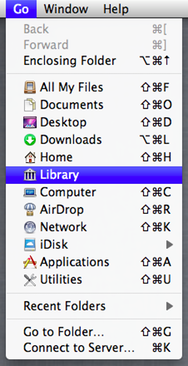
- User Library.png (94.62 KiB) Viewed 123053 times
3. While still holding down the Option key Click on 'Library'
4. Locate the folder "Saved Application State" and open the folder
5. Find the folder "org.openoffice.script.savedState" and delete it.
6. Quit or Force Quit OpenOffice
Re: "Un-closable" "Restore Windows" Message
Posted: Mon Aug 20, 2012 2:14 am
by djjimmer@hotmail.com
SOLVED!!!!
YES!!!
Thank you for the step by step with Images!
What made the difference was your 2nd screen shot and calling it just saved "application state".
My library was not looking anything like your image, so I clicked the selection at the top that gave me the same view as your example!
I know this must seem very straight forward to you, but I never ventured to this before
It took like 2 min and done!
I am SO grateful Larry, Sir!
Most excellent!
I assume this could occur anytime O.O. is shut down unexpectedly?
Do you know if the file was created because of the occurrence of perhaps a force quit or some other improper shut down?
Or was it there already?
Also, why wouldn't either of the buttons displayed work?
If you know that is..
Oh so many thanks! I'm VERY grateful for that!
Re: "Un-closable" "Restore Windows" Message
Posted: Mon Aug 20, 2012 2:49 am
by lgusaas
djjimmer@hotmail.com wrote:
I assume this could occur anytime O.O. is shut down unexpectedly?
Do you know if the file was created because of the occurrence of perhaps a force quit or some other improper shut down?
Or was it there already?
This can re-occur if AOO crashes or a force quit is used. This is a bug in AOO, which has been reported. It may be fixed in the upcoming release of AOO 3.4.1. I don't use OS X Lion so I cannot check to see if it is fixed.
Re: "Un-closable" "Restore Windows" Message
Posted: Mon Aug 20, 2012 5:47 am
by djjimmer@hotmail.com
Very Good!
Thank you again!
Re: [Solved] "Un-closable" "Restore Windows" Message
Posted: Thu Sep 06, 2012 10:13 pm
by poisonsacred
It's indeed not so easy to find the "to-be-deleted" file.
Phil's post on 07 Aug 2011: [Solved] Mac OS X Lion OOo 3.3.0 Restoring
Windows Error is quite useful. I eventually found it and deleted it.
So, now O.O is back to normal!!

Re: [Solved] "Un-closable" "Restore Windows" Message
Posted: Mon Sep 24, 2012 1:23 am
by KnitChick1979
They say a picture is worth a thousand words - thank you for those screenshots lgusaas!! This issue has been bugging me for a couple weeks, and I wasn't sure what could be wrong or how to fix it. I'm glad I came here to look, your screenshots helped me understand exactly where to go to fix it. Good thing too, my resume seems to only be saved in odt & pdf formats & needs editing asap!
Re: [Solved] "Un-closable" "Restore Windows" Message
Posted: Thu Sep 27, 2012 6:23 pm
by livrose
I have tried the advice given and managed to delete the file mentioned. However, the 'Restore Windows' message is still there. It is also preventing me from accessing anything I have saved in open office. Please help!!
Re: [Solved] "Un-closable" "Restore Windows" Message
Posted: Thu Jan 03, 2013 3:27 pm
by HazelJarrett
I have the same problem... I followed the advice given and managed to delete the file mentioned, but the 'Restore Windows' message is still there and I can't access anything saved in open office. I'm really stuck and need to solve this as soon as possible... any advice would be great.. thank you.
Re: [Solved] "Un-closable" "Restore Windows" Message
Posted: Tue Jan 08, 2013 2:19 am
by echo_925
Hello,
I am using Mac OS X 10.7.5 and OpenOffice 3.4.1. I find the folder "Library"in my Mac but cannot find the folder "Saved Application State" or file "org.openoffice.script.savedState" or file "registrymodifications.xcu".
Could anybody give some kind guidance please?
Thanks in advance!
Echo
Re: [Solved] "Un-closable" "Restore Windows" Message
Posted: Tue Jan 08, 2013 6:07 am
by lgusaas
echo_925 wrote:I am using Mac OS X 10.7.5 and OpenOffice 3.4.1. I find the folder "Library"in my Mac but cannot find the folder "Saved Application State" or file "org.openoffice.script.savedState" or file "registrymodifications.xcu".
You need to go to your User Library, which is a hidden folder. Follow the instructions in this post I made earlier in this thread.
http://forum.openoffice.org/en/forum/vi ... 65#p244931
Re: [Solved] "Un-closable" "Restore Windows" Message
Posted: Tue Jan 08, 2013 8:33 am
by echo_925
Hello Larry,
Thank you.
When I click "Go" on the menu bar, the icon "Library" is NOT there. Where should I go then?
Echo
Re: [Solved] "Un-closable" "Restore Windows" Message
Posted: Tue Jan 08, 2013 8:44 am
by lgusaas
echo_925 wrote:Hello Larry,
Thank you.
When I click "Go" on the menu bar, the icon "Library" is NOT there. Where should I go then?
Echo
Read the instructions and follow exactly. They said "Hold down the Option key while clicking Go on the menu bar"
Did you hold down the Option key while clicking Go?
Re: [Solved] "Un-closable" "Restore Windows" Message
Posted: Tue Jan 08, 2013 4:49 pm
by echo_925
Hi Larry,
Thanks for you help. I found the file and deleted it. HOWEVER, the "Restore Windows" still CANNOT be got rid of...
What should I do?
Echo
Re: [Solved] "Un-closable" "Restore Windows" Message
Posted: Sun Jan 27, 2013 4:57 am
by ConstanceSauve
I've tried the steps, followed the picture directions and this little error box is still there!! AHHH!!!
Any other ideas?
Re: [Solved] "Un-closable" "Restore Windows" Message
Posted: Tue Jan 29, 2013 11:00 am
by Jon F
Solved the problem, worked perfectly many, many thanks.
Re: [Solved] "Un-closable" "Restore Windows" Message
Posted: Mon Jun 10, 2013 12:58 am
by SteelJavelin
Thanks, Larry, for the excellent step-by-step diagrams of the solution to this problem.
Maybe I'll write a simple shell to do this.
The forced quit resolves the incident, but your solution cures the "illness".
My problem might have originated when I shut down the system while Open Office was still in the process of closing down.
After that, I couldn't open up Open Office. I re-installed Open Office and I could open it up, but the restore windows box appeared.
Couldn't get rid of it and could neither close Open Office nor shut down the system. Had to resort to the forced quit .
I don't recall if I tried pressing the on/off button for 5+ seconds or not (that probably would work but I only use that method if the system locks up).
Maybe this scenerio might help the development team to resolve the problem permanently.
Re: [Solved] "Un-closable" "Restore Windows" Message
Posted: Wed Dec 04, 2013 9:55 pm
by Jakob
I have the same problem
I did everything up to deleting the file.
but …. dam…
the window is still here….
who can help mere!!!!!

Re: [Solved] "Un-closable" "Restore Windows" Message
Posted: Wed Dec 04, 2013 11:36 pm
by lgusaas
Jakob wrote:I have the same problem
I did everything up to deleting the file.
Did you delete the file?
Also quit (or force quit) AOO
Re: [Solved] "Un-closable" "Restore Windows" Message
Posted: Fri Dec 06, 2013 3:45 pm
by ijkitt
Thank you so much - the clear directions with screen shots were just what I needed.
Re: [Solved] "Un-closable" "Restore Windows" Message
Posted: Sat Jan 04, 2014 12:30 am
by tommy00
Thank you very much! This resolved the situation, and I can use the program after 1 month of searching foe a solution:D