
I'm at my wits end and hoping someone can guide me in the right direction.
I have a list of words (eg. Apple, Banana, Grape, Orange, Kiwi) in Column D.
I not new to programming but I am new to Calc and the way scripts (formulas) are written. I wrote the current code to extract those fruit and randomly input them in Col A, B, and C iterated (sequenced) 5 times (a total of 5 rows containing fruit names in Col A, B, and C.
Code: Select all
=INDEX(SORTBY(D2:D5, RANDARRAY(ROWS(D2:D5))), SEQUENCE(5))The wall I'm hitting is removing any duplicates that are created on the same row for any of the 3 columns as shown in the image below.
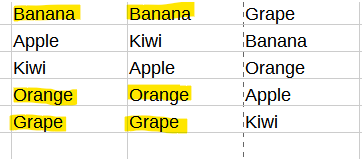
My Goal:
At the time of iteration and outputting of fruit names, I need to compare col B (rows 1 - 5), with col A (rows 1 - 5) and not output any duplicates on col B in the exact same row. Instead it needs to be a blank cell. For example, in the image on row 1, both col A and B contain Banana and col C contains Grape. Col B should be a blank cell because col A already contains Banana. In addition, I need col C (rows 1 - 5) to be compared to col A and B (rows 1 - 5) to ensure no duplicates exist and if so, simply be a blank cell. This would be true for all rows in all columns that contain duplicates as shown in the image.
I've tried IF statements every which way, to include encapsulating the INDEX function statement, encapsulating the entire statement, and encapsulating just the sequence (just to give it a shot) with no success. I've tried RIGHT, SUBSTITUTE, MATCH and a few others with no success. I'm sure this is an easy fix but it's definitely been a nemesis for a few days and it seems I can't find a solution when I search these forums or the vast wilderness of the internet.
Maybe what I'm asking for is beyond Calc's abilities, but any help would be very much appreciated!

