[Solved] Hide duplicate entries in same row

Discuss the spreadsheet application
Locked
Cryotech
Posts: 4
Joined: Wed Jan 22, 2025 6:04 am

[Solved] Hide duplicate entries in same row

Post by Cryotech »

Hello,

I'm at my wits end and hoping someone can guide me in the right direction.

I have a list of words (eg. Apple, Banana, Grape, Orange, Kiwi) in Column D.

I not new to programming but I am new to Calc and the way scripts (formulas) are written. I wrote the current code to extract those fruit and randomly input them in Col A, B, and C iterated (sequenced) 5 times (a total of 5 rows containing fruit names in Col A, B, and C.

Code: Select all

=INDEX(SORTBY(D2:D5, RANDARRAY(ROWS(D2:D5))), SEQUENCE(5))
The above code does exactly what I want it to in the sense it randomizes the order of the fruit in A, B, and C for 5 rows.

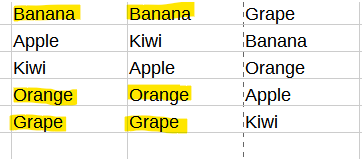
The wall I'm hitting is removing any duplicates that are created on the same row for any of the 3 columns as shown in the image below.
Image

My Goal:
At the time of iteration and outputting of fruit names, I need to compare col B (rows 1 - 5), with col A (rows 1 - 5) and not output any duplicates on col B in the exact same row. Instead it needs to be a blank cell. For example, in the image on row 1, both col A and B contain Banana and col C contains Grape. Col B should be a blank cell because col A already contains Banana. In addition, I need col C (rows 1 - 5) to be compared to col A and B (rows 1 - 5) to ensure no duplicates exist and if so, simply be a blank cell. This would be true for all rows in all columns that contain duplicates as shown in the image.

I've tried IF statements every which way, to include encapsulating the INDEX function statement, encapsulating the entire statement, and encapsulating just the sequence (just to give it a shot) with no success. I've tried RIGHT, SUBSTITUTE, MATCH and a few others with no success. I'm sure this is an easy fix but it's definitely been a nemesis for a few days and it seems I can't find a solution when I search these forums or the vast wilderness of the internet.

Maybe what I'm asking for is beyond Calc's abilities, but any help would be very much appreciated!
Last edited by Hagar Delest on Fri Jan 24, 2025 8:16 am, edited 1 time in total.
OpenOffice 4.1 on Windows 11
User avatar
robleyd
Moderator
Posts: 5505
Joined: Mon Aug 19, 2013 3:47 am
Location: Murbko, Australia

Re: Deleting Duplicate Entries On Same Row Separate Columns

Post by robleyd »

Cross posted on AskLibreOffice.

If you cross post, as a courtesy please let us know that you have done so, otherwise it leads to several discussions and a waste of time because several identical answers may be posted by different users.
Slackware 15 (current) 64 bit
Apache OpenOffice 4.1.16
LibreOffice 26.2.3.2; SlackBuild for 26.2.3 by Eric Hameleers
---------------
I hate this damn computer, I wish that I could sell it.
It won't do what I want it to, Only what I tell it.
Cryotech
Posts: 4
Joined: Wed Jan 22, 2025 6:04 am

Re: Deleting Duplicate Entries On Same Row Separate Columns

Post by Cryotech »

Sorry Robleyd, I didn't realize they were shared sites / forums. If you could (or able to), please delete the post at AskLibreOffice. Since I wasn't able to, I edited that post to point to this one since I was more clear with my explanation of the issue here. I prefer this forum anyways since it's easier to navigate and read.

I still need help / guidance with this issue though.
OpenOffice 4.1 on Windows 11
User avatar
Lupp
Volunteer
Posts: 3756
Joined: Sat May 31, 2014 7:05 pm
Location: München, Germany

Re: Delete duplicate entries on same row separate columns

Post by Lupp »

You can't delete or remove anything by a formula.
In the given case you can
- hide repeating words using a conditional format.
- return an empty string by the formula if the otherwise returned word would occur in the strip a second time.

If you want to check the case "more than one occurrence" referencing cells from elsewhere, you need to go the second way. However, this requires to use helper columns. (If somebody found a way to do it without helpers, I'm interested - but wouild expect very complicated formulas.)

Your signature tells "OpenOffice 4.1" while the formula you posted uses functions only available in LibreOffice V 24.8.0 or higher.

Please try to be more precies next time, and don't paste or attach images but example files where the issue isn't sprecifically about the view.

See attachments.
disask116940_RandomTriples2.ods
(82.52 KiB) Downloaded 77 times
disask116940_RandomTriplesAOO.ods
(74.66 KiB) Downloaded 85 times
On Windows 10: LibreOffice 25.8.4 and older versions, PortableOpenOffice 4.1.7 and older, StarOffice 5.2
---
Lupp from München
Cryotech
Posts: 4
Joined: Wed Jan 22, 2025 6:04 am

Re: Delete duplicate entries on same row separate columns

Post by Cryotech »

Lupp wrote: Wed Jan 22, 2025 6:19 pm - return an empty string by the formula if the otherwise returned word would occur in the strip a second time.
Ok, that's fine if that's how it needs to be done.
Lupp wrote: Wed Jan 22, 2025 6:19 pm If you want to check the case "more than one occurrence" referencing cells from elsewhere, you need to go the second way. However, this requires to use helper columns. (If somebody found a way to do it without helpers, I'm interested - but wouild expect very complicated formulas.)
I can always check the index values in the array using a separate table and then use IFERROR again but I'd rather not go that route if I don't have to.

Lupp wrote: Wed Jan 22, 2025 6:19 pm Your signature tells "OpenOffice 4.1" while the formula you posted uses functions only available in LibreOffice V 24.8.0 or higher.
I need to create unique working files for OpenOffice, and LibreOffice for various reasons so my signature is correct. This question is for OpenOffice (though I'm also trying to find solutions for LibreOffice as well) because I wasn't sure how to accomplish what I was trying to do in OO. Hence my confusion about the shared LibreOffice / OpenOffice forums. If it works for LibreOffice great I'll take the win otherwise I will keep plugging away.
Lupp wrote: Wed Jan 22, 2025 6:19 pm Please try to be more precies next time, and don't paste or attach images but example files where the issue isn't sprecifically about the view.
I don't understand what you're saying here. Not sure what wasn't "more precise" with my explanation above and the image I posted was a specific show and tell example to add clarity to my explanation. However, I will try to be more mindful about posting example files as well.
Lupp wrote: Wed Jan 22, 2025 6:19 pm See attachments.
disask116940_RandomTriples2.ods
disask116940_RandomTriplesAOO.ods
Thank you, I will try these out and if further help / clarification is needed, I will be back.
OpenOffice 4.1 on Windows 11
Cryotech
Posts: 4
Joined: Wed Jan 22, 2025 6:04 am

Re: Delete duplicate entries on same row separate columns

Post by Cryotech »

I appreciate the help Lupp.

I did make slight changes so the formula did exactly as I needed it to do. Your formula returned empty strings for every instance of a duplicate in each column in exact same row and I only needed one instance removed if a duplicate already existed.

For Col A, I used the following formula to return an empty string if cell contained the string "---None---" (used as filler for random list)

Code: Select all

=IF($E2="---None---", "",E2)
For Col B, I used the following formula since B only needed to be tested against A but also return an empty string if contained "---None---".

Code: Select all

=IF($F2="---None---", "", IF(SUMPRODUCT($E2:$F2=F2)=1,F2,""))
And lastly, for Col C, I used the following formula to test against "---None---", Col B, AND Col A. If neither A or B contained the same string, output otherwise return empty.

Code: Select all

=IF($G2="---None---", "", IF(SUMPRODUCT($E2:$G2=G2)=1,G2,""))
Works like a charm now.

I never even considered SUMPRODUCT() so thank you for providing the guidance.
OpenOffice 4.1 on Windows 11
Locked