[Issue] Weird page size, Writer insists upon rotating it to print
[Issue] Weird page size, Writer insists upon rotating it to print
I want to print labels on continuous feed stock. The paper I am using resembles this product: https://ganson-store.com/4-x-1-7-16-pin ... ls-a-case/#
I formatted the page size as 4" horizontal, 1.5" vertical. The page looks fine, until I go to print it:
Writer's Print dialog is gratuitously rotating the page. How do I tell it not to do that?
Whether I select Landscape or Portrait doesn't help. It seems to want to consider the "long" dimension (which happens to be 4 inches) the vertical one no matter what I do.
This is important because I have many labels to print. Thank you.
I formatted the page size as 4" horizontal, 1.5" vertical. The page looks fine, until I go to print it:
Writer's Print dialog is gratuitously rotating the page. How do I tell it not to do that?
Whether I select Landscape or Portrait doesn't help. It seems to want to consider the "long" dimension (which happens to be 4 inches) the vertical one no matter what I do.
This is important because I have many labels to print. Thank you.
Last edited by MrProgrammer on Sun Jan 01, 2023 7:27 pm, edited 2 times in total.
Reason: Tagged as [Issue] -- MrProgrammer, forum moderator
OpenOffice 4.1.11 / macOS 11.7.3
Re: Weird page size, Writer insists upon rotating it to print
Please upload the .odt file showing the problem so that it can be analysed.
Press POSTREPLY and click the Upload attachment tab below where you type (128 kB max); or use a file share site such as mediafire, Dropbox or Google Drive for a larger file.
Also, what happens when you select a different printer like a PDF printer?
And does it print correctly meaning it is only the print pop-up which is wrong?
Finally, is it OK when you test by swapping the dialogue boxes with Preferences > OpenOffice > General > check/uncheck Use OpenOffice dialogue boxes?
Press POSTREPLY and click the Upload attachment tab below where you type (128 kB max); or use a file share site such as mediafire, Dropbox or Google Drive for a larger file.
Also, what happens when you select a different printer like a PDF printer?
And does it print correctly meaning it is only the print pop-up which is wrong?
Finally, is it OK when you test by swapping the dialogue boxes with Preferences > OpenOffice > General > check/uncheck Use OpenOffice dialogue boxes?
LO 6.4.4.2, Windows 10 Home 64 bit
See the Writer Guide, the Writer FAQ, the Writer Tutorials and Writer for students.
Remember: Always save your Writer files as .odt files. - see here for the many reasons why.
See the Writer Guide, the Writer FAQ, the Writer Tutorials and Writer for students.
Remember: Always save your Writer files as .odt files. - see here for the many reasons why.
Re: Weird page size, Writer insists upon rotating it to print
Thanks!
The PDF rendering is shown below.
I attempted to toggle portrait / landscape which does not help. No matter what I do it insists upon rotating the text 90º and printing it that way. The only place it looks correct is when I am composing the document (attachment).
[Edited to fix uploads]
No. It prints the text rotated, exactly as shown in the print dialog.Also, what happens when you select a different printer like a PDF printer?
And does it print correctly meaning it is only the print pop-up which is wrong?
The PDF rendering is shown below.
Sadly, no. Selecting the OO Print dialog does the exact same thing:Finally, is it OK when you test by swapping the dialogue boxes with Preferences > OpenOffice > General > check/uncheck Use OpenOffice dialogue boxes?
I attempted to toggle portrait / landscape which does not help. No matter what I do it insists upon rotating the text 90º and printing it that way. The only place it looks correct is when I am composing the document (attachment).
[Edited to fix uploads]
OpenOffice 4.1.11 / macOS 11.7.3
Re: Weird page size, Writer insists upon rotating it to print
You have specified a 4" width and a 1.5" height which is a Landscape orientation, but the orientation setting is Portrait. In the page style settings change the Orientation setting to Landscape, then fix the dimensions.
AOO 4.1.14 on Ubuntu MATE 22.04
Re: Weird page size, Writer insists upon rotating it to print
Already tried that, but perhaps you can see if I did something wrong.
PDF output is identical.
OpenOffice 4.1.11 / macOS 11.7.3
Re: Weird page size, Writer insists upon rotating it to print
If I open that file in OO and export as pdf it looks how it should.
Windows 10, Openoffice 4.1.11, LibreOffice 7.4.0.3 (x64)
Re: Weird page size, Writer insists upon rotating it to print
That's what it's supposed to look like. Bug in the Mac version perhaps?
OpenOffice 4.1.11 / macOS 11.7.3
Re: Weird page size, Writer insists upon rotating it to print
There's a bug thread here
Edit: that's for LibreOffice though.
https://bugs.documentfoundation.org/sho ... i?id=92190Bug 92190 - PRINTs landscape despite configured as portrait (Mac OS)
Edit: that's for LibreOffice though.
Windows 10, Openoffice 4.1.11, LibreOffice 7.4.0.3 (x64)
Re: Weird page size, Writer insists upon rotating it to print
Windows 10, Openoffice 4.1.11, LibreOffice 7.4.0.3 (x64)
Re: Weird page size, Writer insists upon rotating it to print
Click the General tab on the AOO Print dialog, then select the printer and click Properties. Is there an Orientation setting there?
AOO 4.1.14 on Ubuntu MATE 22.04
Re: Weird page size, Writer insists upon rotating it to print
The LibreOffice bug is VERIFIED FIXED so if you still get no joy with OO you could try LibreOffice to see if it gives you what you want - I still use OO but many of the regular posters here recommend switching to LO anyway.
Windows 10, Openoffice 4.1.11, LibreOffice 7.4.0.3 (x64)
Re: Weird page size, Writer insists upon rotating it to print
Thank you. It's past time I upgraded to LO. I appreciate your assistance.
OpenOffice 4.1.11 / macOS 11.7.3
Re: Weird page size, Writer insists upon rotating it to print
No Properties for that printer. Not a surprise because I'm using a remote Mac as a print server.
I think the solution will be to move on from OO and upgrade to the latest version of LibreOffice. Thank you for your insight.
OpenOffice 4.1.11 / macOS 11.7.3
- MrProgrammer
- Moderator
- Posts: 5453
- Joined: Fri Jun 04, 2010 7:57 pm
- Location: Wisconsin, USA
Re: Weird page size, Writer insists upon rotating it to print
No, since you have not used option OpenOffice → General → Print dialogs → Use OpenOffice dialogs, that is a MacOS print dialog. Click the ? next to the PDF button and the MacOS UserGuide will open. Options are set with OpenOffice → Preferences on a Mac. The rest of my post assumes that the option is set so that File → Print will use the OpenOffice dialog.
The undesired rotation may be due to this unresolved problem which affects MacOS:
Printing on PDF format or Preview by print panel ignores page orientation
The problem also affects the OpenOffice print dialog. It's not clear to me from reading the issue exactly what circumstance triggers incorrect printing, which made finding a workaround difficult.
Some help pages suggest that there should be, but nope, perhaps also due to the aforementioned issue.
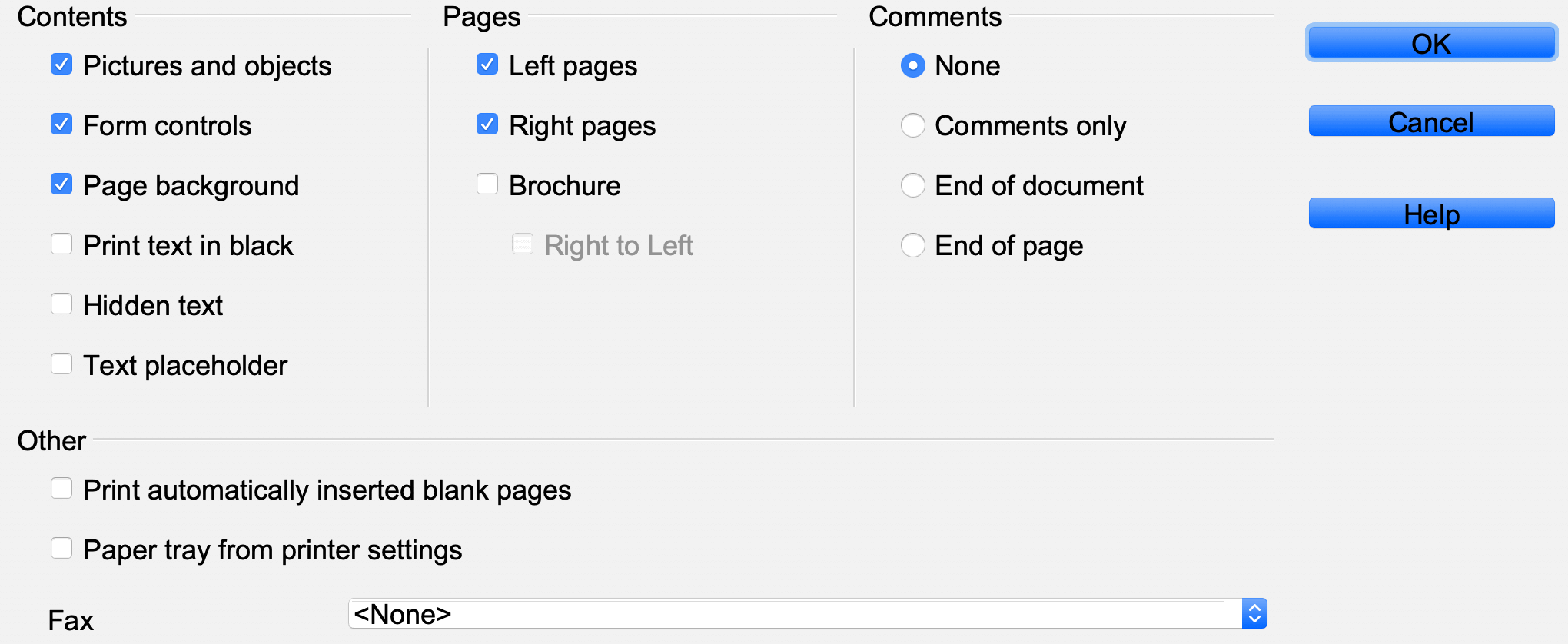
I have discovered an ugly workaround, which I'm primarily documenting for myself. It seems as if the bug may cause the orientation to come from the default paper size. So I created the desired paper size in Preview's Print dialog, assigned it as the default, and then OpenOffice would print the page as desired. I was not able to determine a way to create and set a new default paper size using OpenOffice dialogs. I used Preview to create the paper size though I could also have used TextEdit, Safari, or other Apple programs.
Quit OpenOffice if it is running. OpenOffice seems to determine the default paper size only when launched.
Launch Preview → File → Take screenshot → From entire screen → Wait about 10 seconds (this creates a preview document)
File → Print → Paper size → Manage custom sizes
→ ✚ → Untitled → Rename to Foo → Width → 4 → Height → 1.5
→ PDF → Open in Preview → Preview → Quit (I don't want to print anything, just create a paper size)
→ System Preferences → Printers and Scanners → Default paper size → Foo → System Preferences → Quit
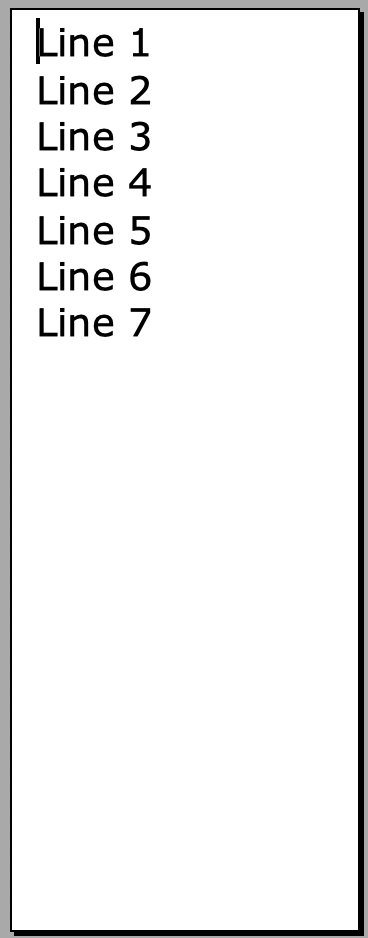
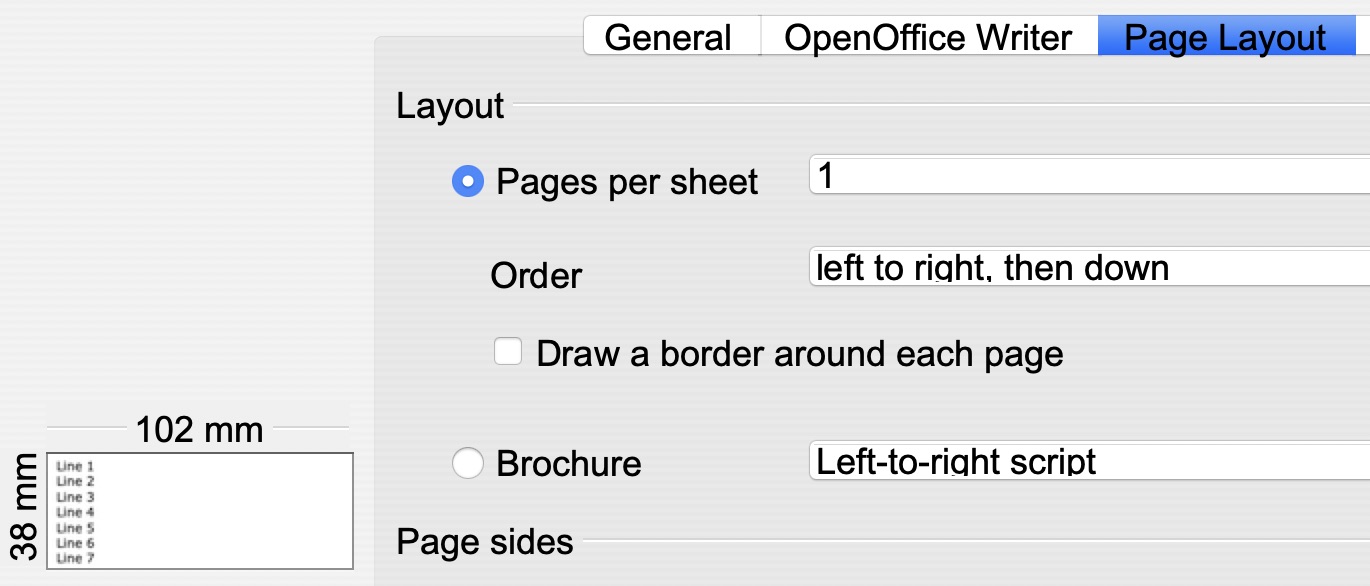
Expect it will take 20 minutes or so to perform the previous steps to set the appropriate default paper size. Launch OpenOffice → Open Untitled 1.odt → Format → Page → Page → Orientation → Landscape
The page in Writer looks strange. However, File → Print shows it will print the way we want. 102 mm is 4 inches, 38 mm is 1.5 inches. The real solution is to use LibreOffice if the bug has been fixed there.
| Edit: As of 2023-03-25 LibreOffice has the same problem: Wrong Printing Orientation issue |
Mr. Programmer
AOO 4.1.7 Build 9800, MacOS 13.7.8, iMac Intel. The locale for any menus or Calc formulas in my posts is English (USA).

Re: Weird page size, Writer insists upon rotating it to print
You are definitely on to something. The fact that the Print dialog and function is related to Preview is one I had not considered before. This is new information and gives me something to work with. Thank you for that!MrProgrammer wrote: ↑Sun Jan 01, 2023 6:16 am I have discovered an ugly workaround, which I'm primarily documenting for myself.
My preliminary experimentation with your suggestion has yet to be successful — the Print dialog and PDF output still bears its incorrect "vertical" orientation no matter what I do, but I need to look at it again from a fresh perspective. There appears to be an interrelationship with Portrait vs. Landscape and the label dimensions and I am having difficulty comprehending how they affect one another. I wish that cursed "portrait / landscape" terminology had never been invented
OpenOffice 4.1.11 / macOS 11.7.3
Re: [Issue] Weird page size, Writer insists upon rotating it to print
Bought LibreOffice. Same exact problem.
It seems the crux of the problem is that OO (and LO) both insist upon swapping my chosen width and height when changing the page format from Portrait to Landscape, and vice versa. No matter what. Even if that were ok it rotates the text 90º and that's just rude.
OpenOffice 4.1.11 / macOS 11.7.3
Re: [Issue] Weird page size, Writer insists upon rotating it to print
i just created a sample file in my LO 6.1.6 version on Windows 10. The page properties: 10x4 cm Horizontal, zero margins. This is a Custom Page size with extreme size data.
The Print setting show me different page sizes when I choose different printers.
Here is the (minimal?) page size of my physical Printer ("Brother DCP..." laser):
Maybe these are the minimal paper sizes what the printers can handle. (???) Supposed cause: the actual Page size is smaller than the Paper size what the printer van handle...
Even the Microsoft virtual PDF printer shows a "special page size" - (I supposed it before: a VIRTUAL printer can handle ANY page sizes... (maybe it is not true???)
Some printers not changed the "orientation". But the virtual printer named PDF24 shows same behavior that you have: the orientation of the text is changed - relative to the paper (or the paper orientation is changed...)!
The Print setting show me different page sizes when I choose different printers.
Here is the (minimal?) page size of my physical Printer ("Brother DCP..." laser):
Maybe these are the minimal paper sizes what the printers can handle. (???) Supposed cause: the actual Page size is smaller than the Paper size what the printer van handle...
Even the Microsoft virtual PDF printer shows a "special page size" - (I supposed it before: a VIRTUAL printer can handle ANY page sizes... (maybe it is not true???)
Some printers not changed the "orientation". But the virtual printer named PDF24 shows same behavior that you have: the orientation of the text is changed - relative to the paper (or the paper orientation is changed...)!
Tibor Kovacs, Hungary; LO7.5.8/25.8.5.2 /Win7-10-11 x64Prof.
PortableApps: LO3.3.0-25.8.5.2;AOO4.1.14
Please, edit the initial post in the topic: add the word [Solved] at the beginning of the subject line - if your problem has been solved.
PortableApps: LO3.3.0-25.8.5.2;AOO4.1.14
Please, edit the initial post in the topic: add the word [Solved] at the beginning of the subject line - if your problem has been solved.
Re: [Issue] Weird page size, Writer insists upon rotating it to print
A workaround might be to rotate the text 90 degrees perhaps?
Format menu/character/Position tab/Rotation/scaling
The more complicated your design the more awkward that will be to work with of course...
Edit:
drawing toolbar text boxes can also be rotated.
Format menu/character/Position tab/Rotation/scaling
The more complicated your design the more awkward that will be to work with of course...
Edit:
drawing toolbar text boxes can also be rotated.
Windows 10, Openoffice 4.1.11, LibreOffice 7.4.0.3 (x64)
Re: [Issue] Weird page size, Writer insists upon rotating it to print
That's a great idea and I really appreciate your thinking about it, but the result is just a mess:
I am nearly certain the macOS version of both OO and LO are inexorably linked to its Preview app, and that's where the problem ultimately lies. It probably works exactly as expected in Windows which is why everyone seems so confused about it.
None of my Mac workarounds seem to be working. In an ideal world Preview would simply respect my definitions of "vertical" and "horizontal" instead of attempting to be too clever. Obviously tractor fed labels go in and out of line feed printers "vertically" despite the longer dimension being horizontal.
I am nearly certain the macOS version of both OO and LO are inexorably linked to its Preview app, and that's where the problem ultimately lies. It probably works exactly as expected in Windows which is why everyone seems so confused about it.
None of my Mac workarounds seem to be working. In an ideal world Preview would simply respect my definitions of "vertical" and "horizontal" instead of attempting to be too clever. Obviously tractor fed labels go in and out of line feed printers "vertically" despite the longer dimension being horizontal.
OpenOffice 4.1.11 / macOS 11.7.3
Re: [Issue] Weird page size, Writer insists upon rotating it to print
I can find no solution to this problem, but a workaround is to use an Avery Pages template for 4" x 1.5" US Letter size full sheet labels. Their template number is 5159. Populate the left column and ignore the right column.
You can only print a full sheet but I already concluded that would be the case.

You can only print a full sheet but I already concluded that would be the case.
OpenOffice 4.1.11 / macOS 11.7.3
