Page 1 of 1
[Solved] OpenOffice not appearing in "open with" Ubuntu
Posted: Sat Nov 01, 2014 1:09 pm
by Dattebayo
Since I installed OO 6 months ago on my 14.04 LTS Ubuntu, I have never been able to open any document directly with OO. Instead, I have to open OO first, then use the open command and find the file.
I would like to be able to associate file types, but as you can see by the photo below, there is nothing there.
What can I do to change the menu so OO appears in there? Thanks again.
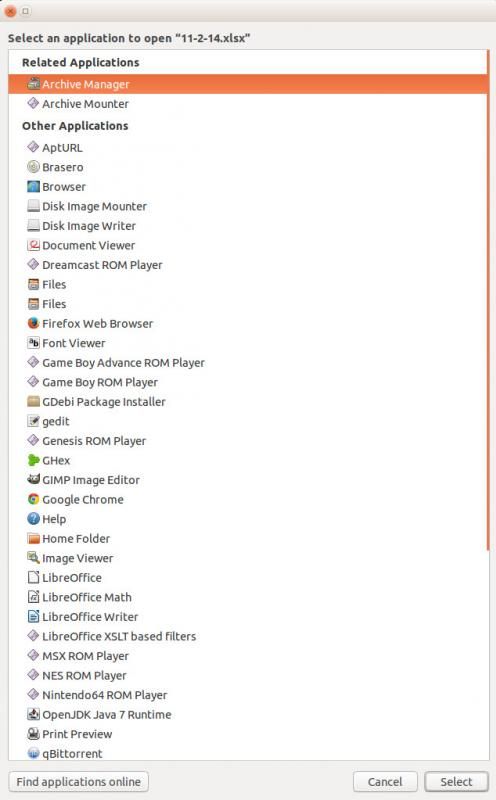
-Dave
Re: OpenOffice not appearing in "open with" Ubuntu
Posted: Sat Nov 01, 2014 1:57 pm
by Villeroy
You downloaded an archive, unzipped the archive, went to the DEBS folder within the extracted folder and installed all contained *.deb files.
There is another subfolder DEBS/desktop-integration/ with an additional package. Install that one too.
for the records and for other applications: If there would be no desktop integration package you could visit /usr/share/applications/ and add some .desktop files for openoffie using the libreoffice-*.desktop files as templates.
Re: OpenOffice not appearing in "open with" Ubuntu
Posted: Sat Nov 01, 2014 2:06 pm
by Dattebayo
It didn't install.
dpkg: error processing archive /home/dave/en-US/DEBS/desktop-integration/openoffice4.1-debian-menus_4.1.1-9775_all.deb (--install):
trying to overwrite '/usr/bin/soffice', which is also in package libreoffice-common 1:4.2.6.3-0ubuntu1
/usr/bin/gtk-update-icon-cache
gtk-update-icon-cache: Cache file created successfully.
/usr/bin/gtk-update-icon-cache
gtk-update-icon-cache: Cache file created successfully.
Processing triggers for gnome-icon-theme (3.10.0-0ubuntu2) ...
Processing triggers for hicolor-icon-theme (0.13-1) ...
Processing triggers for shared-mime-info (1.2-0ubuntu3) ...
Unknown media type in type 'all/all'
Unknown media type in type 'all/allfiles'
Unknown media type in type 'uri/mms'
Unknown media type in type 'uri/mmst'
Unknown media type in type 'uri/mmsu'
Unknown media type in type 'uri/pnm'
Unknown media type in type 'uri/rtspt'
Unknown media type in type 'uri/rtspu'
Processing triggers for bamfdaemon (0.5.1+14.04.20140409-0ubuntu1) ...
Rebuilding /usr/share/applications/bamf-2.index...
Processing triggers for desktop-file-utils (0.22-1ubuntu1) ...
Processing triggers for gnome-menus (3.10.1-0ubuntu2) ...
Processing triggers for mime-support (3.54ubuntu1) ...
Errors were encountered while processing:
/home/dave/en-US/DEBS/desktop-integration/openoffice4.1-debian-menus_4.1.1-9775_all.deb
Re: OpenOffice not appearing in "open with" Ubuntu
Posted: Sat Nov 01, 2014 2:20 pm
by Dattebayo
Okay, nevermind.
I hadn't removed all of Libre yet, I still had a few files sticking around due to not cleaning up properly.
Thanks for the clue, it's all working properly now.
Re: OpenOffice not appearing in "open with" Ubuntu
Posted: Sat Nov 01, 2014 3:10 pm
by Villeroy
It is possible to keep LO. It is a useful application because it can handle more foreign file formats more or less well.
The only conflict between AOO and LO is /usr/bin/soffice which is a symlink to the respective soffice executable.
I resolved this conflict by means of dpkg --force-overwrite replaces the symlink /usr/bin/soffice to the newly installed office. You can use your own symlink pointing to anything you want.
Re: OpenOffice not appearing in "open with" Ubuntu
Posted: Sat Nov 01, 2014 3:16 pm
by Dattebayo
Every time I used Libre it completely effed up the document I was trying to use. I was forced to use OO because it didn't ignore page breaks or read formatting incorrectly for Microsoft documents. I don't use Libre for anything anymore...