Page 1 of 1

Read-Error Format error discovered in the file in sub-docum

Posted: Wed Mar 12, 2014 10:38 pm
by jimcoli
When I try to open a .odt text document on my Mac OS X in OpenOffice 4.0.1, I get the following warning:
Read-Error
Format error discovered in the file in sub-document style.xml at 2,580605(row,col).

Any help opening the 300 plus page document would be much appreciated.

thanks!

Re: Read-Error Format error discovered in the file in sub-do

Posted: Thu Mar 13, 2014 6:36 pm
by John_Ha
Welcome to the forum.

If you could post the file here (128kB limit) or on a file hosting site, someone here could have a look at it. Or send me a pm (click on PM on the right) with your email ID and I will look at it for you.

You don't say where the file comes from - can you ask the person who wrote it to send it to you in another format?

You could try an on-line viewer (like http://www.viewdocsonline.com/ - no recommendation intended!) - google openoffice viewer and take your pick

If you are desperate and just want the text, unzip the ODT file and look for content.xml - it has all the content together with html tags.

Re: Read-Error Format error discovered in the file in sub-do

Posted: Thu Mar 13, 2014 8:19 pm
by jimcoli
John thanks- The document is a novel i'm writing and save to a flash drive. Fortunately I save a copy by emailing it to myself and am able to open that. However this has happened several times and I'm getting nervous. I did work on this document in Word 2010 and it was saved as a Microsoft Word 97-2004 doc when I first started having problems. I used Word to do some pagination I just couldn't quite figure in OO and started having the problem shortly after (perhaps coincidence). I believe I got a warning (can't remember the specifics) at that time and thought I read that saving as a Microsoft Word 97-2004 doc wasn't a good idea. I converted back to saving in .odt and hadn't had a problem for over a month. Now I'm getting this warning. So I do need a solution that will let me keep the document.

Re: Read-Error Format error discovered in the file in sub-do

Posted: Thu Mar 13, 2014 8:57 pm
by John_Ha
Jim

Mixing between Word and OpenOffice is not a good idea - it's much more sensible to stick with one or the other. Microsoft doesn't publish the specification for doc files - in fact, a doc file is just a memory dump of what MS Word had in memory - and AOO's .doc import had to be reverse engineered.

My guess is that the odt file is somehow slightly wrong in one of the style files suggesting this may happen again. I don't know any html or css coding to suggest how to fix it.

The good news is the style files only tell AOO how to display the text, tables, bullets, pictures etc, but they don't affect the actual document content which is stored elsewhere in the odt file. This is what a typicalodt file looks like when unzipped - the text is stored in content.xml, images are stored in Pictures, etc.
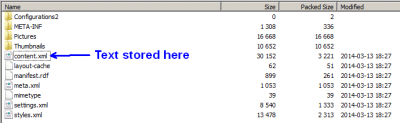
unzipped typical odt file
I have just done a (very drastic) test. I created a minimum document with just one word in it, and saved it as minimum.odt, so it had very little styles information stored in the odt file. I then created another, more complex document with lots of different fonts, headings, tables, images, indents, paragraph styles etc, and saved it as complex.odt. It had much more styles information stored in the odt file.

I then did "open heart surgery". I copied the content.xml file from complex.odt and inserted it into minimum.odt. I then opened minimum.odt. It now had the complex.odt words in it, and some (but surprisingly not all ) of the formatting was lost. The images weren't there. But no text was missing.

So, in extremis, you could try this. Be sure to do it on a spare copy, and not on your only version, in case it goes pear-shaped. Ideally you would use the latest "known to be good" odt file (ie before you did the pagination, or the saved by email version) for the "minimum" file so that you kept as much formatting as possible; and your latest "corrupted" odt for the content.xml. Alternatively, create a "minimum.odt" file as I did, but be prepared for more formatting work.

But it is drastic ...

I just had a thought - I wonder if the reason that the saved by email version is OK is because you had deleted whatever it was in the document using the "faulty style", so that faulty style was itself deleted from the saved style data in the sub document. I repeat that I don't know any html or css coding so could be way off beam.

Re: Read-Error Format error discovered in the file in sub-do

Posted: Thu Mar 13, 2014 9:43 pm
by John_Ha
This thread [Hint] How did I fix my ODT file may be useful ... the first post is similar to my suggestion.
viewtopic.php?f=7&t=1532

Re: Read-Error Format error discovered in the file in sub-do

Posted: Fri Mar 14, 2014 2:22 pm
by jimcoli
John-thanks. This will take me some time to wrap my head around. I haven't worked behind the scenes with my docs before.

You said: Unzip and look for the content.xml. Does that image you show appear in my Terminal App?

Would the commands be all the same as for ajut?
He lists favorite text editor as kate, i believe. Looks like I'll need one.

Re: Read-Error Format error discovered in the file in sub-do

Posted: Fri Mar 14, 2014 3:47 pm
by John_Ha
jimcoli wrote:You said: Unzip and look for the content.xml. Does that image you show appear in my Terminal App?
I am not familiar with OS X but I would have thought you could download many zip utilities, or see How-To-Zip-And-Unzip-Files-And-Folders-On-A-Mac at http://macs.about.com/od/faq1/f/How-To- ... -A-Mac.htm.
I use 7-zip from www.7-zip.org. When you unzip a file you should see that screen (7-zip) or a similar screen. You can drag contents.xml out of the window onto your desktop, and vice versa.
Would the commands be all the same as for ajut?
He lists favorite text editor as kate, i believe. Looks like I'll need one.
If my way works, you don't need to edit anything. But there are tons of editors available for free download - Apple should already have one installed. I am on Windows so cannot suggest anything for OS X.