MrProgrammer wrote:If you want dates displayed in DD/MM/YYYY format, just change your locale to one that uses that date format.
I was going to beg to differ, but after hours spent researching this issue and reading bugs
51662,
5556,
72229,
106992 and
30216, I've realised that the bottom line is that OOo ignores one's settings in Windows' "Regional and Language Options" control panel applet. The setting you're referring to is the one inside OOo, which is hard-coded to use date formats (and other things) that the developers have decreed are correct for that particular locale. I suppose it's difficult to argue with this top-down wisdom, but as an OOo user I'd sure like more control over my environment (as I do through the Windows "Regional and Language Options" control panel applet), rather than having my environment dictated to me by those who "know better".
In my case, being an international standards-oriented kinda guy (although many other users have more compelling reasons, such as legal requirements), I'd prefer to use the ISO 8601 format for short dates, which is YYYY-MM-DD, but according to OOo we Canadians are supposed to be using DD/MM/YYYY. I followed various instructions involving changing styles, default templates, etc., but these did not work for me. I can, of course, change the format that is displayed, but not the format that OOo (Calc in particular) uses outside of, for want of a better word, the "facade" of what is displayed in the finished product. Someone even suggested changing my locale to Uyghur, which uses the ISO 8601 date format, but this introduces other complications, not the least of which is another alphabet! I don't have the time to go through the several dozen other locales to find one that uses the ISO 8601 date format and the English language.
The following screen capture illustrates the problem succinctly. It shows two cells, both of which contain the date 24 April 2011. The top cell is being edited, and shows the DD/MM/YYYY format while it is being edited (which is also displayed in the formula bar), but once I hit enter or tab it then displays the YYYY-MM-DD format, which is what I want and have set as the format of these cells. Ironically, I can enter a date in the YYYY-MM-DD format and it will display that way, but OOo still converts and stores it in the DD/MM/YYYY format.
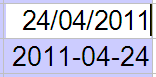
- Editing a cell.
- ooo_cell_edit.gif (1.95 KiB) Viewed 7246 times
The other screen captures show my Windows "Regional and Language Options" control panel applet (in following message, as I can only upload three attachments per message), my OOo language options, and the format of a date (28 March 2011) automatically inserted into a footer.
If, in all of my reading, I've missed some obvious way that I can have OOo "think" in the YYYY-MM-DD format (instead of the DD/MM/YYYY format) as well as display in the YYYY-MM-DD format, I'd sure appreciate being set straight.
