Page 1 of 1
[Solved] Open link to file in program, not browser
Posted: Mon Feb 21, 2011 6:37 am
by boz
I have created some html links to Open Office documents on our local web. When I click the links the files open in a browser window. I want to force them to open in their corresponding programs, and not in the browser. How can I do this?
Re: Open link to file in program, not browser
Posted: Mon Feb 21, 2011 1:37 pm
by boz
What I mean is, I have links on a web page. The links point to OpenOffice documents (and they are not html documents). For example, one link points to "abcd.ods". When I click on the link to open the document, it opens automatically within the browser. I don't want it to do that. I want it to open in the corresponding program - calc.
I know this isn't specifically an OpenOffice question, but I thought someone here might know some script or code which forces documents to open in their parent programs, and not within the browser page. Sorry if it's irrelevant.
Re: Open link to file in program, not browser
Posted: Mon Feb 21, 2011 2:43 pm
by Zizi64
Hi,
The
<A HREF="file://///Computer_name/Shared_Drive_name/Path/Filename.odt" TARGET="_blank">link to a file</A>
format works for me fine on our LAN (With Firefox3.6.13 on Windows XPprofSP3).
(Better way to download the file into the local drive, and then open it. The direct opening procedure maybe will more problematic)
Re: Open link to file in program, not browser
Posted: Mon Feb 21, 2011 3:03 pm
by rudolfo
Generally this kind of link is not different from a link to a pdf document. In other words you have to tell the browser that the mime type (or the extension .ods) should be opened with the external program scalc.exe.
And if you link from a webserver (protocol http://) in your LAN to a local or UNC resource (protocol file://) at least in firefox some security restrictions are applied which would not let you open this file resource (see
http://kb.mozillazine.org/Links_to_loca ... n%27t_work on how to work around this restriction). Probably not relevant in your case, because you
can open the file in the browser.
Re: Open link to file in program, not browser
Posted: Tue Feb 22, 2011 3:38 pm
by boz
Zizi64 wrote:Hi,
The
<A HREF="file://///Computer_name/Shared_Drive_name/Path/Filename.odt" TARGET="_blank">link to a file</A>
format works for me...
Our links follow the same format: "..\docs\forms.ods" target="_blank">Forms</a>". But the files open in a browser window, which I don't want them to do.
Half the reason is because sometimes when it opens in a small window or when you try to resize the window, things go a bit strange; the files end up filling only half the window, with just blank space below, and then the browser crashes every now and then. The other reason is, I want people to modify the original document, and not use copies - so I don't want them downloading the file, modifying it, and then copying it back to the server. Only want one person modifying a file at one time, basically.
I know I could easily solve the problem by putting a bunch of shortcuts on their desktops, but that's not what I want either, for various reasons.
Re: Open link to file in program, not browser
Posted: Tue Feb 22, 2011 3:44 pm
by boz
rudolfo wrote:Generally this kind of link is not different from a link to a pdf document. In other words you have to tell the browser that the mime type (or the extension .ods) should be opened with the external program scalc.exe.
I was thinking it had to do with something along those lines. I remember Netscape had settings where you could configure mime types.
Problem is we use Internet Explorer here.
Anyone know where the settings are?
Re: Open link to file in program, not browser
Posted: Tue Feb 22, 2011 4:22 pm
by Zizi64
Our links follow the same format: "..\docs\forms.ods" target="_blank">Forms</a>". But the files open in a browser window, which I don't want them to do.
1: Wich browser? (Firefoy, IE, Chrome?)
2: What is the begin of your link? ("file://///" or other characters?)
Re: Open link to file in program, not browser
Posted: Wed Feb 23, 2011 1:51 am
by rudolfo
If you say that you want to have your users modifying the original file and not a downloaded copy it makes only sense if you use UNC paths ... which are basically links using the file:// protocol but with a resource on a remote share. You may need to experiment a bit with the number of slashes. Mozilla based browsers expect 5 forward slashes: 2 for belonging to the protocol, one for the root node and the final two for the UNC naming of the remote host. IE in newer versions will accept this as well, but older versions used 3 or 4 forward slashes (can't remember exactly). But stay away from backward slashes, they are wrong in URLs.
For file associations IE uses the configuration in the registry, HKEY_CLASSES_ROOT. The same that is used by the File Manager WIndows Explorer. In other words if you can double click on a .odt file in Windows Explorer and it opens in Writer it should work in IE as well. There is one tiny difference Windows Explorer ignores the Setting for the Value "Content Type" in the registry key ".odt", but for Internet Explorer it is relevant: On my system it is: "application/vnd.oasis.opendocument.text" (Not really sure about this, it could be that the Content Type is ignored by IE as well, if the file is not served via
http:, but through file:)
On second thought: The scenario that you describe sounds very much like you'd better use a Webserver with WebDAV enabled. Remember DAV stands for "Distributed Authoring and Versioning". It is not difficult to set this up, not in Internet Informaton Server and not in Apache.
Re: Open link to file in program, not browser
Posted: Thu Feb 24, 2011 6:04 am
by boz
Zizi64 wrote:
1: Wich browser? (Firefoy, IE, Chrome?)
2: What is the begin of your link? ("file://///" or other characters?)
1. IE
2. It's a just relative link pointing to a file in another directory. Doesn't begin with "file://..." or anything, just <a href="../docs/forms.ods">... That's all.
Re: Open link to file in program, not browser
Posted: Thu Feb 24, 2011 6:36 am
by boz
rudolfo wrote:If you say that you want to have your users modifying the original file and not a downloaded copy it makes only sense if you use UNC paths ... which are basically links using the file:// protocol but with a resource on a remote share. You may need to experiment a bit with the number of slashes. Mozilla based browsers expect 5 forward slashes: 2 for belonging to the protocol, one for the root node and the final two for the UNC naming of the remote host. IE in newer versions will accept this as well, but older versions used 3 or 4 forward slashes (can't remember exactly). But stay away from backward slashes, they are wrong in URLs.
For file associations IE uses the configuration in the registry, HKEY_CLASSES_ROOT. The same that is used by the File Manager WIndows Explorer. In other words if you can double click on a .odt file in Windows Explorer and it opens in Writer it should work in IE as well. There is one tiny difference Windows Explorer ignores the Setting for the Value "Content Type" in the registry key ".odt", but for Internet Explorer it is relevant: On my system it is: "application/vnd.oasis.opendocument.text" (Not really sure about this, it could be that the Content Type is ignored by IE as well, if the file is not served via
http:, but through file:)
On second thought: The scenario that you describe sounds very much like you'd better use a Webserver with WebDAV enabled. Remember DAV stands for "Distributed Authoring and Versioning". It is not difficult to set this up, not in Internet Informaton Server and not in Apache.
I tried to add "file://///.../blah/blah/blah/..." to the link, but it still does the same thing, and it doesn't make any difference whether I use two or five backslashes after "file:" It still opens in a browser window, and then crashes.
Also, .odt, .ods, etc files are all associated with their parent programs and open in them when I click on the files in Windows explorer. My HKEY_CLASSES_ROOT entries for .ods, .odt files are the same as yours.
The server here is not really a server. It's just a central storage box for common files, and doesn't actually run any web server software. So, I don't think the option of enabling WebDAV is available. I'll look into it though.
Re: Open link to file in program, not browser
Posted: Thu Feb 24, 2011 9:54 am
by Zizi64
Wich browser... answer: IE...
...The server here is not really a server.
It is works me fine with Mozzilla Firefox. I tried to get a file from an another PC (Wich is in same Workgroup, and have a shared directory). We are using WinXPprofSP3 on every PC.
...And tried it with IE ver: 8.6001.18702 - I
never use it otherwise - and the result was: The document open in an another browser window (after acknowledgement of a security alert.)
My suggestion:
Use Firefox!
...or ask Microsoft...

Re: Open link to file in program, not browser
Posted: Thu Feb 24, 2011 1:20 pm
by boz
Zizi64 wrote:
My suggestion:
Use Firefox!
...or ask Microsoft...
Yes, Firefox may be the solution. I'll check it out. Just concerned about how it will handle all the sites that require IE add-ons and such.
Re: Open link to file in program, not browser
Posted: Thu Feb 24, 2011 5:08 pm
by boz
Tried Firefox. It kind of solves this problem, but creates many others (eg., doesn't support add-ons for various sites, crashes when I try to run .asx playlists from a link, won't load various content on some pages). I don't mean to knock Firefox, but this isn't really the kind of solution I was looking for.
There must be another way.
Re: Open link to file in program, not browser
Posted: Thu Feb 24, 2011 5:39 pm
by Villeroy
boz wrote:
There must be another way.
... and it is certainly not related to OpenOffice.org.
Re: Open link to file in program, not browser
Posted: Thu Feb 24, 2011 5:46 pm
by Zizi64
won't load various content on some pages
It is not a Mozzilla Firefox forum, but give us some details: wich add-ons missing from it?
(I can banking etc. with Firefox)
I tried play an .asx (From linked website) and it works fine for me (without any modification):
http://vntutor.blogspot.com/2008/01/how ... refox.html
And see:
http://support.mozilla.com/en-US/kb/Usi ... dia+Player
Re: Open link to file in program, not browser
Posted: Fri Feb 25, 2011 12:49 pm
by rudolfo
Villeroy wrote:boz wrote:
There must be another way.
... and it is certainly not related to OpenOffice.org.
In this case it is related with OpenOffice! I have just done a test with both browsers (Firefox and IE, though both rather old versions 1.5 and 6.0). In both cases I get the typical popup box asking me what I want to do with the file:
Save or
Open it with OpenOffice. I am pretty sure it is related with the ActiveX Control that is installed by default. Same mechanism as the Acrobat Reader ActiveX that embeds the Acrobat into the browser window. Except for the point that the OOo ActiveX plugin is anything but stable.
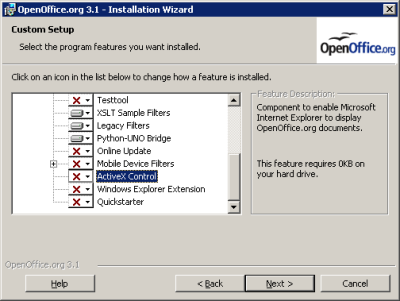
- Custom Install Options (deselect Active X)
When you at it to change the installation, I also recommend to disable the following two options: "Windows Explorer Extension" and "Quickstarter". (Classical reasons for lots of trouble ... just search this forums to see what I mean)
Re: Open link to file in program, not browser
Posted: Sun Feb 27, 2011 11:28 am
by boz
rudolfo wrote:In this case it is related with OpenOffice! ...
I am pretty sure it is related with the ActiveX Control that is installed by default. Same mechanism as the Acrobat Reader ActiveX that embeds the Acrobat into the browser window.
Brilliant! You're a genius rudolfo. I also thought it had something to do with the ActiveX controls, but was trying to change the settings in IE itself. That they might be in the OpenOffice installation didn't even cross my mind. Thanks. Works perfectly now.
Re: [Solved] Open link to file in program, not browser
Posted: Sun Feb 27, 2011 2:19 pm
by Villeroy
Under Linux there is Tools>Options...Internet>Browser Plugin which can be turned off.