Page 1 of 1
[Solved] Page style not applying
Posted: Sun May 10, 2026 7:45 pm
by Marscaleb
I'm trying to apply some page styles to my document.
Well actually I'm trying to apply some page numbers, but I need my title page and table of contents to not be part of the page numbers.
I select my first page and apply the "first page" style and that works fine; page numbers start on the next page.
But when I try to apply "Index" to the second page, it overrides EVERYTHING and applies "Index" to EVERY PAGE, even the one with the first page.
What am I doing wrong here?
Re: Page style not applying
Posted: Sun May 10, 2026 8:02 pm
by FJCC
You can use page breaks to control which styles are applied. Apply the First Page style to your first page. After the text on that page, insert a page break with the menu Insert -> Manual Break. Make sure Page Break is selected on the dialog and in the Style list select Index. Then go to the end of your index and insert another page break, setting the Style list to Default.
Re: Page style not applying
Posted: Sun May 10, 2026 8:08 pm
by floris v
Page styles are hard. See this tutorial:
[Tutorial] Page styles and headers/footers. The main thing to keep in mind is that a page style doesn't apply to a single page but to an entire block, and if you decide to apply a page style on a random page, it may apply itself to the entire document. So, when you work with page styles, you have to plan things, and apply them systematically, starting with the first page, and on and on until the last.
Re: Page style not applying
Posted: Mon May 11, 2026 7:31 am
by Marscaleb
I do have manual breaks in my document, separating the pages before I start the "real" content and then again at the end of each chapter.
But I still have setting the page style for the table of contents somehow applying to the entire document.
Re: Page style not applying
Posted: Mon May 11, 2026 7:55 am
by floris v
In the manual breaks, you have to select the page style for the next page. Did you do that?
Re: Page style not applying
Posted: Mon May 11, 2026 10:31 am
by robleyd
You may need to prepare new page styles prior to inserting the manual breaks, depending on your needs. Then insert the manual break and select the style for the following page(s):
Re: Page style not applying
Posted: Fri May 15, 2026 4:40 pm
by keme
It is worth noting that the "inserted" page break is not a separate element, or object, in your document. The "hard" (manual) page break on ODT documents is a property - or setting - for the paragraph starting a new page.
If you already have page breaks, you don't need to remove them in order to reinsert with altered page style. Just move to the start of the page created by manual break, and select menu item
Format - Paragraph and tab
Text flow.
The dialogs are a bit different in Apache OpenOffice and LibreOffice:
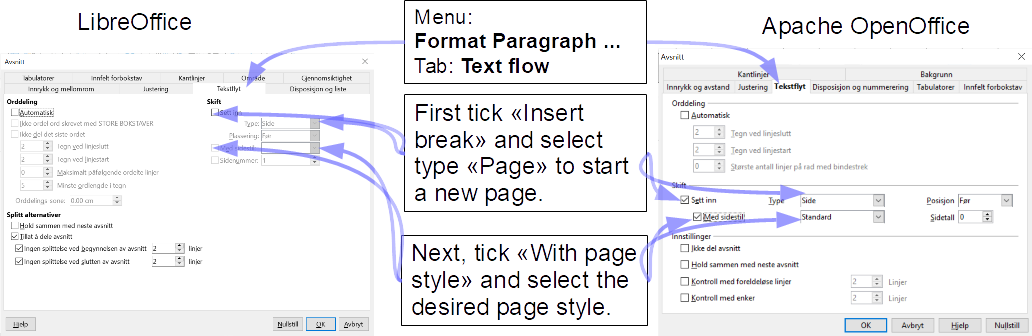
- PageBreak_Style.png (101.7 KiB) Viewed 1222 times
Background
Normally the new page will inherit page style according to "next style" setting for the previous page. This is consistent with your observation that selecting a page style "overrides EVERYTHING".
Ticking "With page style" breaks this inheritance and allows you to select a different page style.
This is similar to what MS Word allows when inserting section breaks. If you are used to working with MS Word, or receive help from people who are, note that LibreOffice and MS Office work on page formatting - and also on sections - in fundamentally different ways, which do not mix.
Next level
If you are building a new document, it may be wiser to use designated (builtin or custom) paragraph styles (!) for the paragraphs starting a new page. Typically, if you want every chapter to start a new page, you would edit the
Heading 1 paragraph style to accomplish this. That is the style usually employed for chapter heading.
For other break situations it may be more sensible to create a new paragraph style. There is a learning threshold, but I guess it will be worth it if you write a lot. The paragraph style dialog you see when you create or edit styles is more or less identical to the
Format Paragraph dialog in the image above.