[Solved: workaround] Make a table line fade

Discuss the word processor
Locked
User avatar
CannedMan
Posts: 256
Joined: Wed Aug 04, 2010 12:06 am

[Solved: workaround] Make a table line fade

Post by CannedMan »

I have a set of tables with thin lines between main elements. Is it possible to make these lines fade gradually from left to right?
Table as seen in LO with non-fading lines?
Bilde_2026-02-05_152629565.png (31.93 KiB) Viewed 5377 times
Table after editing image with GIMP, adding fading.
Lines with gradient.jpg (117.47 KiB) Viewed 5377 times
It is subtle, but it is there. Can this be done in LibreOffice in any way? I know there is an option to do background gradients, but cannot find any way to do that with lines. The only option I can think of, is to create a graphic of a faded line, then select that image as the line, but I cannot see any way to do that either.
Last edited by CannedMan on Fri Feb 06, 2026 2:33 pm, edited 1 time in total.
LibreOffice 7.6.7.2 (X86_64) on Windows 10.0 (19045)
User avatar
RoryOF
Moderator
Posts: 35210
Joined: Sat Jan 31, 2009 9:30 pm
Location: Ireland

Re: Can you make a table line fade?

Post by RoryOF »

A suggestion: use a background gradient, then stack on it a white rectangle, offset to leave only a line area exposed?
Apache OpenOffice 4.1.16 on Xubuntu 24.04.4 LTS
User avatar
CannedMan
Posts: 256
Joined: Wed Aug 04, 2010 12:06 am

Re: Can you make a table line fade?

Post by CannedMan »

The only thing I can think of at the moment, is a transparent overlay with the line areas exposed by semi-transparency.
LibreOffice 7.6.7.2 (X86_64) on Windows 10.0 (19045)
User avatar
CannedMan
Posts: 256
Joined: Wed Aug 04, 2010 12:06 am

Re: Can you make a table line fade?

Post by CannedMan »

Workaround:
I created two PNGs in GIMP, one for headings and one for list items.

Gradient image for headings.
Bilde_2026-02-06_132655800.png (5.41 KiB) Viewed 5326 times
The files was made 2400 × 14 pixels, which scaled perfectly to 0.25 picas.
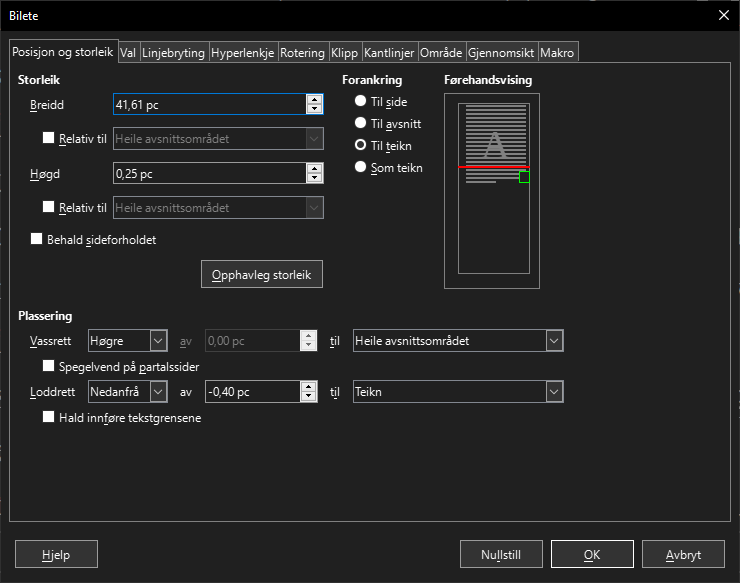
Settings for gradient PNG.
Bilde_2026-02-06_132920030.png (25.02 KiB) Viewed 5326 times
Setting it to anchor to the character (or paragraph for that matter), vertical alignment from the bottom at −0.40 picas (the paragraph having a fixed line height of 1.35 picas) gave the desired result, as per the final image. It is large enough that I can increase the size of the bottom line if desired.
Lines with gradient in PDF.
Lines with gradient in PDF.png (77.14 KiB) Viewed 5205 times
LibreOffice 7.6.7.2 (X86_64) on Windows 10.0 (19045)
JeJe
Volunteer
Posts: 3132
Joined: Wed Mar 09, 2016 2:40 pm

Re: [Solved: workaround] Can you make a table line fade?

Post by JeJe »

You can use a drawing rectangle, insert menu/shape/basic shapes/rectangle
Set the line of the rectangle to none and the area to a gradient and size as desired.
Windows 10, Openoffice 4.1.11, LibreOffice 7.4.0.3 (x64)
Locked
