Page 1 of 1
[Solved] Project suddenly stopped opening
Posted: Sat Nov 29, 2025 5:15 am
by LucidityJ
Hi everyone!
I've been working on a big outline for a project I'm working on. I have been saving fervently since Writer seems to struggle heavily with tables or formatting in general and crashes frequently. Just recently, I had the audacity to try and add a column to a table, and Writer rage quit on me again. This time, it won't open the document. It opens, pauses a moment, and closes. No errors, no reports, no anything.
I can open the document in Word (unlicensed version), but then the work I've been doing for the last 2 hours is gone. I know for a FACT I saved it, because of the constant crashing. To make it weirder, when I open it in Writer the new information that doesn't show when I open it in Word is all there, so I know it's saved.
So, I guess my question is... is there any way to get this back or did I fall for another "you get what you paid for" scenario by not just getting Word?
Re: Project suddenly stopped opening
Posted: Sat Nov 29, 2025 6:11 am
by FJCC
If you post the document to the forum, someone can take a look at its internal structure. To upload a file, click Post Reply and look for the Attachments tab just below the box where you type a response.
I have not experienced that Writer struggles with tables or formatting, so you might be doing something unusual. Posting the document would also help with investigating that.
Re: Project suddenly stopped opening
Posted: Sat Nov 29, 2025 6:26 am
by LucidityJ
I found the file attachment here. I'm not sure what it is that I could be doing wrong, but I'm certainly open to suggestion.
Re: Project suddenly stopped opening
Posted: Sat Nov 29, 2025 6:50 am
by FJCC
I see 16 pages of text. The very detailed descriptions go as far as item
1.2.15.4.5 Level 14 – Not On My Watch
There is some detail as far as section 1.15. That is, there are bullets for 1.15.1 through 1.15.15. Does that sound right for your complete document?
There may be something corrupted in your user profile. I would try doing two things, simultaneously at first.
1. Reset your user profile. To do that:
A. Shutdown OpenOffice
B. Open any folder and enter %appdata%\OpenOffice\4 in the address bar near the top of the folder window.
C. That will take you to a folder containing a folder named user. Rename it to user_old.
D. When you eventually restart OpenOffice, you will get the registration screen.
2. Before restarting OpenOffice, restart your computer in Safe Mode. Instructions for this are easily found on the internet.
With a new user profile and in Safe Mode, is Writer stable? If it is, try running not in Safe Mode..
Re: Project suddenly stopped opening
Posted: Sat Nov 29, 2025 10:51 am
by RoryOF
I got 17 pages, a numbered list dropping out after 5 Pantheon 6 <blank>. I see nothing strange with the two tables, each of about one page, so I wouldn't think those responsible for any difficulties.
Try FJCC's suggestions.
Re: Project suddenly stopped opening
Posted: Sat Nov 29, 2025 2:16 pm
by floris v
Opened in LibreOffice. Saw the same as RoryOF. The file looks fine to me.
Re: Project suddenly stopped opening
Posted: Sat Nov 29, 2025 2:21 pm
by RoryOF
Both floris v and I opened on linux; it might be worth shutting down Windows fully (not the normal hibernation(?) type shutdown) and restarting. That might cure the problem without an OpenOffice profile reset,
Re: Project suddenly stopped opening
Posted: Sat Nov 29, 2025 6:16 pm
by thomasjk
I was able to open your file on Windows 11 24H2 using Libreoffice 25.8.2.1 x64 version.
Re: Project suddenly stopped opening
Posted: Sun Nov 30, 2025 12:08 pm
by DiGro
The file opens with Apache OpenOffice 4.1.16 on Win 11 64-bits.
It delivers 15 pages as mentioned by FJCC.
I had a look at it and it seems there is extensive use of new paragraph signs. (View > Nonprinting characters)
Looking with the Navigator (F5) at the headings there is enormous wasted space between the items

That lead me to the conclusion that it might be that your styles are off.
Luckily you had the sense to use styles! Good for you. I examined your headings a bit.
The styles Top Level, Second Level and Third level didn't have any space defined Before paragraph and Below paragraph.
Adjusting this makes the use of the excessive paragraph signs (hitting Enter) obsolete.
I adjusted the styles a bit and that delivers the headings as they are on the attached image.
The listed items with the green bar in front are my fixed headings, where obsolete paragraph signs have been removed.
The red blocks are your old styles.
You might want to have a new look at your styles

Maybe this reference might be of any help:
https://openoffice-uni.org/openoffice-uni-en.pdf
All the best with your project.
I attached the file fixed be me and the image
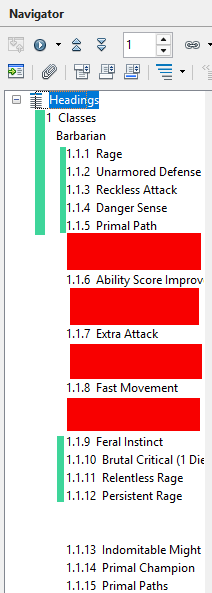
- NewHeadings.png (13.81 KiB) Viewed 5571 times
Re: Project suddenly stopped opening
Posted: Sun Nov 30, 2025 11:17 pm
by LucidityJ
Thank you all for your help and suggestions. I couldn't find the proper appdata folder, but I'm assuming you're correct in the user profile error because the file I downloaded from DiGro opens just fine with all of the data previously not opening for me.
I'll just work from that one, thanks again!