Page 1 of 1
[Solved] Paste from ODT to Writer copies page orientation
Posted: Thu Jul 03, 2025 9:57 pm
by Sparky74
hi
i am trying to paste a landscape sheet format OpenDocument Text (.odt)
but when selecting control V in the destination document document
it shows as portrait not landscape
any help would be appreciated
stuart
Re: copy & paste issue
Posted: Thu Jul 03, 2025 10:34 pm
by Jan_J
As I notices, page style properties propagate with clipboard content if copied region contains entire first paragraph on the page. I am not sure whether the condition is necessary.
LibreOffice 25.2.
Re: Copy & paste issue
Posted: Thu Jul 03, 2025 10:45 pm
by Hagar Delest
I've never seen the page settings carried from a Writer document to another.
You need to change the page style settings in the destination document.
Please add
[Solved] at the beginning of the title in your
first post (top of the topic) with the
✎ button if your issue has been fixed.
Re: Paste from ODT to Writer copies page orientation
Posted: Thu Jul 03, 2025 11:25 pm
by Jan_J
I also thought it was not possible. But when I tried, it worked, at least in elementary cases.
I did not found any documentation for this feature.
Re: Paste from ODT to Writer copies page orientation
Posted: Fri Jul 04, 2025 12:02 am
by Hagar Delest
I tried with LO Version: 25.2.3.2 (X86_64) and no way, with a single paragraph on the page.
Re: Paste from ODT to Writer copies page orientation
Posted: Fri Jul 04, 2025 1:42 am
by Jan_J
What to say? I made screen video to demonstrate. It weight is ~450 kB, so I cannot upload it to the forum. Here's a link:
https://mat.up.wroc.pl/lo/copy_paste_wi ... _style.mp4
but I am not going to keep it forever on the board.
Writer was
Code: Select all
[~]$ libreoffice25.2 --version
LibreOffice 25.2.3.2 bbb074479178df812d175f709636b368952c2ce3
System was Linux / Rocky 9.6 with XFCE4 desktop.
Re: Paste from ODT to Writer copies page orientation
Posted: Fri Jul 04, 2025 7:58 am
by Hagar Delest
What I did reproduce on LO indeed (Windows 11 but I'm sure it will be the same on my LMDE machine), based on your screencast: if the source file has a page style applied (different from the default one), then indeed, if the destination file has no page style defined, then the source page style is applied.
But I'm not a fan of such behavior. When I copy some text, I don't want the page style to be applied with it. Especially if I paste somewhere at the middle of a document.
Re: Paste from ODT to Writer copies page orientation
Posted: Fri Jul 04, 2025 8:58 am
by Jan_J
Hagar Delest wrote: ↑Fri Jul 04, 2025 7:58 am
What I did reproduce on LO indeed (Windows 11 but I'm sure it will be the same on my LMDE machine), based on your screencast: if the source file has a page style applied (different from the default one), then indeed, if the destination file has no page style defined, then the source page style is applied.
Yes, named page style was applied in my source document.
Hagar Delest wrote: ↑Fri Jul 04, 2025 7:58 amBut I'm not a fan of such behavior. When I copy some text, I don't want the page style to be applied with it. Especially if I paste somewhere at the middle of a document.
Me too. I prefer to flow a text into the structure. However, there are some expectations for quick ans dirty solutions. If they can inherit named styles, they become not-so-dirty. Maybe there's some narrow field, where they make sense. But it was not what I expected at start.
Besides, IMO it is too complicated to rely on subtle details how the text has been marked for copying.
Re: Paste from ODT to Writer copies page orientation
Posted: Fri Jul 04, 2025 9:09 am
by cwolan
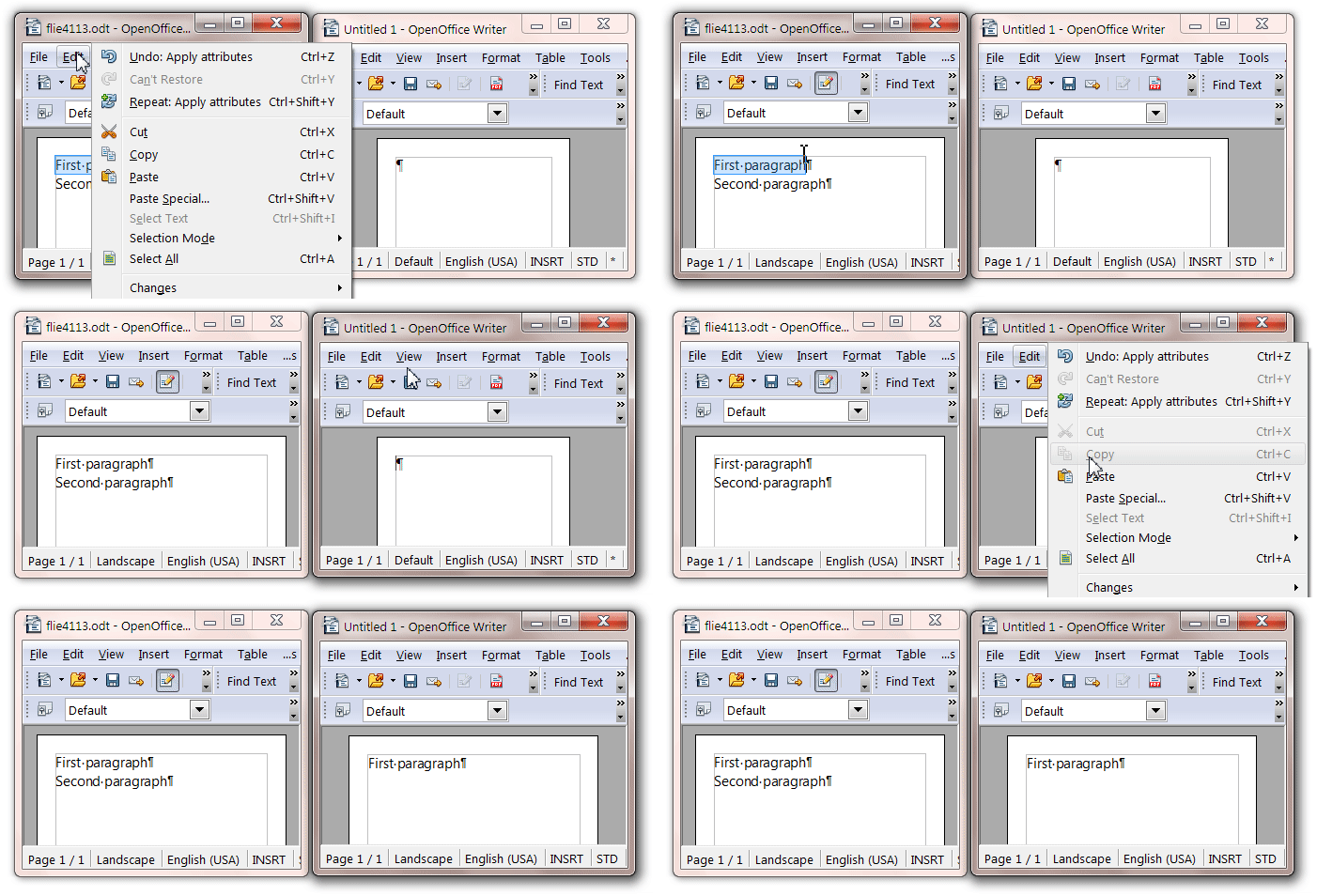
Same behavior in OpenOffice.
⠀
- PagStyPropa.gif (127.46 KiB) Viewed 2724 times
Re: Paste from ODT to Writer copies page orientation
Posted: Fri Jul 04, 2025 9:20 am
by JeJe
Put a blank paragraph in front with the enter key - then select everything but that and copy and paste.
Re: Paste from ODT to Writer copies page orientation
Posted: Fri Jul 04, 2025 9:43 am
by keme
Some explanation (I think):
Background
The page orientation in Writer is not directly assignable by formatting, even though it may appear so. The menu entry "Format - Page" (in AOO; aptly renamed "Format - Page style ..." in LO) does not insert any page formatting change at the cursor's position.
It alters the page style which is in effect at that point. This also alters other pages accordingly (assuming that they use the same page style).
The page style is by default inherited from page style settings active on previous page. To break this inheritance, first a page break is needed. This page break also does not exist as an individual entity (even though it may appear so from the way we "insert" it). Rather, it is a property of the paragraph starting the new page.
Page style is then a
subordinate property of
Page break.
The page break can be inserted explicitly (by the
Insert - Manual break ... menu item or by adjusting settings through
Format - Paragraph - Text flow) or implicitly (by paragraph style, the
Text flow tab).
What happened?
- If you copied content from a paragraph containing a "hard break" (inserted in paragraph directly, or in the paragraph style) with page style settings entered, this should carry over when you paste. The "operative content" in this case will be (part of) the first paragraph on your source page, and will constitute the first paragraph of the page after pasting.
- If you copied from a source where the page style setting was not present on paragraph level (no page breaks inserted; i.o.w. page style manually selected for the document, or inherited from the "next page" setting of previous page) the target page will keep the original page settings.
Re: Paste from ODT to Writer copies page orientation
Posted: Fri Jul 04, 2025 11:57 am
by Hagar Delest
It makes sense indeed!
Since the first paragraph of the document holds the page style information (but not a direct formatting like I first tested), it will paste it in the destination document.