Page 1 of 2
[Solved] Filter data to find patterns
Posted: Wed Mar 26, 2025 7:16 pm
by minxabroad
Hello, I am trying to help a small animal rescue charity with their finances- more specifically I am trying to learn how many donors have a regular monthly payment set up and for how much. It would be great to see other data too that a spreadhseet could help with- alas my skills are minimal and I am struggling. I have downloaded the payments from their bank account into a Libre Office Calc spreadsheet and have tried several things to generate a view of the monthly repeating payments with no luck, at all.

Can anyone suggest as to how go about it (will need details I'm afraid)? Currently, my spreadhseet has 4 columns, some of which are not in use yet. They are DATE, TYPE, DESCRIPTION, VALUE and NAME of Dog (the last one is for those that are sponsoring a specific animal).
Any patient help would be appreciated.
Windows 11
Re: How to filter data in Libre Calc
Posted: Wed Mar 26, 2025 10:12 pm
by Hagar Delest
Can you attach a sample file with fake figures so that we can see what you are trying to do (see:
How to attach a document here)?
Re: How to filter data in Libre Calc
Posted: Thu Mar 27, 2025 12:48 am
by minxabroad
Hope this is ok. Not a lot to see I guess. I am sure there are better ways to do it but It was the most straightforward way I could think of.
I downloaded "payments" from the charity bank account into a spreadsheet. The "description" column brought all it's own transaction letters/numbers with it so I've blocked them out along with names before sharing.
Some of the transactions will be set up as monthly donations but unfortunately, the bank doesn't say which ones and I would like to know which are so that we know how much can be counted on each month, aside from the random donations.
I hoped I would be able to use a search feature to highlight a name and maybe it would show me all their transactions highlighted so that I could then see relatively easily if there was a donation in that name, for the same amount, every month- then it would be very likely that the person set up a recurring monthly donation but I am finding it to be harder than I expected. I did wonder if using a graph would make it easier but I have never added one before.
Re: How to filter data in Libre Calc
Posted: Thu Mar 27, 2025 9:03 am
by Hagar Delest
It depends if you want to do that only once or very few times or if it needs to be automated or run periodically.
As a first thought, I would made a helper column, say G where it concatenates description and value (in G2: =C2&D2). Then you need to find duplicates so that you can count the number of series of duplicates. The description needs to be always the same from a month to another.
There are many topics in the forum about finding duplicates I think.
Re: How to filter data in Libre Calc
Posted: Thu Mar 27, 2025 12:04 pm
by minxabroad
Thank you. I entered the formula into G column and nothing has happened.
I have had a good look around the forum for more help but most of it is way beyond my knowledge or not quite suitable for this situation. There is one I am trying but no luck quite yet.
Re: How to filter data in Libre Calc
Posted: Thu Mar 27, 2025 1:18 pm
by Lupp
minxabroad wrote: ↑Thu Mar 27, 2025 12:04 pm
...
I have had a good look around the forum for more help but most of it is way beyond my knowledge or not quite suitable for this situation. There is one I am trying but no luck quite yet.
Attach an example
.ods !
An image is next to useless i such a case. Even experienced contributors often need an example to test their ideas for a useful suggestion. Do you expect them to create the example sheet? Sorry, that's your job. Don't forget to also be more precise about what you want. Give a hand-made example for the results you want to get. Add another such example to exemplify the flexibility you hope for.
BTW: Your signature shows a version of AOO while your question's title contains "Libre Calc".
Such things are relevant!
E.g: Recent LibreOffice Calc has an array function
FILTER(). AOO Calc has not.
Re: How to filter data in Libre Calc
Posted: Thu Mar 27, 2025 1:28 pm
by John_Ha
There are many ways to do what you want and many ways to extract the result you want. You will have to try them out. One (probably) is:
1. Add a column somewhere - eg say Col H) and fill it with 1, 2, 3, 4 ... , numbering each row. Do this by setting H2 = 1, H3 = 2. Highlight H3. DRag it down the length of the column to fill with consecutive number. NB - you add this column so you can sort back to the original order later
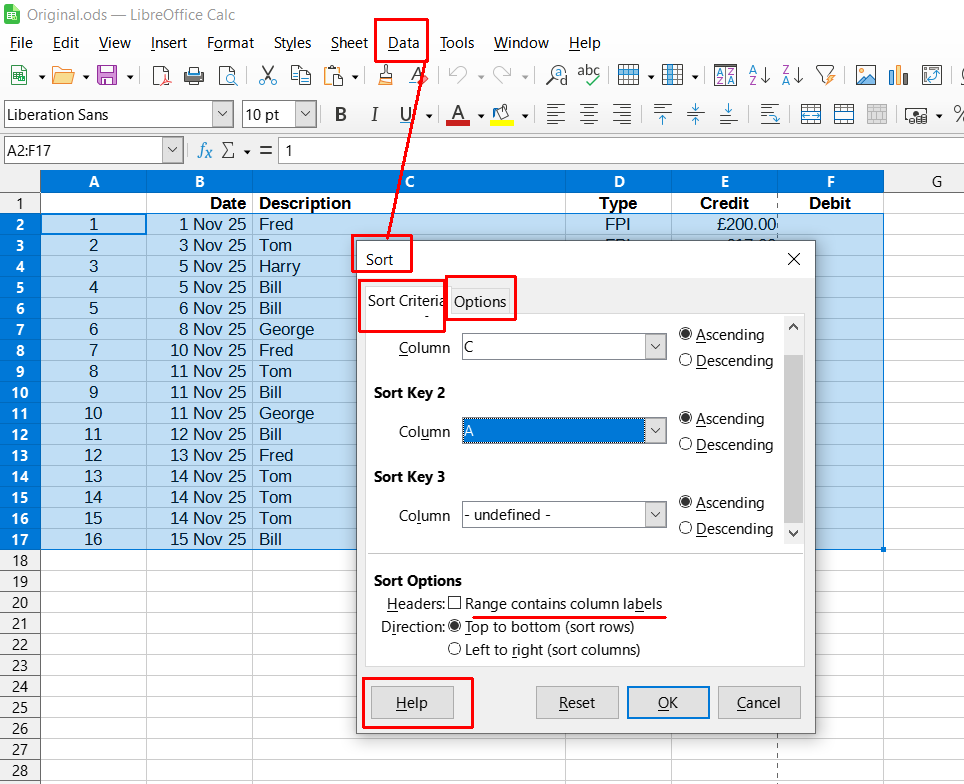
2. Highlight all the data from A2 to bottom right
3. Sort the highlighted data by Data > Sort. Sort on Column C - Description, with the second sort column H Acsending. (Note the Options you can use with Sort like is there a heading in the selected range etc. My chosen highlighted range does not contain labels.
.
- sort.png (77.46 KiB) Viewed 9411 times
You now have all the payee sorted together in alphabetical order, with each payee's entries listed in the order they appear. This needs all the payee names to be identical. (If they aren't, add a helper column, and put a 1 for all the variants of Fred, a 2 for all the variants of Bill etc. Sort on this column).
When finished, highlight all the data from A2 to bottom right and sort the highlighted data on Column H to put it back in the original order.
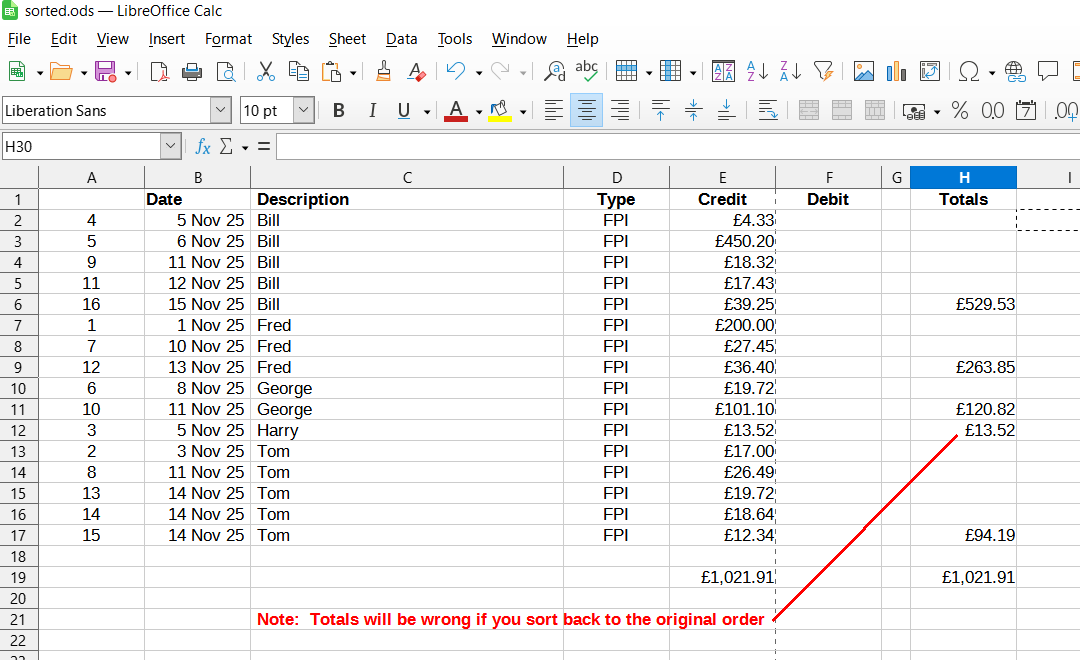
Note if a cell in one row has a value determined by a cell in a different row, the values will be wrong after the sort. See Sorted.ods where Totals goes wrong when sorted back into the original order.
I suggest you read
[Tutorial] Ten concepts that every Calc user should know on using spreadsheets and read the
LibreOffice Calc manual. You will get lost otherwise. Remember, 90% of spreadsheets have errors their authors don't know about.
Sorry, Your Spreadsheet Has Errors (Almost 90% Do) - Forbes
See Original.ods and sorted.ods for examples.
Re: How to filter data in Libre Calc
Posted: Thu Mar 27, 2025 1:32 pm
by John_Ha
Data sorted.
- sorted.png (57.31 KiB) Viewed 9411 times
Re: How to filter data in Libre Calc
Posted: Thu Mar 27, 2025 2:00 pm
by Lupp
Sorry.
(1) I won't attach images.
(2) The attached example needs LibreOffice V 24.8. or higher.
(3) I would prefer to
leave original data untouched.
Interactive sorting and filtering should use the feature "Copy result to".
Same if the action is automated using a Subroutine.
>>>
If somebody checks my attached example, and gets angry about the scaling problems coming with locked ranges for the output of FILTER():
I'm interested in a discussion of the issue - and of a concept I developed against it.
Re: How to filter data in Libre Calc
Posted: Thu Mar 27, 2025 2:20 pm
by Hagar Delest
John_Ha wrote: ↑Thu Mar 27, 2025 1:28 pm
Note if a cell in one row has a value determined by a cell in a different row, the values will be wrong after the sort. See Sorted.ods where Totals goes wrong when sorted back into the original order.
The point here is not with totals but to find a pattern.
I agree that a sample file would be best (my first post). Nonetheless, the question boils down to finding duplicates showing a pattern.
minxabroad wrote: ↑Thu Mar 27, 2025 12:04 pm
I entered the formula into G column and nothing has happened.
Here we cannot do anything as long as we don't have the file however. Making a dummy file by changing the names and the values is not that difficult (keep only few lines). We can give advices on the strategy without actually seeing a file but if you want detailed help, there are some homework to do.
Re: How to filter data in Libre Calc
Posted: Thu Mar 27, 2025 3:04 pm
by minxabroad
@Hagar Delest- apologies- when you said a sample file, I thought you meant an image, to see what kind of set-up I was trying. I have attached a sample this time...i think.
Re: How to filter data in Libre Calc
Posted: Thu Mar 27, 2025 3:06 pm
by Lupp
Hagar Delest wrote: ↑Thu Mar 27, 2025 2:20 pm
... Nonetheless, the question boils down to finding duplicates showing a pattern.
You sure?
>>>
Any pattern can probably best be found/tested using formulas with Boolean results describing the supposed pattern (like used in my attached example under
Condition1 and
Condition2 e.g.).
>>>
Once again: What is be seen as a duplicate today may be seen differently tomorrow. If only
identical data sets are seen as duplicates, things are simple anyway.
Never delete data sets based on a doubtable judgement concerning the concept of "duplicate". Mark data sets as "unused" or "functionally deleted" instead. You can then change the verdict later.
>>>
BTW: Do you know
https://wiki.documentfoundation.org/Rel ... .2/en#Calc ?
Re: How to filter data in Libre Calc
Posted: Thu Mar 27, 2025 3:52 pm
by Lupp
A very raw sketch as a basis for further exchange.
Continued this way lots of things that should be automated will remain handy work.
=== Edit ===
Better look into the new example.
The COUNTIF() function previousl used doesn't regard the letter case as expected (and specified).
I replaced it using SUMPRODUCT().
In addition trailing spaces are now suppressed in columns I, L.
=== /Edit ===
Re: How to filter data in Libre Calc
Posted: Thu Mar 27, 2025 4:28 pm
by John_Ha
"Nonetheless, the question boils down to finding duplicates showing a pattern."
Absolutely.
I was promptly to reply as I devised my method recently when I had to analyse five years of bank and credit cards transactions - about 10,000 in total - and assign them appropriately.
It took me less than an hour. By sorting, you can easily assign a group of transactions by copying the assignation to all the group members. With a weekly item, I did 2,500 lines in a few seconds.
I wouldn't bother attempting to use regex or similar to attempt to separate variants as it is very complex. Once grouped together, the human eye is the best discriminator.
Re: How to filter data in Libre Calc
Posted: Thu Mar 27, 2025 5:45 pm
by Hagar Delest
Here is my quick proposal:
I have added a test column in F. Then I added another one (G) that compares the test cell of the line with all the test cells of the test column. Any single entry will show 1, any entry with duplicates will give the number of occurrences. I even added a conditional formatting on the G column to highlight the lines with duplicates.
Thus, you get the pattern with a hint about how long they were in place.
Note: better remove all empty lines, they mess up with the filters and formulas.
As I said previously, it needs the description to remain the same. If the string changes with the month for example, it will require another helper column to look for the invariable parts to be tested.
Please add
[Solved] at the beginning of the title in your
first post (top of the topic) with the
✎ button if your issue has been fixed.
Edit: eventually, it is quite the same as Lupp's file! I thought that his file would be much more complicated, I should have checked his file before because it is exactly the strategy I proposed in my first posts...
Re: How to filter data in Libre Calc
Posted: Thu Mar 27, 2025 6:48 pm
by minxabroad
Hello, Thank you to each of you for your work. It appears to this ignorant eye that the solutions are quite the same so I am guessing none has a benefit over the other?
@Hagar Delest , regarding the description remaining the same, the descriptions that are downloaded directly from the bank are relatively long and convoluted. I removed all characters but the names to keep it as simple as possible. Do you think that's the best way of dealing with that?
Thank you again, gentlemen.
Re: [Solved] How to filter data in Libre Calc
Posted: Thu Mar 27, 2025 7:09 pm
by Hagar Delest
Indeed, both files are equivalent.
That's what I meant for the description. It may be long and convoluted but as long as they remain the same, it doesn't matter, the comparison will still work. You don't need to really show the helper column, the one you need to see is the one that counts the entries.
Try on your file: if there is no match (no duplicate at all), then it is likely that the description changes (or that no one has done any periodic payment).
The best would be to try to spot a line that you know is a periodic payment and see if it is detected by the formula. If it is not, then you have to see what is the part of the description changes to adjust the helper column.
Re: [Solved] How to filter data in Libre Calc
Posted: Thu Mar 27, 2025 9:55 pm
by minxabroad
Excellent. Thank you.
Re: [Solved] How to filter data in Libre Calc
Posted: Fri Mar 28, 2025 2:38 pm
by minxabroad
@Hagar Delest Very sorry to trouble you again but I have added the info into the cells and am now not able to get the formula to work in the test column. I tried to simply copy the formula into that column but I get a result saying " #VALUE! " . I haven't yet shortened the "description" from their original bank details like they are in the sample but that wouldn't affect it, would it?
Re: [Solved] How to filter data in Libre Calc
Posted: Fri Mar 28, 2025 2:42 pm
by Hagar Delest
Difficult to say without seeing the actual file. There is a problem because at the beginning you said that the simple formula I gave (=C2&D2) did not work. It can't fail.
Copy some cells in one of the file provided (Lupp's or mine) and see how it works.
Re: [Solved] How to filter data in Libre Calc
Posted: Fri Mar 28, 2025 2:58 pm
by minxabroad
Yours was working perfectly- it was only after I copied and pasted new info into the sheet that it stopped- so I have done something to cause a fault. Does this sample attached help?
Re: [Solved] How to filter data in Libre Calc
Posted: Fri Mar 28, 2025 3:06 pm
by Lupp
A formula for creating a compound from, a text and a number MUST convert the number to text. Using the concatenation operator & the conversion is automatically done based on standard formatting.
You may prefer explicit formatting with the hgelp of the function TEXT(). The operator + can't be used for concatenation in Calc formulas.
What did lead you to this misuse?
Re: [Solved] How to filter data in Libre Calc
Posted: Fri Mar 28, 2025 3:22 pm
by minxabroad
Lupp, You may as well be speaking another language to me. I opened up the sample sheet and copied and pasted the relevant data into the cells. I am guessing that's the misuse you are speaking of. Aside from that, I do not have the relevant knowledge to understand what you are talking about.
Re: [Solved] How to filter data in Libre Calc
Posted: Fri Mar 28, 2025 4:11 pm
by Hagar Delest
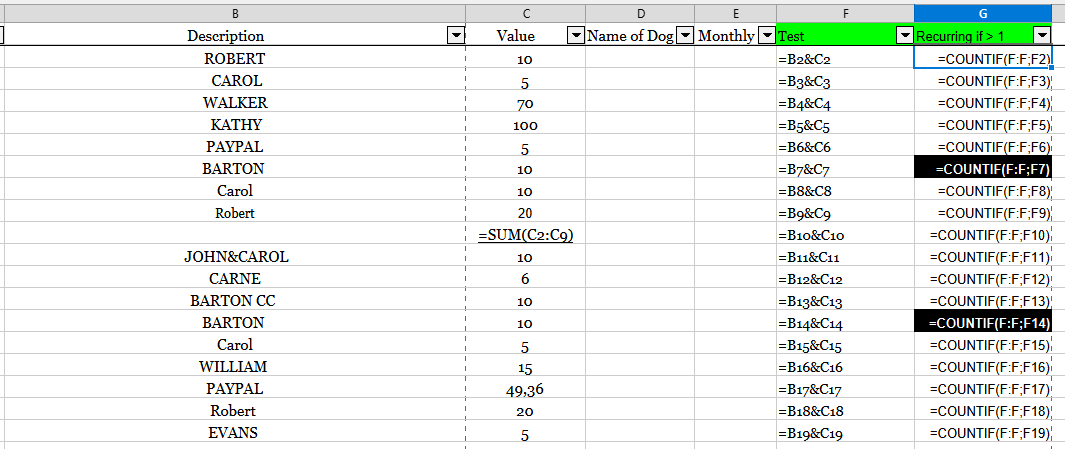
Your formula shows a '+' sign. It should be a '&'.
- Formulas.png (17.02 KiB) Viewed 9171 times
Re: [Solved] How to filter data in Libre Calc
Posted: Fri Mar 28, 2025 4:21 pm
by minxabroad
Thank you. That is something I can actually understand.

Re: [Solved] How to filter data in Libre Calc
Posted: Fri Mar 28, 2025 4:42 pm
by Lupp
That COUNTIF() doesn't distinguish letter case, and that some of your "Descriptions" may contain trailing spaces will nonetheless be a problem.
"ROBERT" and the first "Robert" will be taken as the same (but have assigned different amounts).
The first "Robert" and the second "Robert " have assigned the same amount, but are not accepted as equal descriptions, and therefore don't pass the filter for monthly donators due to the space in the second case.
Re: [Solved] How to filter data in Libre Calc
Posted: Fri Mar 28, 2025 5:06 pm
by John_Ha
Edit > Find All ..., works quite well.
Re: [Solved] How to filter data in Libre Calc
Posted: Fri Mar 28, 2025 5:07 pm
by Hagar Delest
Lupp wrote: ↑Fri Mar 28, 2025 4:42 pm
That COUNTIF() doesn't distinguish letter case, and that some of your "Descriptions" may contain trailing spaces will nonetheless be a problem.
"ROBERT" and the first "Robert" will be taken as the same (but have assigned different amounts).
The first "Robert" and the second "Robert " have assigned the same amount, but are not accepted as equal descriptions, and therefore don't pass the filter for monthly donators due to the space in the second case.
No big issue. I guess that those names were typed quickly to make a dummy file.
With the description field provided by the bank export, it should not happen.
Re: [Solved] How to filter data in Libre Calc
Posted: Sat Mar 29, 2025 3:13 pm
by minxabroad
Hope it's ok to write here once more after it's been marked solved. I have one further question. I have been delving into this and finally some of the more technical things you have said and shown examples of are sinking in. I have even created another conditional column (thanks to your help) and am considering what other handy bits of info I might be able to glean with further effort. My one question is likely an easy one for you but I have not been able to get it just right and that is I would like to be able to highlight/colour change an entire row based on the data in one of the columns, specifically the word "PAYPAL" in the description column. I can get a cell to highlight easily enough but not the row.
Re: [Solved] How to filter data in Libre Calc
Posted: Sat Mar 29, 2025 3:36 pm
by Alex1
Select the row, then go to conditional formatting and use a formula as the criteria.