Page 1 of 1
[Solved] No "Expand References" in Writer options dialog
Posted: Wed Oct 02, 2024 6:39 pm
by Owyn
robleyd wrote: ↑Sat May 22, 2021 1:44 pm
You may need to make a change in your settings. Tools | Options | OpenOffice Calc | General
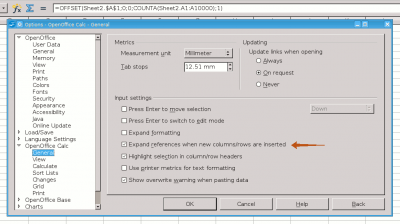
how do I turn this setting on for the WRITER app? I use tables with formulas in my writer but there are no settings for the Calc there in the UI, only for the Writer

Re: A setting is missing from the UI
Posted: Wed Oct 02, 2024 6:53 pm
by floris v
That is correct. Writer doesn't have much support for updating references in tables, because it's intended for producing static text. You can insert a Calc table (a spreadsheet sheet really) in a Writer document, and that will offer you the full power of Calc in a Writer document.
Re: A setting is missing from the UI
Posted: Wed Oct 02, 2024 7:45 pm
by Owyn
Nvm, I was able to do it by launching the Calc app - calc settings were there and they affect the Writer as well
Re: A setting is missing from the UI
Posted: Wed Oct 02, 2024 10:02 pm
by MrProgrammer
Owyn wrote: ↑Wed Oct 02, 2024 7:45 pm
Nvm, I was able to do it by launching the Calc app - calc settings were there and they affect the Writer as well
I cannot reproduce that behavior in a Writer table in OpenOffice. In my experience Table → Insert → Rows (or Columns)
never expands references, even when rows or columns are inserted in the middle of a table. The new row or column
always has empty cells. Here is my test:
• Table → Insert → Table → Columns → 2 → Rows → 3 → OK
• A1 → 3 → B1 →
=<A1>*1000
• A2 → 1 → B1 →
=<A2>*1000
• A3 → 4 → B1 →
=<A3>*1000
• Select the upper left cell of the table, containing 3
• Table → Insert → Rows → Number → 1 → Position → After → OK
• Observe that cell B2 (below value 3000) does not contain a formula and is empty
• The reference
=<A1>*1000 in B1 was
not expanded to B2
Perhaps you can give me instructions on how to reproduce expansion of refernces with a procedure that I can follow. Begin with a Table → Insert → Table step that creates an empty Writer table.
Re: A setting is missing from the UI
Posted: Wed Oct 02, 2024 10:05 pm
by Hagar Delest
I guess that the table was actually an embedded spreadsheet in a Writer document.
Please add
[Solved] at the beginning of the title in your
first post (top of the topic) with the
🖉 button if your issue has been fixed.
Re: [Solved] No Expand References in Writer options dialog
Posted: Wed Oct 02, 2024 10:12 pm
by Owyn
Yes, it's an embedded table