Page 1 of 1
[Solved] Selection direction for footnote changes menus
Posted: Wed May 29, 2024 4:49 pm
by CannedMan
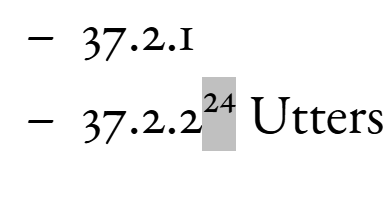
- Footnote selection.
- Bilde_2024-05-29_154311104.png (9.91 KiB) Viewed 8783 times
I have found that which menu options I get when selecting a footnote, changes depending on whether I select it left to right or right to left.
Selecting left to right, I get this menu:
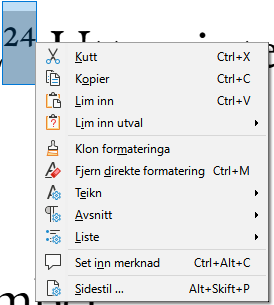
- Menu options selecting footnote left to right.
- Bilde_2024-05-29_154415661.png (11.39 KiB) Viewed 8783 times
Menu options: Cut, Copy, Paste, Paste selection; Clone formatting, Remove direct formatting, Characters, Paragraph, List; Insert comment; Page style.
Selecting right to left, I get this menu:
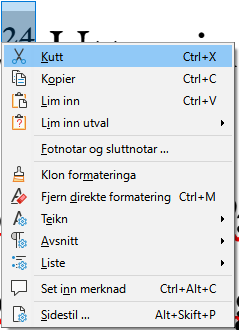
- Menu options selecting footnote right to left.
- Bilde_2024-05-29_154708510.png (11.38 KiB) Viewed 8783 times
Cut, Copy, Paste, Paste selection; Footnotes and endnotes; Clone formatting, Remove direct formatting, Characters, Paragraph, List; Insert comment; Page style
Now, getting different options based on whether you go
Shift + → or
Shift + ← certainly is not intuitive, and I cannot think that this is anything but a bug.
Re: [Bug] Direction of selecting footnote changes menu options
Posted: Wed May 29, 2024 7:15 pm
by Hagar Delest
Then you should report it:
[Tutorial] Reporting bugs or suggestions.
Same with LibreOffice, it depends on the "last" active character. Or the position of the cursor when there is no selection (right click for example).
Not sure it's that problematic anyway.
Re: [Solve][Bug] Direction of selecting footnote changes menu options
Posted: Fri May 31, 2024 12:42 pm
by JeJe
This is LibreOffice and it doesn't look like a bug but design - the menu has the footnote option if the flashing viewcurser is at the beginning of the footnote number. It is the ordinary text menu if at the end of the footnote number (Edit i.e. at the beginning of some ordinary text). This is regardless of whether the number is selected or the viewcursor is instead collapsed.
Re: [Solve][Bug] Direction of selecting footnote changes menu options
Posted: Fri May 31, 2024 2:39 pm
by Bill
This isn't a bug. When the insertion point is before the footnote, an option to edit the footnote is added to the context menu. This option does not appear when the insertion point is after the footnote. The behavior is similar to fields which also show an option in the context menu to edit the field only when the insertion point is before the field.
Re: [Solved][Bug] Direction of selecting footnote changes menu options
Posted: Mon Jun 03, 2024 12:06 pm
by CannedMan
What I described was not having the insertion point before or after, but selecting the note from before or after, i.e. I selected the footnote (I tend to use keys rather than the mouse for this), then opened the context menu; I did not open the context menu by simply putting the pointer at a specific point (though I do understand that it will act differently based on where the pointer is, no text selected, when the context menu is opened)
Re: [Solve][Bug] Direction of selecting footnote changes menu options
Posted: Mon Jun 03, 2024 12:55 pm
by JeJe
Its not a bug, its the design. You want it to know that you've selected only the footnote number and go by that.
But the selection could be any length and have various contents - so they're showing the menu depending on where the viewcursor is and what immediately follows it.
If you select the text in front of the footnote number ending in front of the number the menu will include the footnote entry. The selection is always ignored.
Re: [Solved][Bug] Direction of selecting footnote changes menu options
Posted: Sun Jun 09, 2024 2:39 am
by CannedMan
Alright, that does make sense. It is confusing when you encounter it, but I understand why it is the way it is. At first, I thought it would make more sense to me as an end user, if the cursor was considered to be wherever the selection is, but of course, if you select anything more than just a few characters, that can quickly get waaaay out of hand, especially memory-wise. I am trying to think of some way that this (what is going on) could be better communicated to the user via the graphical output, but I can’t think of anything. Maybe something along the lines of if and only if everything selected to the user would look like it is all the same kind of data, then the context menu should reflect that, but I can see that that would get very difficult to delimit.