Page 1 of 1
Colors lost if file is saved in Word 97 DOC format
Posted: Tue May 14, 2024 5:15 pm
by Repercussionist
Recently, when using the latest Apache OpenOffice, version 4.1.15, on my MacBook Pro, OS Sonoma 14.2.1, if I set a Text Document paper format as Letter size with 0.75" margins and saved it as a Microsoft Word 97/2000/XP (.doc), when next I opened it, the paper format was A4 with .79" margins.
In an attempt to cure the above in the Preferences, the text which was previously in colour now displays in black only.
Any suggestions?
Thank you,
Martin
Re: Apache OpenOffice Colors
Posted: Tue May 14, 2024 6:30 pm
by Zizi64
Any suggestions?
Do not work in the foreign, never standardized, obsolete file formats like the binary MS .doc format.
Can you upload a sample file here?
Re: Apache OpenOffice Colors
Posted: Tue May 14, 2024 11:25 pm
by JeJe
Which text?
Re: Apache OpenOffice Colors
Posted: Thu May 16, 2024 6:28 am
by Repercussionist
Sample.doc uploaded.
I coloured some text but I can't see it.
Highlighting still works as it should.
Re: Which text?
All of it.
Re: Apache OpenOffice Colors
Posted: Thu May 16, 2024 7:00 am
by Zizi64
Please upload an ODF version of your sample doc, too (with the desired settings). I am sure that the native .odt format can save your settings.
Re: Apache OpenOffice Colors
Posted: Thu May 16, 2024 7:14 am
by JeJe
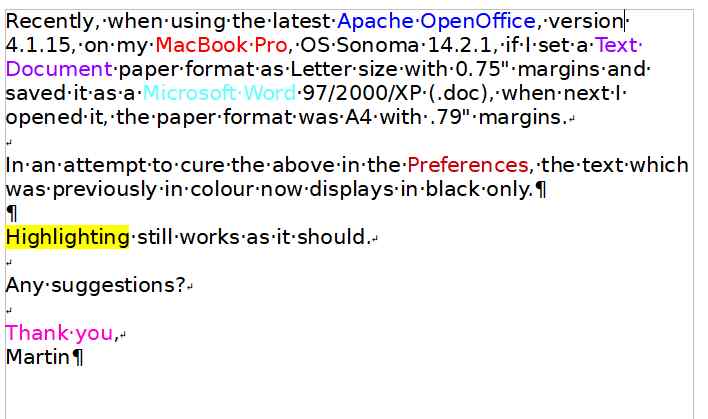
The picture is what I see, which is showing colored text. If that's different from what you see - how? By Preferences I assume you mean you think you've inadvertently changed something in Tools menu/options?
- Untitled.jpg (32.06 KiB) Viewed 7615 times
Re: Apache OpenOffice Colors
Posted: Thu May 16, 2024 8:32 am
by Zizi64
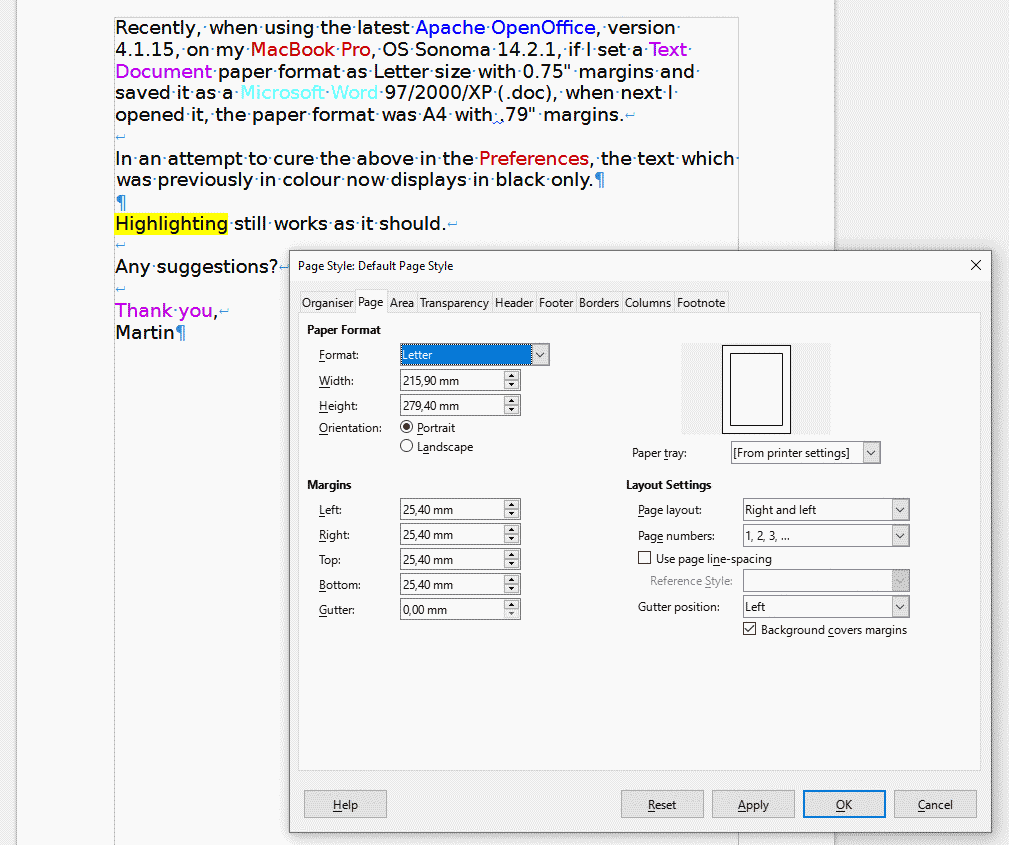
it is apeared in my LibreOffice 7.5.8:
- Colors and Page properties.png (36.51 KiB) Viewed 7579 times
The page size is "Letter", but the margins are 1" (25,4 mm).
Re: Apache OpenOffice Colors
Posted: Thu May 16, 2024 10:14 am
by RoryOF
Opened in OpenOffice 4.1.14 on Xubuntu as page size Letter for me, with 1 inch margins. Also Letter, 1 inch margins in AbiWord. In both cases the colours were as Zixi64 and JeJe illustrated.
Re: Apache OpenOffice Colors
Posted: Thu May 16, 2024 11:49 am
by LastUnicorn
I tried the following:
(1) Opened
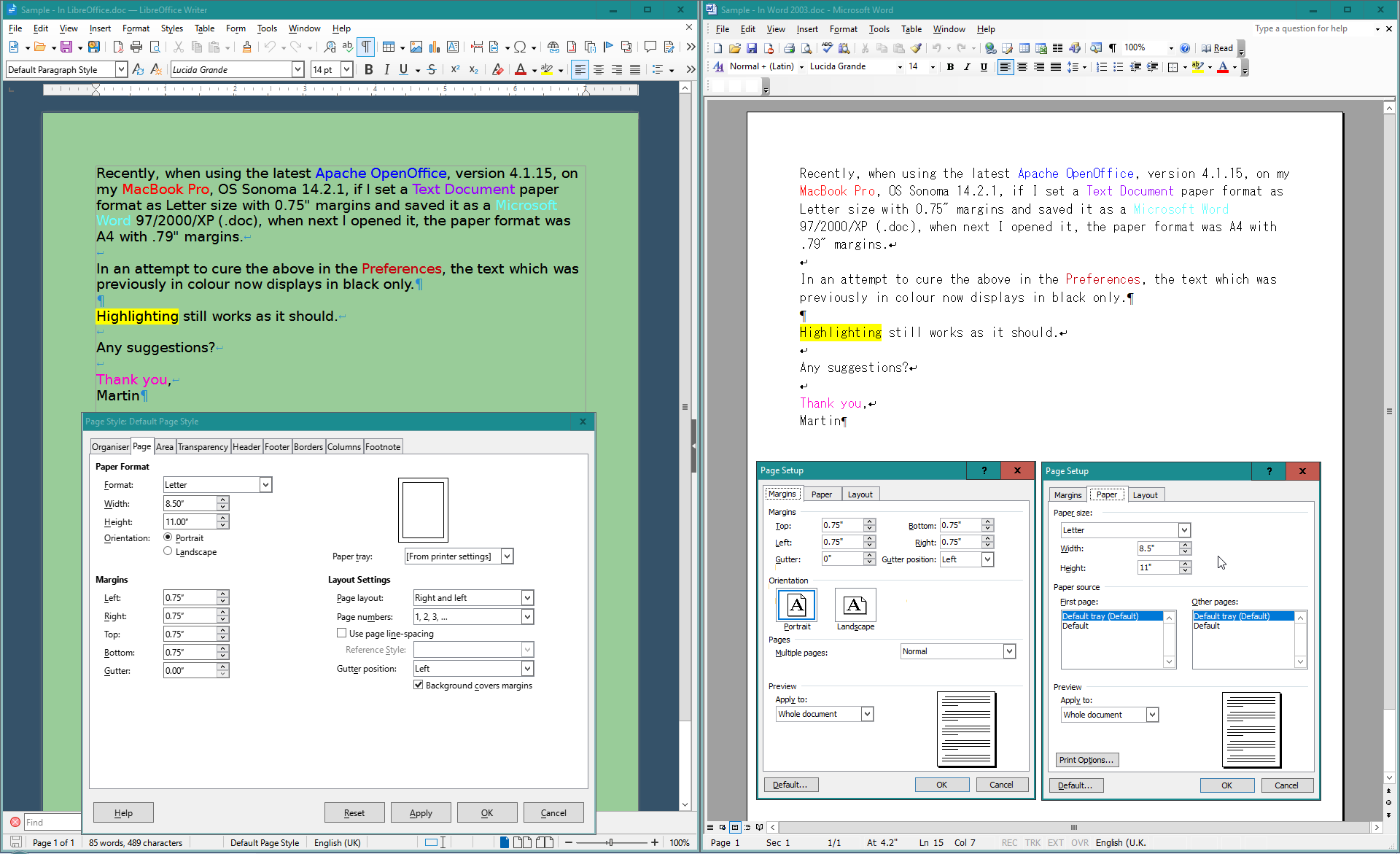
Sample.doc in LibreOffice 7.6.7. Page size was shown as Letter. Margins I had to manually set to 0.75" (my own usual defaults are 1.0". Then saved the doc in Word 97-2003.doc format as
Sample - In Word 2003.doc
(2) Opened that Microsoft document in Word 2003 and it was okay. Page size Letter, and margins at 0.75".
Maybe this is because I am using LibreOffice and not OpenOffice. LibreOffice is said to have better handling for Microsoft Office documents so you might want to consider trying LibreOffice and see if you get a better result there. There are several good reasons for switching to LibreOffice anyway, some of which are mentioned here:
[Tutorial] Considering a Switch from OpenOffice to LibreOffice? Some Useful Information
- LibreOffice - Word 2003 Document.png (108.75 KiB) Viewed 7469 times
Re: Apache OpenOffice Colors
Posted: Thu May 16, 2024 3:48 pm
by Hagar Delest
I think it is a setting linked to high contrast mode or printing in black but I couldn't find which one in the Tools > Options...
Like the setting that shows the pics or not.
Re: Apache OpenOffice Colors
Posted: Thu May 16, 2024 4:02 pm
by RoryOF
Perhaps /Tools /Options /OpenOffice Writer /Print : ""Print text in black" should be unchecked.
Re: Apache OpenOffice Colors
Posted: Thu May 16, 2024 6:22 pm
by JeJe
If you've turned on record changes then changes will be all the one color (brown as default for me), instead of the actual text color, but highlight will still be colored. To see if its this go to,
Edit menu /changes/ untick "show" to turn this off.
Re: Colors lost if file is saved in Word 97 DOC format
Posted: Sat May 18, 2024 6:23 pm
by Repercussionist
Re: I am sure that the native .odt format can save your settings.
It can't.
I don't have Microsoft Office, only OpenOffice.
Re: Perhaps /Tools /Options /OpenOffice Writer /Print : ""Print text in black" should be unchecked.
'Print text in black' is unchecked.
Re: Edit menu /changes/ untick "show" to turn this off.
'Show' is unticked'
Re: Colors lost if file is saved in Word 97 DOC format
Posted: Tue Jun 04, 2024 5:07 pm
by MrProgrammer
Repercussionist wrote: ↑Tue May 14, 2024 5:15 pm
Recently, when using the latest Apache OpenOffice, version 4.1.15, on my MacBook Pro, OS Sonoma 14.2.1, if I set a Text Document paper format as Letter size with 0.75" margins and saved it as a Microsoft Word 97/2000/XP (.doc), when next I opened it, the paper format was A4 with .79" margins.
I can reproduce that problem with OpenOffice 4.1.7 on MacOS 13.6.3. When I open your
Sample.doc, the margins are 1 inch. I think DOC format handles page styles differently than OpenOffice. Actually, I think I have read that DOC format does not support the concept of a Page Style. Perhaps OpenOffice uses our default page style settings when it saves or opens a file in foreign DOC format, Letter 1 inch for me, A4 .79 inch for you. It is well known on the forum that saving text documents in other than ODT format risks loss of content, formatting, or features. If you need to work
reliably in DOC format, MS Office is the one and only program for you. LibreOffice has tried to improve support for foreign formats DOC and DOCX.
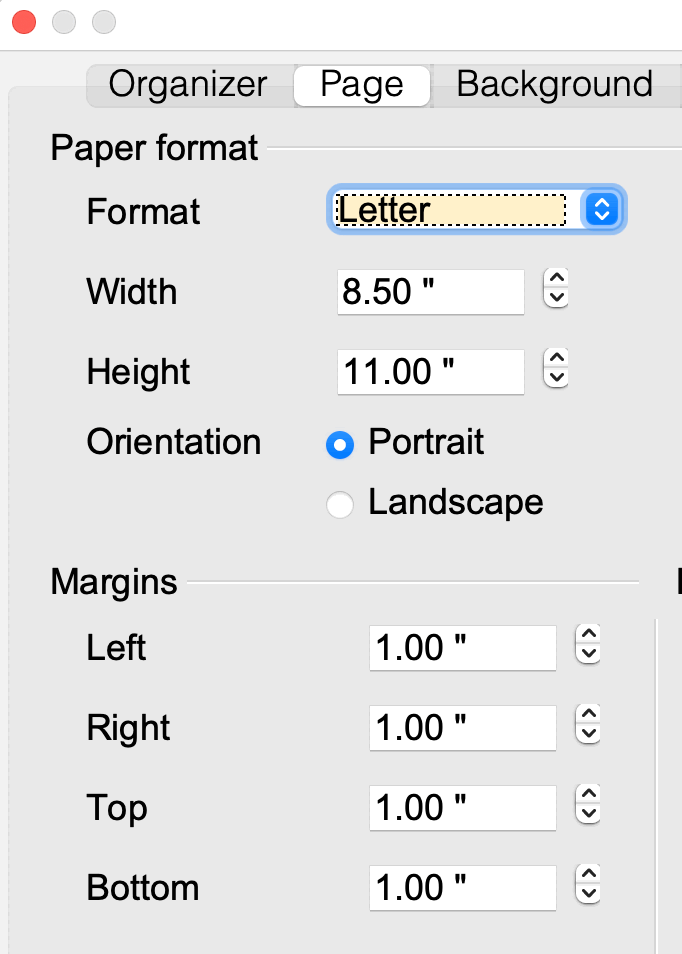
- Format → Page
- 202406040955.gif (36.13 KiB) Viewed 6819 times
Repercussionist wrote: ↑Tue May 14, 2024 5:15 pm
In an attempt to cure the above in the Preferences, the text which was previously in colour now displays in black only.
I cannot reproduce that problem with OpenOffice 4.1.7 on MacOS 13.6.3. JeJe,
Zizi64,
LastUniforn, and I can all see the colors in your DOC file. I looked at several possible settings in Preferences which might display your document in black, but none of them did. I also looked at many preferences in → System Settings, though it is not possible for me to try every combination of them. If you suspect a change to your System Settings is the cause, use the Guest User account to verify that. The Guest User gets a new, default set of preferences. Do your problems occur for the Guest User account?
Q28/A28: How do I use the Guest User account to run a test?
Q29/A29: How can I access a file from the Guest User account without a USB drive?
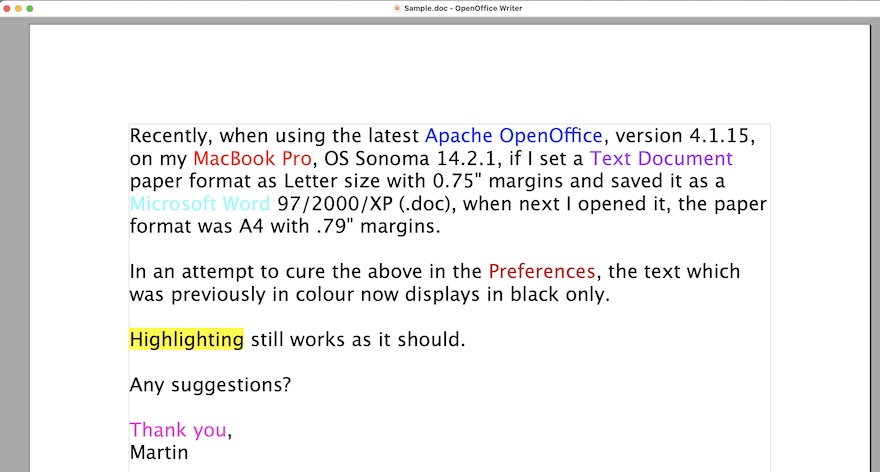
- Sample.doc screen image
- 202406040946.jpg (100.47 KiB) Viewed 6819 times
Repercussionist wrote: ↑Sat May 18, 2024 6:23 pm
Re: I am sure that the native .odt format can save your settings.
It can't.
I cannot reproduce that problem with OpenOffice 4.1.7 on MacOS 13.6.3. I opened your
Sample.doc and changed the margins to ¾ inch, then saved it as an ODT document. When I later open it, the colors and ¾ inch margin are present.
- Sample.odt
- Sample.odt
- (19.47 KiB) Downloaded 93 times
Repercussionist wrote: ↑Tue May 14, 2024 5:15 pm
Recently, when using … MacOS Sonoma 14.2.1
It is possible that MacOS 14 has introduced changes or new preferences which cause the problem that you have. However no one else on the forum has reported it. I do not use MacOS 14.
Did you try to open
Sample.doc with
Pages? It is included in MacOS 14, already installed, ready to use. Are the colors present there? They are for me. Are the margins 1 inch in Pages? They are for me. Since both OpenOffice and Pages report the margin in Sample.doc to be 1 inch, this suggests that OpenOffice did not save your ¾ inch margin when you created your document in DOC format.
Saving text documents in other than ODT format risks loss of content, formatting, or features.
RoryOF wrote: ↑Thu May 16, 2024 4:02 pm
Perhaps /Tools /Options /OpenOffice Writer /Print : ""Print text in black" should be unchecked.
I think this only affects the File → Print dialog. I find that the
Print text in black setting has no effect in the document as displayed in View → Print Layout or View → Web Layout or File → Page Preview.
JeJe wrote: ↑Thu May 16, 2024 7:14 am
By Preferences I assume you mean you think you've inadvertently changed something in Tools menu/options?
On MacOS OpenOffice does not have Tools → Options. Tools → Options on other platforms is OpenOffice → Preferences in MacOS.
Re: Colors lost if file is saved in Word 97 DOC format
Posted: Tue Jul 23, 2024 11:41 pm
by Repercussionist
Re: I opened your Sample.doc and changed the margins to ¾ inch, then saved it as an ODT document. When I later open it, the colors and ¾ inch margin are present.
I downloaded my Sample.doc, which you had saved as an ODT document, when I opened it, the highlighting was present, the colours were still absent, and the margin are all 1".
So far, nothing has changed.
Re: Colors lost if file is saved in ODF Text DOC format
Posted: Tue Jul 23, 2024 11:58 pm
by Repercussionist
Re: By Preferences I assume you mean you think you've inadvertently changed something in Tools menu/options?
I meant I've inadvertently changed something in the OpenOffice Preferences.
Having opened a new ODF Text Document and, while adding colours to the text, the colours are not visible... even when saved as a .odt file and then opened.
Re: Colors lost if file is saved in Word 97 DOC format
Posted: Wed Jul 24, 2024 12:18 am
by floris v
I opened it in AOO 4.1.11 and it was in Letter format with 1 inch margins, all colors kept as in the screenshots above. So, Writer kept in the colors in the conversion, they just don't show on your system. Maybe your user profile got corrupted, in that case it helps to reset it.
Click here for help how to do that.