Page 1 of 1
[Solved+Issue] Tooltip hints for formula fields
Posted: Fri Feb 23, 2024 2:15 pm
by IKStool
In the old office (v3.3), the formula hint showed the formula itself. In subsequent versions, this was "broken." The tooltip shows the meaning of the expression, which I already see on the page. How to return "old" hints?
https://disk.yandex
.com/i/uCx2cVXea-jzLg -- new Office (3.4+)

- 202402230837.jpg (37.88 KiB) Viewed 4652 times
https://disk.yandex
.com/i/bJON3uWUHUj1wg -- "True Hints" Office 3.3
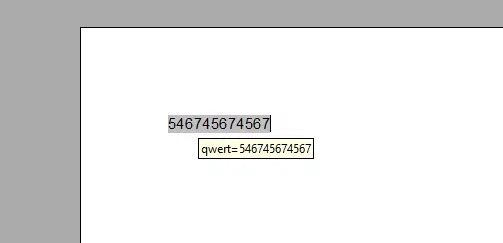
- 202402230838.jpg (11.26 KiB) Viewed 4652 times
Re: Tooltip hints for formulas
Posted: Fri Feb 23, 2024 5:42 pm
by FJCC
I don't know of a way to change the tooltip, but you can see the desired information by pressing the keys CTRL + F9 to toggle between the field value and the field name.
Re: Tooltip hints for formulas
Posted: Sat Feb 24, 2024 12:03 am
by Nick N,
IKStool wrote: ↑Fri Feb 23, 2024 2:15 pm
In the old office (v3.3), the formula hint showed the formula itself. In subsequent versions, this was "broken." The tooltip shows the meaning of the expression, which I already see on the page. How to return "old" hints?
https://disk.yandex
.com/i/uCx2cVXea-jzLg -- new Office (3.4+)202402230837.jpg
https://disk.yandex
.com/i/bJON3uWUHUj1wg -- "True Hints" Office 3.3202402230838.jpg
Hi,
How did you get that?
Nick

Re: Tooltip hints for formulas
Posted: Mon Feb 26, 2024 7:20 am
by IKStool
FJCC wrote: ↑Fri Feb 23, 2024 5:42 pm
I don't know of a way to change the tooltip, but you can see the desired information by pressing the keys CTRL + F9 to toggle between the field value and the field name.
I understand, but this is completely inconvenient. Formatting is completely lost. For big documents, it's a problem.
We need a hint, as in the "old" office
Re: Tooltip hints for formulas
Posted: Mon Feb 26, 2024 8:07 am
by IKStool
Nick N, wrote: ↑Sat Feb 24, 2024 12:03 am
How did you get that?
What exactly?
Re: Tooltip hints for formulas
Posted: Mon Feb 26, 2024 8:10 am
by Zizi64
Formatting is completely lost. For big documents, it's a problem.
What formatting is lost? The formatting of the Fields?
What type of the fields are you using in the Writer document showed by your attached images? Can you upload an ODF type sample file here? What settings (of the fields or of the hints) are you using to display the field name and the field value in same time?
We need a hint, as in the "old" office.
I can not find such function even in my LibreOffice Writer, when I am using the available Field types, even is I have set the "Extended Tips" option.
Maybe the only one "solution" is to use the archaic old OOo version, what has such feature.
Re: Tooltip hints for formulas
Posted: Mon Feb 26, 2024 9:07 am
by cwolan
Archaic LibreOffice 3.3.0.4 vs brand new 7.5.6.2
⠀

- juxtaVER.gif (97.66 KiB) Viewed 4359 times
⠀
| Edit: By "brand new" I obviously meant 7.6.5.2 (in text and in recording) |
Re: Tooltip hints for formulas
Posted: Mon Feb 26, 2024 9:14 am
by Hagar Delest
I agree, the former behavior makes much more sense. Why display as a tooltip the information already in clear in the text??? Showing what is the source or the formula resulting in the value is way more useful.
You should file a bug report, I think it can be considered as a regression (maybe it has already been filed, I have not checked):
[Tutorial] Reporting bugs or suggestions.
Re: Tooltip hints for formulas
Posted: Mon Feb 26, 2024 12:07 pm
by Nick N,
IKStool wrote: ↑Mon Feb 26, 2024 8:07 am
Nick N, wrote: ↑Sat Feb 24, 2024 12:03 am
How did you get that?
What exactly?
Do apologize for the remark, thus i cannot figure out what for is to raise such query, if it's only a matter of product feature.
Regards
Nick
Re: Tooltip hints for formulas
Posted: Tue Feb 27, 2024 3:20 pm
by IKStool
Zizi64 wrote: ↑Mon Feb 26, 2024 8:10 am
Formatting is completely lost. For big documents, it's a problem.
What formatting is lost? The formatting of the Fields?
If the formula is long, then it "stretches" the document.
Example. Source document 4 pages. After "Ctrl + F9" - 52 pages. It is difficult to find the one, the most necessary formula.

- Clipboard02.jpg (123.1 KiB) Viewed 3843 times
Re: Tooltip hints for formulas
Posted: Tue Feb 27, 2024 4:15 pm
by Zizi64
Example. Source document 4 pages. After "Ctrl + F9" - 52 pages. It is difficult to find the one, the most necessary formula.
Image
Please upload a real, ODF type sample file here.
Re: Tooltip hints for formulas
Posted: Tue Feb 27, 2024 4:45 pm
by Hagar Delest
Anyway, even if we can see the formula by another mean, that is with field display (Ctrl+F9), it defeats the point of a meaningful tooltip.
Re: Tooltip hints for formulas
Posted: Tue Feb 27, 2024 5:28 pm
by cwolan
In case of LibreOffice:
tdf#159446 ("UX Design/Technical Writing: Collect and analyze tooltip text on fields") might be relevant.
Re: [Issue] Tooltip hints for formulas
Posted: Tue Feb 27, 2024 11:20 pm
by JeJe
You can place a (transparent) form control label and set its tooltop to whatever you want.
Re: [Issue] Tooltip hints for formulas
Posted: Wed Feb 28, 2024 8:53 am
by Hagar Delest
I think that the point is not really how to display the formula but to correct a regression.
We will always be very good at finding workarounds. At some point, better fix what is broken.
Re: Tooltip hints for formulas
Posted: Wed Feb 28, 2024 12:39 pm
by IKStool
Zizi64 wrote: ↑Tue Feb 27, 2024 4:15 pm
Please upload a real, ODF type sample file here.
Please:
))))
I have a lot of this formatting in documents. and a dilemma arises - the convenience of working with formulas (OpenOffice v3.3) or the use of modern extensions (OpenOffice v4 +)
Re: [Issue] Tooltip hints for formulas
Posted: Wed Feb 28, 2024 2:20 pm
by Zizi64
From your sample file:
Code: Select all
a=1+2+3+4+5+6+1+2+3+4+5+6+1+2+3+4+5+6+1+2+3+4+5+6+1+2+3+4+5+6+1+2+3+4+5+6+1+2+3+4+5+6+1+2+3+4+5+6+1+2+3+4+5+6+1+2+3+4+5+6+1+2+3+4+5+6+1+2+3+4+5+6+1+2+3+4+5+6+1+2+3+4+5+6+1+2+3+4+5+6+1+2+3+4+5+6+1+2+3+4+5+6+1+2+3+4+5+6+1+2+3+4+5+6+1+2+3+4+5+6+1+2+3+4+5+6+1+2+3+4+5+6+1+2+3+4+5+6+1+2+3+4+5+6+1+2+3+4+5+6+1+2+3+4+5+6+1+2+3+4+5+6+1+2+3+4+5+6+1+2+3+4+5+6+1+2+3+4+5+6+1+2+3+4+5+6+1+2+3+4+5+6+1+2+3+4+5+6+1+2+3+4+5+6+1+2+3+4+5+6+1+2+3+4+5+6+1+2+3+4+5+6+1+2+3+4+5+6+1+2+3+4+5+6+1+2+3+4+5+6+1+2+3+4+5+6+1+2+3+4+5+6+1+2+3+4+5+6+1+2+3+4+5+6+1+2+3+4+5+6; b=-689+1+2+3+4+5+6+1+2+3+4+5+6+1+2+3+4+5+6+1+2+3+4+5+6+1+2+3+4+5+6+1+2+3+4+5+6+1+2+3+4+5+6+1+2+3+4+5+6+1+2+3+4+5+6+1+2+3+4+5+6+1+2+3+4+5+6+1+2+3+4+5+6+1+2+3+4+5+6+1+2+3+4+5+6+1+2+3+4+5+6+1+2+3+4+5+6+1+2+3+4+5+6+1+2+3+4+5+6+1+2+3+4+5+6+1+2+3+4+5+6+1+2+3+4+5+6+1+2+3+4+5+6+1+2+3+4+5+6+1+2+3+4+5+6+1+2+3+4+5+6+1+2+3+4+5+6+1+2+3+4+5+6+1+2+3+4+5+6+1+2+3+4+5+6+1+2+3+4+5+6+1+2+3+4+5+6+1+2+3+4+5+6+1+2+3+4+5+6+1+2+3+4+5+6+1+2+3+4+5+6+1+2+3+4+5+6+1+2+3+4+5+6+1+2+3+4+5+6+1+2+3+4+5+6+1+2+3+4+5+6+1+2+3+4+5+6+1+2+3+4+5+6+1+2+3+4+5+6+1+2+3+4+5+6+1+2+3+4+5+6+3;2
Why you use such huge formulas?
Re: [Issue] Tooltip hints for formulas
Posted: Wed Feb 28, 2024 2:44 pm
by IKStool
Zizi64 wrote: ↑Wed Feb 28, 2024 2:20 pm
Why you use such huge formulas?
Production necessity. Corporate design standards. And so on...
Re: [Issue] Tooltip hints for formula fields
Posted: Thu Feb 29, 2024 2:04 am
by JeJe
The attached document implements the label tooltip suggestions - the macro has added a form control over all the textfields with the content (formula) as the tooltip. it works with your sample as a run once upon document completion, but would be fiddly if edits were needed afterwards.
As suggested, a bug/feature request in LibreOffice might be listened to, but the timescale might not be short.
Re: [Issue] Tooltip hints for formula fields
Posted: Thu Feb 29, 2024 8:51 am
by Hagar Delest
JeJe wrote: ↑Thu Feb 29, 2024 2:04 am
As suggested, a bug/feature request in LibreOffice might be listened to, but the timescale might not be short.
It depends.
Since it is a regression, it may be possible to easily go back to the initial behavior.
Re: [Issue] Tooltip hints for formula fields
Posted: Thu Feb 29, 2024 9:54 am
by IKStool
JeJe wrote: ↑Thu Feb 29, 2024 2:04 am
The attached document implements the label tooltip suggestions - the macro has added a form control over all the textfields with the content (formula) as the tooltip. it works with your sample as a run once upon document completion, but would be fiddly if edits were needed afterwards.
As suggested, a bug/feature request in LibreOffice might be listened to, but the timescale might not be short.
Thanks! Almost a working option. If the formula in the line is one, then it works. If the formula is not the first in the line, then the hint is shifted, and the second and third formulas do not work.
Re: [Issue] Tooltip hints for formula fields
Posted: Thu Feb 29, 2024 9:05 pm
by JeJe
Fixed that and tidied the macro up a bit.
Re: [Issue] Tooltip hints for formula fields
Posted: Mon Mar 11, 2024 10:10 am
by IKStool
JeJe wrote: ↑Thu Feb 29, 2024 9:05 pm
Fixed that and tidied the macro up a bit.
THANKS!!!! SUPER!!!!