Page 1 of 1
[Solved] Desktop shortcuts for files no longer work
Posted: Thu Oct 12, 2023 6:28 pm
by BlebNevus
Since upgrading to LO 7.5.7.1, the shortcuts to frequently used files that I’ve created on my desktop no longer open those files. When I create new shortcuts, they don’t work either. Any idea why?
Re: Desktop shortcuts for files no longer work
Posted: Thu Oct 12, 2023 7:34 pm
by Bill
You may have to provide more information. How do you create the shortcuts? How do you use the shortcuts? Does anything happen when you use the shortcuts? Is there an error message? Can you open the files without using the shortcuts?
Re: Desktop shortcuts for files no longer work
Posted: Thu Oct 12, 2023 7:38 pm
by BlebNevus
1. I create the shortcuts through Windows (10) Explorer, right-clicking on the file, then choosing Send to -- Desktop (create shortcut).
2. I use them by clicking on the icon created for the file in the desktop to open the file.
3. This worked fine in previous versions of L.O. Since installing the latest ugrapde, nothing happens when I click on the icon. No error message.
4. The files open fine when I open them in their proper locations.
Re: Desktop shortcuts for files no longer work
Posted: Thu Oct 12, 2023 8:10 pm
by LastUnicorn
I have the same version of LibreOffice and am also on Windows 10. Creating a shortcut on the desktop by the route you describe works entirely fine for me. This would suggest the problem is either a Windows 10 problem peculiar to your own local system or an issue with the install of LibreOffice.
If it was me I would first of all try just reinstalling LibreOffice, but choose the 'Repair' option, and see if that cures the issue.
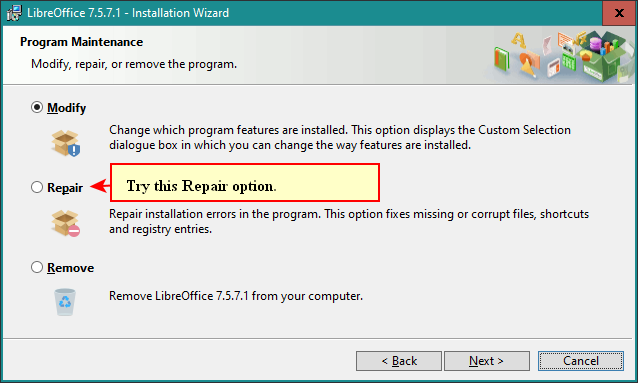
- LibreOffice Repair Option.png (26.45 KiB) Viewed 42695 times
P.S. To test if Repair was successful you might have to reboot your system after the repair and also maybe recreate the shortcuts on your Desktop.
Re: Desktop shortcuts for files no longer work
Posted: Thu Oct 12, 2023 8:39 pm
by RoryOF
I would start by opening the shortcut and verifying that the internal file path pointed to the location of the file. Also verify that Open-/Libre-Office is set as the default file for the filetype(s) in question; don't assume that all is correct because you know/think it ought be.
Re: Desktop shortcuts for files no longer work
Posted: Thu Oct 12, 2023 9:12 pm
by BlebNevus
I confirmed that other desktop shortcuts open correctly. The problem seems to be limited to L.O.
Thanks for the replies.
@RoryOF - Yes, the file paths are correct. And, yes, I confirmed that L.O. is still the default program for these files (as I expected because, after all, it's opening them fine when I access them in my documents folder).
@LastUnicorn - I may resort to the repair you suggest, although I'm wondering how likely it is that L.O. would work fine in every other respect but this. I have a sneaking suspicion that something other than a corruption of L.O. is responsible for this very localized problem. I just wish I could figure out what it is.
Re: Desktop shortcuts for files no longer work
Posted: Thu Oct 12, 2023 10:03 pm
by LastUnicorn
If you right-click on the link on the Desktop and select
Properties does it show in similar fashion to this on the
General Tab:
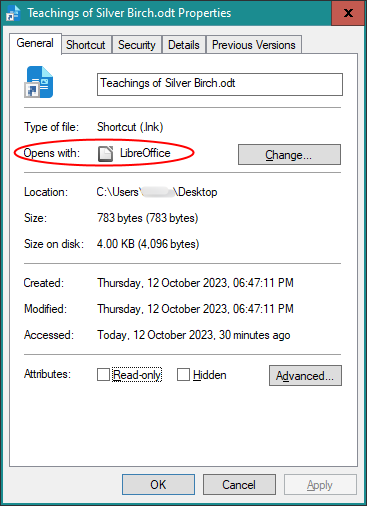
- Link Properties.png (13.09 KiB) Viewed 42643 times
Re: Desktop shortcuts for files no longer work
Posted: Thu Oct 12, 2023 10:11 pm
by BlebNevus
It says "LibreOffice Writer" rather than just "LibreOffice" -- and shows the latest version's new blue icon -- but, basically, yes.
Re: Desktop shortcuts for files no longer work
Posted: Thu Oct 12, 2023 10:33 pm
by LastUnicorn
That
sounds okay to me. If I click on the
Change... Button then it shows this on my system:
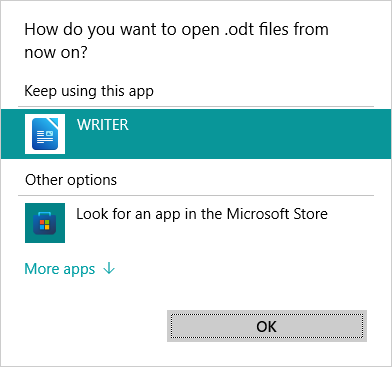
- Link Change.png (8.36 KiB) Viewed 42610 times
I'm wondering why you have the difference on your system. I'm wondering why I have "LibreOffice" and you have "LibreOffice Writer".
I'm also wondering if you make a link to the same document but with the link in a location other than the Desktop does that link fail to work too?
Re: Desktop shortcuts for files no longer work
Posted: Thu Oct 12, 2023 11:00 pm
by BlebNevus
Thanks for pursuing this with me. An update: I'm now seeing that some files aren't opening even when I click on them in their home folder, although most do. It doesn't seem to be due to file type (.doc vs. .docx vs. odt) or to which subfolder it's in, but some files now can't be opened at all. (I say "now" but I can't figure out whether that's been true since I updated LO a couple of days ago or whether the problem is getting worse. At least I know that it isn't just a desktop issue. And I went back to Windows' default program list to confirm that reassigning L.O. as the program for these file types didn't help.
Re: Desktop shortcuts for files no longer work
Posted: Thu Oct 12, 2023 11:16 pm
by BlebNevus
Update: I just closed out of LO and reopened it, and so far the problem seems to have resolved, including the desktop shortcuts. I can't believe that actually fixed it, so I'm holding my breath. If the issue recurs, I'll write back. In the meantime, thanks again for your help.
Re: Desktop shortcuts for files no longer work
Posted: Thu Oct 12, 2023 11:25 pm
by LastUnicorn
I don't understand what you mean by "closed out of LO and reopened it". What does that mean? Do you mean you just shutdown LibreOffice then relaunched it?
P.S. You need to update your forum signature.
Re: Desktop shortcuts for files no longer work
Posted: Thu Oct 12, 2023 11:42 pm
by BlebNevus
Yes, that's what I meant.
Re: [Solved] Desktop shortcuts for files no longer work
Posted: Fri Oct 13, 2023 8:23 am
by Hagar Delest
I have tagged the topic as solved, remove the tag and the green mark if it comes back.
I experience that also but rather rarely. In such case, open the task manager (Ctrl+Shift+Esc) and kill all the soffice.bin processes that appear. There may be one that is preventing all the others to run properly. Killing it (or all) does free the memory and then you can relaunch LO.