Ok I post a lot or urls...
getting drop down menus after the ctrl + shift + V is as bad as the hyperlink dialog box.. and not being able to turn it off in the spellcheck options is sorta sad...
I've been a user for 30 years or so and I never liked the hyperlink dialog box junk..
the issue is a bug to me,, not a feature,,, wysiwyg is all I want,,is this so hard for open office?
from the forums I see ..I am not alone...
this is my only complaint, and it's a big one to me...
epic fail I can't get a wysiwyg.. past without jumping thru hoops..
please give us a way to have/past wysiwyg urls. without all the steps,,
Unexpected result pasting URL copied from Edge
Unexpected result pasting URL copied from Edge
Last edited by MrProgrammer on Sun Oct 01, 2023 6:38 pm, edited 1 time in total.
Reason: Edited topic's subject to identify Edge as the source of the URL on the clipboard
Reason: Edited topic's subject to identify Edge as the source of the URL on the clipboard
OpenOffice 4.1 on windows vista 32 bit
Re: Why won't they fix the url issue,,bug vs feature
What is your goal? I assume you have a url in the copy buffer and you want to paste it into a Writer document. Do you want to avoid it being formatted as a link? That is an option under Tools -> AutoCorrect Options -> Options tab. Do you want to paste as unformatted text? The shortcut is Ctrl + Shift + Alt + V.
OpenOffice 4.1 on Windows 10 and Linux Mint
If your question is answered, please go to your first post, select the Edit button, and add [Solved] to the beginning of the title.
If your question is answered, please go to your first post, select the Edit button, and add [Solved] to the beginning of the title.
Re: Why won't they fix the url issue,,bug vs feature
I'm not following what you're asking? If the problem is inserting a hyperlink, what steps do you take and from where does it come?
If I select a hyperlink like your username on this page and copy and paste into Writer it appears as the same, a hyperlink, with no other steps required.
If I select a hyperlink like your username on this page and copy and paste into Writer it appears as the same, a hyperlink, with no other steps required.
Windows 10, Openoffice 4.1.11, LibreOffice 7.4.0.3 (x64)
Re: Why won't they fix the url issue,,bug vs feature
If its the same question as here and its not solved you should have continued that thread with another post saying why not?
viewtopic.php?t=109459
viewtopic.php?t=109459
Windows 10, Openoffice 4.1.11, LibreOffice 7.4.0.3 (x64)
Re: Why won't they fix the url issue,,bug vs feature
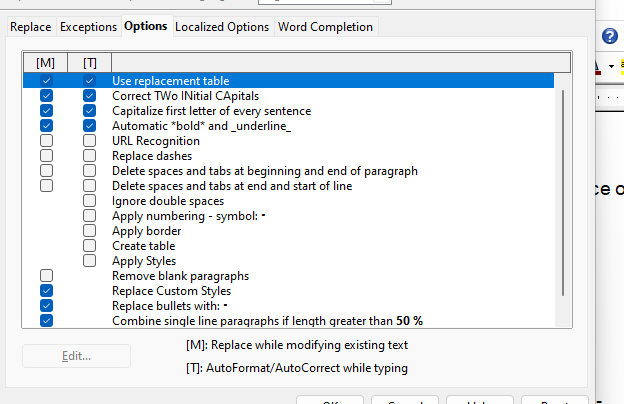
Upload a screen shot of your AutoCorrect options. This has nothing to do with spellcheck options.
AOO 4.1.14 on Ubuntu MATE 22.04
Re: Why won't they fix the url issue,,bug vs feature
What is your goal? I assume you have a url in the copy buffer and you want to paste it into a Writer document. Do you want to avoid it being formatted as a link? That is an option under Tools -> AutoCorrect Options -> Options tab. Do you want to paste as unformatted text? The shortcut is Ctrl + Shift + Alt + V.
[/quote]
sorry but... the auto correct options does not turn off the dialog box. (new computer..win 11 clean install..)
and the short cut ctrl+shift+V is not short when you still get a dialog box asking you "unformatted text. ==html format---or HTML without comments..
the goal is to get a wysiwyg copy and paste urls.. without jumping thru hoops.
respectfully..
[/quote]
sorry but... the auto correct options does not turn off the dialog box. (new computer..win 11 clean install..)
and the short cut ctrl+shift+V is not short when you still get a dialog box asking you "unformatted text. ==html format---or HTML without comments..
the goal is to get a wysiwyg copy and paste urls.. without jumping thru hoops.
respectfully..
OpenOffice 4.1 on windows vista 32 bit

Re: Why won't they fix the url issue,,bug vs feature
If you read FJCC's reply carefully, you'll seejoeoo wrote:and the short cut ctrl+shift+V is not short when you still get a dialog box asking you "unformatted text. ==html format---or HTML without comments
which will directly paste as unformatted text without asking for confirmation.FJCC wrote:The shortcut is Ctrl + Shift + Alt + V.
Slackware 15 (current) 64 bit
Apache OpenOffice 4.1.16
LibreOffice 26.2.2.2; SlackBuild for 26.2.2 by Eric Hameleers
---------------
I hate this damn computer, I wish that I could sell it.
It won't do what I want it to, Only what I tell it.
Apache OpenOffice 4.1.16
LibreOffice 26.2.2.2; SlackBuild for 26.2.2 by Eric Hameleers
---------------
I hate this damn computer, I wish that I could sell it.
It won't do what I want it to, Only what I tell it.
Re: Why won't they fix the url issue,,bug vs feature
unticking the autocorrect URL recognition and using Ctrl + Shift + Alt + V doesn't paste the URL for me either
Here's what I get with the macro recorder
If pasting works as you want it on your other system - you could record the macro for when you press Ctrl + Shift + Alt + V and try using that generated macro on the one where it doesn't work.
It may be a case of changing the 1 in the below line to a different number
args1(0).Value = 1
Here's what I get with the macro recorder
If pasting works as you want it on your other system - you could record the macro for when you press Ctrl + Shift + Alt + V and try using that generated macro on the one where it doesn't work.
It may be a case of changing the 1 in the below line to a different number
args1(0).Value = 1
Code: Select all
sub Main
rem ----------------------------------------------------------------------
rem define variables
dim document   as object
dim dispatcher as object
rem ----------------------------------------------------------------------
rem get access to the document
document   = ThisComponent.CurrentController.Frame
dispatcher = createUnoService("com.sun.star.frame.DispatchHelper")

rem ----------------------------------------------------------------------
dim args1(0) as new com.sun.star.beans.PropertyValue
args1(0).Name = "SelectedFormat"
args1(0).Value = 1

dispatcher.executeDispatch(document, ".uno:ClipboardFormatItems", "", 0, args1())


end sub
Windows 10, Openoffice 4.1.11, LibreOffice 7.4.0.3 (x64)
Re: Why won't they fix the url issue,,bug vs feature
thanks for pointing that out,,,it worked ...but it's buggy ...brings up other menue's more often than I would care for.. my thinking is it's too many key'srobleyd wrote: ↑Wed Aug 23, 2023 1:32 pmIf you read FJCC's reply carefully, you'll seejoeoo wrote:and the short cut ctrl+shift+V is not short when you still get a dialog box asking you "unformatted text. ==html format---or HTML without commentswhich will directly paste as unformatted text without asking for confirmation.FJCC wrote:The shortcut is Ctrl + Shift + Alt + V.
at one time... tried it half a dozen times,,,testing this function, had less than 50% of my Key combination work.. ..other times it either get nothing or brought up the " navigator or view" .. I am sure this is a keyboad buffer issue,,,with open office...and keyboard driver..
buggy...very buggy ..
open office should just let us turn this bug-feature off.....
been a year or so since, I have addressed this issue..
none of the key combinations ever worked on my old thinkpad carbon x1 laptop..zero ..
the key combination is not reliable...and I should not have to change keyboard buffer setting on a new laptop,,
this issue- bug is all over the place in the forums... a simple on-off switch, would clear this up.. but the switch in autocorrect option..does not work..plain and simple.. the key combinations crap... it is a bug ..not a feature...
thanks..
OpenOffice 4.1 on windows vista 32 bit
Re: Why won't they fix the url issue,,bug vs feature
You can change the keyboard shortcut for pasting unformatted text. Select the menu Tools -> Customize and choose the Keyboard tab. Scroll down through the listed shortcuts to Ctrl + Alt + Shift + V and click on it. In the Category list, choose Edit. In the Function list, scroll down to and click on Paste Unformatted Text.You should now see Ctrl + Alt + Shift + V listed in the Keys box. Click Delete. In the list of Shortcut keys, scroll to the key combination you want to use. Let's say Alt + V. Click on that and then on the Modify button. Alt + V will now be shown in the Keys box as assigned to Paste Unformatted Text. Click OK and you are done.
OpenOffice 4.1 on Windows 10 and Linux Mint
If your question is answered, please go to your first post, select the Edit button, and add [Solved] to the beginning of the title.
If your question is answered, please go to your first post, select the Edit button, and add [Solved] to the beginning of the title.
Re: Why won't they fix the url issue,,bug vs feature
Perhaps @joeoo should try LibreOffice and see if it suits better.
Slackware 15 (current) 64 bit
Apache OpenOffice 4.1.16
LibreOffice 26.2.2.2; SlackBuild for 26.2.2 by Eric Hameleers
---------------
I hate this damn computer, I wish that I could sell it.
It won't do what I want it to, Only what I tell it.
Apache OpenOffice 4.1.16
LibreOffice 26.2.2.2; SlackBuild for 26.2.2 by Eric Hameleers
---------------
I hate this damn computer, I wish that I could sell it.
It won't do what I want it to, Only what I tell it.
Re: Why won't they fix the url issue,,bug vs feature
@joeoo: When you copy the links in your Web browser are you highlighting the links? Right-clicking a highlighted link should show options to "Copy" and "Copy link". From my testing with URL Recognition enabled, "Copy" copies the link with formatting and pasting in Writer pastes the link text with formatting. "Copy link" copies the link without formatting and pasting in Writer pastes the URL without formatting. In your original post you said you had to open the Hyperlink dialog and paste the link in the text box on the dialog "so it does not get formatted". This implies to me that you may have used "Copy" instead of "Copy link" in your Web browser.
Note that pasting the link in the text box on the Hyperlink dialog does not produce a non-clickable link.
If this does not help, I suggest that you upload a sample document with two links, one which has not been fixed and one which has been fixed using the method described in your first post on this subject.
Note that pasting the link in the text box on the Hyperlink dialog does not produce a non-clickable link.
If this does not help, I suggest that you upload a sample document with two links, one which has not been fixed and one which has been fixed using the method described in your first post on this subject.
AOO 4.1.14 on Ubuntu MATE 22.04
Re: Why won't they fix the url issue,,bug vs feature
the "copy link" does not come up in either edge or chrome..with a right mouse click .. so??? maybe you have a different set up? new intell I3 HP laptop ,, new / clean install win11Bill wrote: ↑Thu Aug 24, 2023 11:45 pm @joeoo: When you copy the links in your Web browser are you highlighting the links? Right-clicking a highlighted link should show options to "Copy" and "Copy link". From my testing with URL Recognition enabled, "Copy" copies the link with formatting and pasting in Writer pastes the link text with formatting. "Copy link" copies the link without formatting and pasting in Writer pastes the URL without formatting. In your original post you said you had to open the Hyperlink dialog and paste the link in the text box on the dialog "so it does not get formatted". This implies to me that you may have used "Copy" instead of "Copy link" in your Web browser.
Note that pasting the link in the text box on the Hyperlink dialog does not produce a non-clickable link.
If this does not help, I suggest that you upload a sample document with two links, one which has not been fixed and one which has been fixed using the method described in your first post on this su??
so you just lost me here...
Note that pasting the link in the text box on the Hyperlink dialog does not produce a non-clickable link.
look ...this is not my first rodeo with the issue...
I want to turn off the formatting Open office does to urls.. a simple WYSIWYG... the switch in the tools auto-correct options does not give you a WYSIWYG past. key combo buffers stopped the ctrl+shift+alt+v... the ctrl+shift+V brings up a dialog box.. asking what kind of paste you want.
I guess I will try to assign new key command.. and try that..
but open office should fix tis bug.,... it's not a feature...
OpenOffice 4.1 on windows vista 32 bit
Re: Why won't they fix the url issue,,bug vs feature
they have the same issue ..last I checked..
so I've been using open office,, pretty much from it's inception, use to be sun.- oracle star office ... back then,,
the fork seems to be fine.. just used OO so long now..
I haven't kept up with LibreOffice since I downsized my computer farm..
I used to write a little open source back then..
OpenOffice 4.1 on windows vista 32 bit
Re: Why won't they fix the url issue,,bug vs feature
Apparently Microsoft has changed the copy and paste of URLs from the Address Bar in Edge. They are now copied and pasted as a hyperlinked title instead of a URL. This may be why you're having the problem. Try changing the default behavior in Edge.
Improved copy and paste of URLs in Microsoft Edge
[Solved] How to paste a text url into Apache OpenOffice Writer?
AOO 4.1.14 on Ubuntu MATE 22.04
Re: Why won't they fix the url issue,,bug vs feature
A new key command won't help. OpenOffice formatting is not the problem. You keep saying that you want a WYSIWYG paste, but that's exactly what you are getting. Copying from the Address Bar in Edge or Chrome in Windows copies a hyperlinked title instead of the URL. Pasting in Writer pastes the hyperlinked title, not the URL. Pasting using Ctrl-Alt-Shift-V doesn't help because the title is still pasted, not the URL. The only option I see that might work is to change the default copy behavior in Edge and Chrome so they copy the URL instead of the hyperlinked title. This is not a bug in OpenOffice.joeoo wrote: ↑Fri Aug 25, 2023 8:34 am I want to turn off the formatting Open office does to urls.. a simple WYSIWYG... the switch in the tools auto-correct options does not give you a WYSIWYG past. key combo buffers stopped the ctrl+shift+alt+v... the ctrl+shift+V brings up a dialog box.. asking what kind of paste you want.
I guess I will try to assign new key command.. and try that..
but open office should fix tis bug.,... it's not a feature...
AOO 4.1.14 on Ubuntu MATE 22.04
Re: Why won't they fix the url issue,,bug vs feature
I'm confused by this thread, particularly with Bill's last two posts, and whether you want the underlying url to be pasted or the label?
If its the url, I wrote a simple macro to examine the html snippet on the system clipboard, if there is one, and insert that.
There are likely bugs though, including when character codes are out of the range it can handle. But I may as well post it anyway.
Also in the attached document.
If its the url, I wrote a simple macro to examine the html snippet on the system clipboard, if there is one, and insert that.
There are likely bugs though, including when character codes are out of the range it can handle. But I may as well post it anyway.
Also in the attached document.
Code: Select all
	REM  *****  BASIC  *****

Sub InsertPlainURL
	dim cl,a,k,st as string,a1,b1,vc,jj as long
	cl= createunoservice("com.sun.star.datatransfer.clipboard.SystemClipboard"
	a = cl.getcontents.getTransferDataFlavors()

	for k = 0 to ubound(a)
		with a(k)
			if  .HumanPresentableName = "HTML Format" then
				n= cl.getcontents.getTransferData(a(k))
				on error resume next
				for k = 0 to ubound(n)
					jj = n(k)
					st = st & chr(jj)
				next

				a1 = instr(1, st,"href=" & chr(34))

				if a1 then
					b1 = instr(a1+7,st, chr(34))

					if b1 then
						vc =thiscomponent.currentcontroller.viewcursor
						vc.string =  mid(st,a1 +6,b1-a1 - 6)
						vc.collapsetoend
					end if
				end if
			end if

		end with
	next
End Sub
- Attachments
-
- url.odt
- (12.3 KiB) Downloaded 112 times
Windows 10, Openoffice 4.1.11, LibreOffice 7.4.0.3 (x64)
Re: Why won't they fix the url issue,,bug vs feature
That's why I suggested that Joeoo upload a sample file. A sample file would answer that quickly. Without a sample file I can only guess from the clues posted. Joeoo's statement that there was no "copy link" option when right-clicking the link only makes sense when right-clicking in the address bar. All other links on Web pages should have the "copy link" option. Joeoo also stated "the goal is to get a wysiwyg copy and paste urls..". That will only happen if the URL itself has been copied. It won't happen if the hyperlinked title has been copied.
AOO 4.1.14 on Ubuntu MATE 22.04
Re: Why won't they fix the url issue,,bug vs feature
If is a hyperlink with the label made the same as the underlying URL - then I made a slight mod to my above post which does that. Like I say, won't work with all URLs.
Code: Select all
	REM  *****  BASIC  *****

Sub InsertPlainURL
	dim cl,a,k,st as string,a1,b1,vc,jj as long,newst as string
	cl= createunoservice("com.sun.star.datatransfer.clipboard.SystemClipboard"
	a = cl.getcontents.getTransferDataFlavors()

	for k = 0 to ubound(a)
		with a(k)
			if  .HumanPresentableName = "HTML Format" then
				n= cl.getcontents.getTransferData(a(k))
				on error resume next
				for k = 0 to ubound(n)
					jj = n(k)
					st = st & chr(jj)
				next

				a1 = instr(1, st,"href=" & chr(34))

				if a1 then
					b1 = instr(a1+7,st, chr(34))

					if b1 then
						vc =thiscomponent.currentcontroller.viewcursor
						newst = mid(st,a1 +6,b1-a1 - 6)
						vc.string = newst
						vc.hyperlinkurl =newst
						vc.collapsetoend
					end if
				end if
			end if

		end with
	next
End Sub
- Attachments
-
- url2.odt
- (12.49 KiB) Downloaded 108 times
Windows 10, Openoffice 4.1.11, LibreOffice 7.4.0.3 (x64)
Re: Why won't they fix the url issue,,bug vs feature
If its just take a plain text string off the clipboard which is in the form of a url and insert a hyperlink into Writer with that text string as the hyperlink URL and hyperlink label, that's easier.
Code: Select all
	REM  *****  BASIC  *****

Sub InsertHyperlinkFromTextURL
	dim cl,a,k,vc,n
	cl= createunoservice("com.sun.star.datatransfer.clipboard.SystemClipboard"
	a = cl.getcontents.getTransferDataFlavors()
	for k = 0 to ubound(a)
		with a(k)
			if  .HumanPresentableName = "Unicode-Text" then
				n= cl.getcontents.getTransferData(a(k))
				vc =thiscomponent.currentcontroller.viewcursor
				vc.string = n
				vc.hyperlinkurl =n
				vc.collapsetoend
				exit for
			end if
		end with
	next
End Sub
- Attachments
-
- url3.odt
- (12.21 KiB) Downloaded 103 times
Windows 10, Openoffice 4.1.11, LibreOffice 7.4.0.3 (x64)
Re: Why won't they fix the url issue,,bug vs feature
the problem is with writer ..not the browser,,, browsers can copy and past urls as WYSIWYG elsewhere,, I do it every day..Bill wrote: ↑Fri Aug 25, 2023 6:47 pmA new key command won't help. OpenOffice formatting is not the problem. You keep saying that you want a WYSIWYG paste, but that's exactly what you are getting. Copying from the Address Bar in Edge or Chrome in Windows copies a hyperlinked title instead of the URL. Pasting in Writer pastes the hyperlinked title, not the URL. Pasting using Ctrl-Alt-Shift-V doesn't help because the title is still pasted, not the URL. The only option I see that might work is to change the default copy behavior in Edge and Chrome so they copy the URL instead of the hyperlinked title. This is not a bug in OpenOffice.joeoo wrote: ↑Fri Aug 25, 2023 8:34 am I want to turn off the formatting Open office does to urls.. a simple WYSIWYG... the switch in the tools auto-correct options does not give you a WYSIWYG past. key combo buffers stopped the ctrl+shift+alt+v... the ctrl+shift+V brings up a dialog box.. asking what kind of paste you want.
I guess I will try to assign new key command.. and try that..
but open office should fix tis bug.,... it's not a feature...
OpenOffice 4.1 on windows vista 32 bit
Re: Why won't they fix the url issue,,bug vs feature
I installed Edge and Writer has no problems at all with the URLs copied from Edge, Chromium or Firefox. At this point, I have no ideas about why you are having problems or exactly what the problems are. If you upload a sample document with bad links and links you have fixed, I'll look at it. Otherwise, I think I'm done with this problem.
AOO 4.1.14 on Ubuntu MATE 22.04
Re: Why won't they fix the url issue,,bug vs feature
Dear bill, I'm sorry you feel I am uncooperative,
I thought the issue was explained in detail, maybe I was wrong .
I will do my best.. as this issue is nothing new with OO writer.
1.the switch in auto correct does not turn url recognition off, url's either need to be entered thru the hyperlink text box, taking extra steps .
2. the key combo of ctrl + shift + alt+V has a 25% chance of working for me
the ctrl + shift + V works but brings up a dialog box, that I have to select, the type of paste I want, those 3 selections are "unformated text" "HTML format" and "HTML format without comment" , these extra keystrokes /selections are irritating when all you want is a WYSIWYG.
3 WYSIWYG = having a url like "https://www.google.com"/ in the clipboard buffer and pasting to OO writer will give you "Google" and not "https://www.google.com/ " having to use some magic keyboard combo is ..well silly..and slow down productivity.
"note:the url in my keyboard buffer posted to this forum and works just fine, as you can see.. I can past that url anywhere but OO writer, where it comes out Google ,,, unless I do voodoo magic, key combo or hyperlink text dialog paste.
4. this issue is nothing new, I have had several different hardware platforms over the years that, I found, I had to use the hypertext dialog text input. always seeming to have issues with key combo's.
above you will find a screen shot image of the auto correct options unchecked for urls.
I don't know what other images I can provide that would be useful to help solve this issue.
I paste a lot of url's ..and that's why this issue has always bugged me...
I want to turn off url recognition and be able to paste. what's in the buffer to OO writer, without any steps at all.. no dialogs no key combo's..
just a simple WYSIWYG paste..example https://www.google.com/ not Google.
this is why I say, It's a bug and not a feature.
hope this clarifies the issue...
Respectfully.
I thought the issue was explained in detail, maybe I was wrong .
I will do my best.. as this issue is nothing new with OO writer.
1.the switch in auto correct does not turn url recognition off, url's either need to be entered thru the hyperlink text box, taking extra steps .
2. the key combo of ctrl + shift + alt+V has a 25% chance of working for me
the ctrl + shift + V works but brings up a dialog box, that I have to select, the type of paste I want, those 3 selections are "unformated text" "HTML format" and "HTML format without comment" , these extra keystrokes /selections are irritating when all you want is a WYSIWYG.
3 WYSIWYG = having a url like "https://www.google.com"/ in the clipboard buffer and pasting to OO writer will give you "Google" and not "https://www.google.com/ " having to use some magic keyboard combo is ..well silly..and slow down productivity.
"note:the url in my keyboard buffer posted to this forum and works just fine, as you can see.. I can past that url anywhere but OO writer, where it comes out Google ,,, unless I do voodoo magic, key combo or hyperlink text dialog paste.
4. this issue is nothing new, I have had several different hardware platforms over the years that, I found, I had to use the hypertext dialog text input. always seeming to have issues with key combo's.
above you will find a screen shot image of the auto correct options unchecked for urls.
I don't know what other images I can provide that would be useful to help solve this issue.
I paste a lot of url's ..and that's why this issue has always bugged me...
I want to turn off url recognition and be able to paste. what's in the buffer to OO writer, without any steps at all.. no dialogs no key combo's..
just a simple WYSIWYG paste..example https://www.google.com/ not Google.
this is why I say, It's a bug and not a feature.
hope this clarifies the issue...
Respectfully.
OpenOffice 4.1 on windows vista 32 bit
Re: Why won't they fix the url issue,,bug vs feature
You're copying something on to the clipboard from an html page (or what?):
Is it a) a hyperlink with the label "Google" and the URL for it that's in your last post which you copied?
Or b) is it the URL as plain text that you're copying?
I think I now get that you want Writer to insert a hyperlink with "Google" as the label the same as if you clicked on insert menu/hyperlink and put the URL and label in via that dialog. (or is that wrong?)
Is it a) a hyperlink with the label "Google" and the URL for it that's in your last post which you copied?
Or b) is it the URL as plain text that you're copying?
I think I now get that you want Writer to insert a hyperlink with "Google" as the label the same as if you clicked on insert menu/hyperlink and put the URL and label in via that dialog. (or is that wrong?)
Last edited by JeJe on Sat Aug 26, 2023 2:33 pm, edited 1 time in total.
Windows 10, Openoffice 4.1.11, LibreOffice 7.4.0.3 (x64)
Re: Why won't they fix the url issue,,bug vs feature
I've attached a document with a hyperlink made via the insert menu/hyperlink. Is that the result you want?
If not, how about posting what you do want in a document?
If not, how about posting what you do want in a document?
- Attachments
-
- result.odt
- (8.79 KiB) Downloaded 117 times
Windows 10, Openoffice 4.1.11, LibreOffice 7.4.0.3 (x64)
Re: Why won't they fix the url issue,,bug vs feature
If pasting in Writer gives you "Google" instead of the URL, that's a clear indication that you have both the link title "Google" and the link URL "https://www.google.com" in the clipboard, not just the link URL. That's what Microsoft calls a hyperlinked title in their description of how copying of URLs works in Edge. With URL Recognition on, if the clipboard contains the link title and the link URL when a link is pasted in Writer, the link URL is put in the Target box on the Hyperlink dialog and the link title is put in the Text box on the Hyperlink dialog. What is in the Text box is what is displayed in the document. That is how it's supposed to work. It's not a bug. If you want the URL to be put in the Text box and displayed in the document then you have to make Edge stop copying the URL as a hyperlinked title and make it copy the URL as plain text. Read the instructions in the link I posted earlier.joeoo wrote: ↑Sat Aug 26, 2023 1:34 pm 3 WYSIWYG = having a url like "https://www.google.com"/ in the clipboard buffer and pasting to OO writer will give you "Google" and not "https://www.google.com/ " having to use some magic keyboard combo is ..well silly..and slow down productivity.
Regarding the keyboard shortcut to paste unformatted text, it will paste the link title if the link title and link URL are in the clipboard. Pasting as unformatted text is not a solution. The solution is to make sure the clipboard does not contain the link title.
AOO 4.1.14 on Ubuntu MATE 22.04
Re: Why won't they fix the url issue, bug vs feature
Regarding the keyboard shortcut "Ctrl-Shift-V", Microsoft says to use Ctrl-Shift-V to paste the URL as an address instead of as hyperlinked Text. This may not be working in AOO and LO because it conflicts with their usage of Ctrl-Shift-V to open the Paste Special dialog. I don't use Windows, so I can't test this.
AOO 4.1.14 on Ubuntu MATE 22.04
-
Hagar Delest

- Moderator
- Posts: 33614
- Joined: Sun Oct 07, 2007 9:07 pm
- Location: France
Re: Why won't they fix the url issue,,bug vs feature
If I understand correctly, you don't want the url to become a hyperlink, correct?
If so, the autocorrect change turning an url into a hyperlink is the default behavior most users want. So just because very few users don't like it doesn't mean that the devs should bother such request. That would make additional code for very low UX improvement at all. Once the setting is changed in the options, you're done.
I have never seen AOO/LO turn https://www.google.com/ into Google when pasting the url (it can if you copy the text Google in a page, when Google is a hyperlink itself).
Note: I tried Ctrl+Shift+V in MS Word and it does nothing at all (Windows 10).
| Edit: I tested that with Brave, I think that the following answers explain well enough Edge feature. |
LibreOffice 25.2 on Linux Mint Debian Edition (LMDE 7 Gigi) and 25.2 portable on Windows 11.
Re: Why won't they fix the url issue, bug vs feature
People here might find this page interesting - it gives the parts of the URL according to the OO Api,
https://www.openoffice.org/api/docs/com ... l/URL.html
The OP appears to want part of the server to be presented for Google. "Google" on its own doesn't appear in any of the fields of the URL struct. The "path" for it is empty.
https://www.openoffice.org/api/docs/com ... l/URL.html
The OP appears to want part of the server to be presented for Google. "Google" on its own doesn't appear in any of the fields of the URL struct. The "path" for it is empty.
Code: Select all
dim url as new com.sun.star.util.URL
url.complete ="https://www.google.com/"
ts =createunoservice("com.sun.star.util.URLTransformer")
ts.parsestrict(url)
mri url

'gives
'Arguments     string            ""
'Complete      string            https://www.goo...
'Main          string            https://www.goo...
'Mark          string            ""
'Name          string            ""
'Password      string            ""
'Path          string            ""
'Port          short             0
'Protocol      string            https://
'Server        string            www.google.com
'User          string            ""
'
Windows 10, Openoffice 4.1.11, LibreOffice 7.4.0.3 (x64)
Re: Why won't they fix the url issue,,bug vs feature
It's my understanding that Edge in Windows 10/11 is copying Google to the clipboard, then Google gets pasted in Writer. This is a feature of Edge in Windows but not Edge in Linux.Hagar Delest wrote: ↑Mon Aug 28, 2023 1:51 pm If I understand correctly, you don't want the url to become a hyperlink, correct?
Copy the URL from the address bar in Edge in Windows, then paste it in Writer. Does it paste https://www.google.com/ or does it paste Google.
AOO 4.1.14 on Ubuntu MATE 22.04