Page 1 of 1
[Solved] Word document per default
Posted: Thu Dec 01, 2022 7:58 pm
by paul1509
Hi all,
the openoffice register all files under the format pages.
I need to use per default word document so that to avoid to export each time a new document in word.
any solution?
Re: Word document per default
Posted: Thu Dec 01, 2022 8:30 pm
by Zizi64
Please try to give us some more details about your problem.
Re: Word document per default
Posted: Thu Dec 01, 2022 8:33 pm
by paul1509
I just need to use per default word (doc) document when registering documents and not pages as most of my counterparts use word file. I want to avoid to manually export document under word format each time
Re: Word document per default
Posted: Thu Dec 01, 2022 8:47 pm
by RoryOF
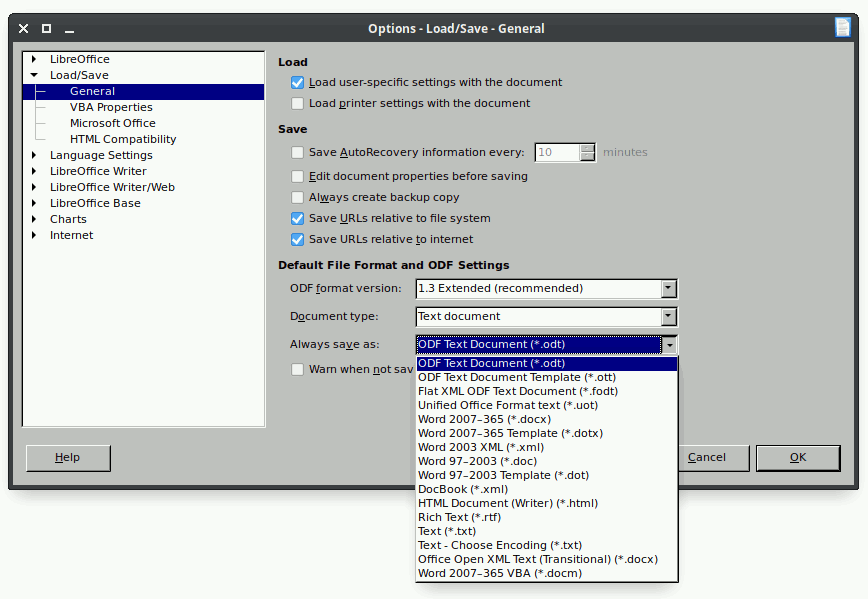
/Tools /Options /Load-Save /General and change the setting in "Always Save As".
Re: Word document per default
Posted: Thu Dec 01, 2022 8:53 pm
by paul1509
I don't have this menu in my version of openoffice
Re: Word document per default
Posted: Thu Dec 01, 2022 8:55 pm
by RoryOF
Options on a Mac is under Preferences.
Re: Word document per default
Posted: Thu Dec 01, 2022 9:05 pm
by paul1509
i searched in the preferences but i don't have these options under preferences as well
Re: Word document per default
Posted: Thu Dec 01, 2022 10:45 pm
by Hagar Delest
Don't you have this dialog (from LibreOffice but same for Apache OpenOffice)?
- Save.png (34.16 KiB) Viewed 6063 times
Do you really use Apache OpenOffice? What version? 4.1.13? Your signature is not quite right (openoffice 12).
Note: if you have to work in .doc, then stick to MS Word. You may experience glitches with the import/export filter that would ruin your experience with Apache OpenOffice. LibreOffice offers a better filter (but in this case use .docx since .doc is quite deprecated), but won't replicate exactly the .docx rendering.
Please add
[Solved] at the beginning of the title in your
first post (top of the topic) with the
🖉 button if your issue has been fixed.
Re: Word document per default
Posted: Thu Dec 01, 2022 10:54 pm
by RoryOF
He's on a Mac, Hagar.
Re: Word document per default
Posted: Fri Dec 02, 2022 9:24 am
by keme
A (not recommended) procedure for MacOS, to set default save format for new documents to "Word file" in Writer:
- Find Preferences on the application menu (that is the first menu to the right of the apple icon, labeled OpenOffice or Writer).
- Expand Load/Save branch in the left pane, and select General.
You should see this:

- Skjermbilde 2022-12-02 kl. 08.03.40.jpg (91.15 KiB) Viewed 6018 times
Note that using a storage format which is not native to the application, is likely to lead to problems. Pagination, lists, precise spacing, are recurring sources of trouble when using Word storage formats in Writer. MS Word does support the odt format.
If this is not what you asked for, see answer from MrProgrammer. He provided links for "everything" else.
Re: Word document per default
Posted: Fri Dec 02, 2022 11:07 am
by paul1509
thank you guys for your support appreciated.
these options don't exist under open office, but they exist with libre office
i downloaded libre office and use it as default software, it seems far better than open office, and I found all these set up
thanks
Re: [Solved] Word document per default
Posted: Fri Dec 02, 2022 12:00 pm
by Hagar Delest
Well, I don't see what's wrong with my screenshot since OP told that he went to the Preferences dialog. The Always save as field is the same in both applications (agreed, not exactly at the same location).
Anyway, be aware that the use of .doc or .docx (the latter with LibreOffice) is at your own risk. They are not the native file format for AOO/LO, hence, each import/export operation may add some glitches in the documents since the features are not all identical.
Re: [Solved] Word document per default
Posted: Fri Dec 02, 2022 12:04 pm
by RoryOF
It may be that a user will find the menu rearrangements or the onscreen displays of LibreOffice irksome, and prefer to remain with OpenOffice.
Re: [Solved] Word document per default
Posted: Fri Dec 02, 2022 2:31 pm
by John_Ha
Read
[Tutorial] Differences between Microsoft and AOO/LO files for a description of differences and for why you should always work in, and save Writer files as .odt, Calc files as .ods, Impress files as .odp, etc.