Page 1 of 1
[Solved] Keyboard shortcuts to enter Greek letters
Posted: Thu Apr 01, 2021 8:36 am
by ThylacineP
Hi,
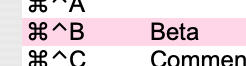
I'm using macros to create keyboard shortcuts on a mac and I'm very embarrassed to ask this question, but how do I perform the following keystroke (attached screenshot)?
- image.png (10.32 KiB) Viewed 14989 times
I assumed it was command+control+b
But that is not working.
I have assigned this symbol to another shortcut (command+b) and the macro does work, but I would to use the above shortcut as I can then do the whole greek alphabet easily, without erasing default shortcuts.
Thanks heaps and sorry for such a silly question,
| Edit: Attachment removed and image added inline [robleyd, mod] |
Re: Macros and Keyboard shortcuts
Posted: Thu Apr 01, 2021 3:24 pm
by Villeroy
Hold Ctrl and Cmd with 2 fingers of the left hand, then hit the b with a finger of the right hand.
I don't own a Mac and refer to this picture:
https://store.storeimages.cdn-apple.com ... 6943580215
Re: Macros and Keyboard shortcuts
Posted: Thu Apr 01, 2021 4:51 pm
by MrProgrammer
ThylacineP wrote:I assumed it was command+control+b [but] that is not working.
[Issue] Control key not recognized on MacOS
Q13: How do I type accented characters (é, ö, ñ, ç etc.) on a Mac?
Q14: How do I enter untypeable characters (Unicode) on a Mac?
You can use → System Preferences → Keyboard → Input Sources to add Greek (use the +). Then enable Show Input Menu in Menu Bar so you can switch to the Greek keyboard when you want to enter those characters.
ThylacineP wrote:I'm very embarrassed to ask this question, …
No, it's a good question. Others have asked about it previously.
Issue 92094 is not easy to find in the Bugzilla database since it doesn't quite match your problem, but I believe it means that you cannot rely on using the Control key shortcuts in the Tools → Customize → Keyboard dialog. That is my experience.
If this solved your problem please go to your first post use the Edit button and add [Solved] to the start of the subject field. Select the green checkmark icon at the same time.
Re: Macros and Keyboard shortcuts
Posted: Thu Apr 01, 2021 6:27 pm
by Bill
ThylacineP wrote:I assumed it was command+control+b
But that is not working.
Did you assign the macro to the keyboard shortcut Control-Command-B or is that what you're trying to do? I don't have a Mac, so I don't know if the Control-Command-B shortcut is listed on the Customize dialog in OpenOffice. If it isn't listed, then I don't know how it could be assigned to anything.
Re: Macros and Keyboard shortcuts
Posted: Fri Apr 02, 2021 3:18 am
by ThylacineP
@ΜrProgrammer thank you so much, such an easy solution to my problem.
