Page 1 of 1
[Solved] Second language spelling module will not activate
Posted: Tue Sep 29, 2020 12:02 am
by DandZS
I have had recurring problems with the second language module loading. In this case, Spanish. I use English as the default language.
I finished a document that I started a couple of weeks ago in Spanish without any problem. I loaded a new document and although Extension Manger shows that Spanish is installed (I tried installing another dictionary as well), only English is available in the languages available for selection, paragraph or all text.
I have gone through all of the steps outlined in the other similar posts, ie. deleting the user profile, restarting OO, etc. but to no avail.
I then tried typing some spanish text in the document, and that brought up Portuguese as an option. So I loaded a couple of paragraphs of the spanish document in the page, and then spanish became available as an option.
Where to from here?
Re: Second language spelling module will not activate.
Posted: Tue Sep 29, 2020 12:17 am
by Villeroy
Spell checking is not a global option. It is not even a per-document option. You can format paragraphs, table cells and evern smaller text snippets as Spanish, English, Chinese or whatever. If the respective spell-check module is installed, it will be used for the corresponding text snippet. There is even a "[None]" language which disables any spell checking for the snippet that has been formatted with this language attribute. This way you can create multi-lingual documents.
See
recent topic.
Re: Second language spelling module will not activate.
Posted: Tue Sep 29, 2020 1:28 am
by DandZS
I think that you missed the topic.
Re: Second language spelling module will not activate.
Posted: Tue Sep 29, 2020 2:16 am
by Bill
When you start a new document, Tools > Language and the Language in the Status bar only show the User Interface language, the Locale language and the Default language for documents. You have all set to English, so you only see English, but you can select "More" to select other languages. The other language will then be added to the choices in Tools > Language and the Language setting in the Status bar.
Re: Second language spelling module will not activate.
Posted: Tue Sep 29, 2020 7:39 am
by Zizi64
Your signature is:
OOo 3.0.X on Ms Windows XP
Please update your signature in your user profile in this forum.
(if your problem is related to a bug, then we must know the program version and the environment properties.)
Re: Second language spelling module will not activate.
Posted: Tue Sep 29, 2020 7:43 am
by Zizi64
I loaded a new document and although Extension Manger shows that Spanish is installed (I tried installing another dictionary as well), only English is available in the languages available for selection, paragraph or all text.
Have you tried to modify the language in a Paragraph Style (for example in the Default one)?
Can you upload a screenshot about the part of the software where the "only English" item was appeared?
Re: Second language spelling module will not activate.
Posted: Tue Sep 29, 2020 8:00 am
by Hagar Delest
Have you tried that one?
[Tutorial] Spell check and Language configuration?
Please add
[Solved] at the beginning of the title in your
first post (top of the topic) with the
*EDIT button if your issue has been fixed.
Re: Second language spelling module will not activate.
Posted: Tue Sep 29, 2020 5:31 pm
by DandZS
Bill wrote:When you start a new document, Tools > Language and the Language in the Status bar only show the User Interface language, the Locale language and the Default language for documents. You have all set to English, so you only see English, but you can select "More" to select other languages. The other language will then be added to the choices in Tools > Language and the Language setting in the Status bar.
This is where I have been trying to change things. I had not seen the tutorial
spell check and language configuration that brought me to the format/character. I have not had time to check out the paragraph style.
I see that the first post assumed that I understood these things, so I did not understand his direction.
I realize that I did not follow through on the Tools/language/more, thinking that that was simply for adding new modules, not selecting the language that I wanted to use from installed modules. Since I had already installed the module.
The only matter that I have my doubts about is the adding spelling modules.
As you see in the attachments, I have English and Spanish modules installed. Yet the Spanish module is Chile. However, the only option that I am given is Spanish-Spain.
It is no big problem, it works, but I wonder why I cannot load the other one.
Thank you all for your time and patience. Very much appreciated.
Re: Second language spelling module will not activate.
Posted: Tue Sep 29, 2020 7:55 pm
by Bill
Your screen shot shows no dictionaries for any Latin American country. You probably installed the dictionary that is for Español (España) which only has a dictionary for Spain. There is another extension that has dictionaries for Spain and Latin American countries. Also, each Latin American country has a separate dictionary. To find the other Spanish dictionaries on the Extensions site, set the "Dictionary" tag and search for "Español" on the Search Extensions page. Searching for "Spanish" doesn't work.
Re: Second language spelling module will not activate.
Posted: Wed Sep 30, 2020 2:33 am
by Bill
After looking at your two screen shots again, they seem to be in disagreement. The first screen shot shows the extension for Spanish (Chile) to be installed but not the extension for Spanish (Spain). However the second screen shot shows just the opposite. The second screen shot should have the ABC check mark by Spanish (Chile) and not by Spanish (Spain). I cannot duplicate what your screen shots show. See my screen shots:
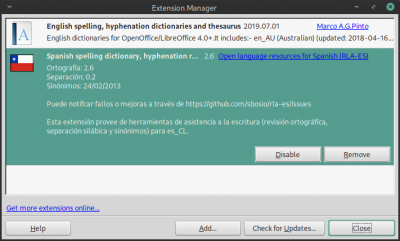
- Extension Manager
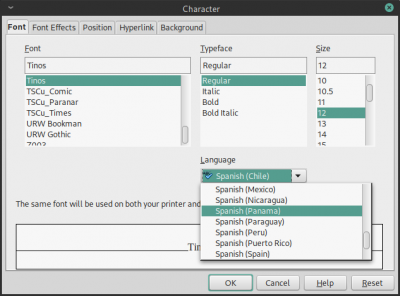
- Character dialog
At this point, the only thing I can suggest is to reset your user profile to remove any corruption of the language settings. The new user profile will only have the default English dictionary, so you will need to reinstall the Spanish (Chile) dictionary. After installing the Spanish (Chile) dictionary, select Tools > Language > For all Text > More to open the Languages dialog and change the default Western language to Spanish (Chile). After that your screen shots should match mine.
Re: Second language spelling module will not activate.
Posted: Wed Sep 30, 2020 8:01 am
by Hagar Delest
You can have this if you've deactivated the Hunspell entry in the options. Make sure there is a check mark for the Hunspell dic (Edit button of the Writing Aids options):
Re: Second language spelling module will not activate.
Posted: Wed Sep 30, 2020 11:01 am
by Bill
Hagar Delest wrote:You can have this if you've deactivated the Hunspell entry in the options. Make sure there is a check mark for the Hunspell dic (Edit button of the Writing Aids options):
Spellcheck_options.png
That's a possible explanation only if the Spanish (Chile) and Spanish (Spain) dictionary extensions are both installed, but the OP's screen shot of the Extension Manager does not show Spanish (Spain) installed.
Individual languages can be deactivated even if the Hunspell SpellChecker option is checked. To reactivate all installed languages, click the Hunspell SpellChecker option on Writing Aids to deactivate them all, then click again to reactivate them all. Use the edit button if you want to reactivate languages one at a time.
Re: Second language spelling module will not activate.
Posted: Thu Oct 01, 2020 6:57 pm
by DandZS
I had reset the user profile, but apparently made the screen shot before, because it now has the Chile Spanish checked, not Spain.
Again, thank you all so much for your input and patience.
