Page 1 of 1
[Solved] How to create a Venn Diagram in OOo
Posted: Tue Feb 11, 2020 3:44 pm
by MrOffice
I want to create a coloured venn diagram. When I intersect two circular shapes the colour is not correct.
I created a red circular shape and a green one with 50 % transparency each. The intersected area has a brown colour.
How can I make the intersected area a yellow colour? Or alternatively green colour when mixing red and yellow.
Thank you.
Re: How to create a Venn Diagram in OOo
Posted: Tue Feb 11, 2020 5:43 pm
by John_Ha
It doesn't work like that.
| Edit: I used blue not green in my example |
See
Merging, subtracting, or intersecting shapes in the Draw Guide where you create a blue shape, create a red shape and create an "intersection of both" shape which you colour yellow.
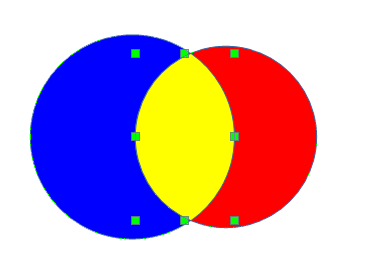
- Three shapes: blue, red and yellow.
Note the yellow shape has been selected. - Clipboard03.png (10.47 KiB) Viewed 6695 times
1 Create both shapes
2 Create intersection shape
3 Set intersection shape to yellow
4 Copy intersection shape
5 Undo till you get the two original shapes
6 Paste the yellow intersection shape. It appears in front in
exactly the correct position.
Showing that a problem has been solved helps others searching so, if your problem is now solved, please view your
first post in this thread and click the Edit button (top right in the post) and add [Solved] in front of the subject.
Re: How to create a Venn Diagram in OOo
Posted: Tue Feb 11, 2020 5:52 pm
by Lupp
(Both circles assumed as "transparent 50%".)
You surely noticed that the colour shown in the area of intersection depends on the Z-order you set. Having brought to front the green circle ("green" with (R,G,B)=(0,255,0)) you don't get a lighter green or whatever colour, but something darker but still in the green range. The red circle brought to front you get a rather dark colour again, but somehow red.
Why darker? Any partial transparency leaves a partial intransparency, too. Intransparent colour will filter the colour of the background treated like "shining sun" (255,255,255) by suppressing parts of it. That's the subtractive way of combining colours.
With different words: Your expectation you would get an additive composition without any influence of te background was wrong.
Re: How to create a Venn Diagram in OOo
Posted: Wed Feb 12, 2020 1:07 am
by MrOffice
you are right, haha. I thought there might be a setting to automatically set the colour space. I set it up correctly now. The solution is a combination of @John_Ha and @Lupp.
1 Create both shapes, 0 % transparency
2 Create intersection shape
3 Place intersection on top of shape
4 Set intersection area to background colour of the other shape
5 Set intersection area to 50 % transparency
this gives me a nice mixture in a subtractive colour space! For intersection with 3 areas you would use 33% transparency, of course.
thank you