[Dropped] Corrupted document

Discuss the word processor
Locked
Uuuuuuuuuuuu
Posts: 5
Joined: Sat Apr 12, 2025 6:53 pm

[Dropped] Corrupted document

Post by Uuuuuuuuuuuu »

I have searched but can't find this precise issue - certainly not answered in a way that I could understand.

I've just spent hours writing a very important document, constantly saving so that I would not lose my work in the event of a computer crash.

Of course, my computer just crashed. So I restarted it, and went to open the document.

The icon has changed, and instead of showing the usual icon for .odt files, it is different. This picture shows the difference between the file I was working on (on the left) and the other file I had open at the time, which I was using to copy-paste some passages across. All afternoon, while I was working on it, and saving the file at regular intervals, both files had the same icon.

Image

When I tried to open the file, I was presented with a box telling me to register OpenOffice. This is bizarre, as I've always used OpenOffice on this computer and have never seen that before. Then, I was presented with a box of ASCII Filter Options, which I've also never seen before.

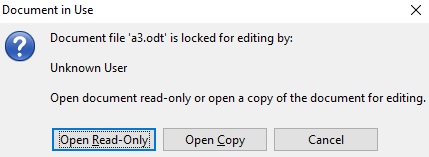
Next, I get this box, which I've also never seen before. Needless to say, I have not locked the file:
Image

On opening the document, it is completely corrupted - all my work has gone, and has been replaced by hundreds of hashtag-type symbols.

Image

The other document that was open at the time - the unimportant one that I was just using to copy-paste stuff - is completely fine.

I have no idea what to do. I've Googled for tutorials on how to repair corrupted files, and they either don't work or I can't understand them. Please could someone explain to me what I need to do to get my work back?

It's absolutely ESSENTIAL that I recover all this work AS SOON AS POSSIBLE. There is no possible way for me to repeat the work that was done, and I don't have time left anyway. It's absolutely vital that I get all this work back, and very very soon. Please help. I have been using OpenOffice for more than a decade and nothing like this has ever happened before. Please, please save me...
Last edited by MrProgrammer on Sat Apr 19, 2025 4:06 pm, edited 1 time in total.
Reason: Dropped: File contains no recoverable data after crash; User has no backups of the file
OpenOffice 4.1.11 on Windows 10
User avatar
LastUnicorn
Posts: 812
Joined: Sat Mar 29, 2008 2:41 am
Location: Scotland

Re: Corrupted document - Please help, urgent

Post by LastUnicorn »

To read for now, someone with more expertise than me will doubtless come by in time: [Tutorial] The Dreaded Pound Signs: file reduced to ####

For future reference you would be best to switch from OpenOffice to LibreOffice. Despite your current trial there are several good reasons for making the switch anyway, some of which are mentioned here: [Tutorial] Considering a Switch from OpenOffice to LibreOffice? Some Useful Information
LibreOffice 25.8.4.2 (x64) installed to Windows 11 Pro. 25H2
Apache OpenOffice Portable 4.1.16 [Portable Apps]
For Java I use Adoptium Temurin JRE LTS Releases.
User avatar
RoryOF
Moderator
Posts: 35210
Joined: Sat Jan 31, 2009 9:30 pm
Location: Ireland

Re: Corrupted document - Please help, urgent

Post by RoryOF »

The repeated ### signs are a certain sign that document is corrupt beyond recovery. You might look in the backup folder to see has it made a backup, or download a recovery utility such as Recuva or PhotoRec and let one of these attempt to find deleted copies of the document.
Apache OpenOffice 4.1.16 on Xubuntu 24.04.4 LTS
Uuuuuuuuuuuu
Posts: 5
Joined: Sat Apr 12, 2025 6:53 pm

Re: Corrupted document - Please help, urgent

Post by Uuuuuuuuuuuu »

The "save a backup" option was unchecked by default. I don't know why. So there is no backup.

I have downloaded and run Recuva, and it is showing no files.

I'm afraid I can't just accept that this is gone - this is hours and hours and hours of very hard work which cannot be repeated. There has to be some way to bring this back. It was saved over and over again, all afternoon, and there was nothing wrong with the document. All that happened is that the computer crashed while a document was open. How could this have destroyed the file? It is simply not an option for me to say "well ok, it's gone." What has happened? It is absolutely vital that I get this work back.
OpenOffice 4.1.11 on Windows 10
User avatar
RoryOF
Moderator
Posts: 35210
Joined: Sat Jan 31, 2009 9:30 pm
Location: Ireland

Re: Corrupted document - Please help, urgent

Post by RoryOF »

There is no way; if you have a previous copy from a Save, use that.
Apache OpenOffice 4.1.16 on Xubuntu 24.04.4 LTS
User avatar
LastUnicorn
Posts: 812
Joined: Sat Mar 29, 2008 2:41 am
Location: Scotland

Re: Corrupted document - Please help, urgent

Post by LastUnicorn »

You emotions are common when this kind of thing happens, it happened to me many, many years ago on an old Atari computer. First comes denial, the stage you are at now, my work must be there 'somewhere'! Then comes grief, when you mourn the reality and inevitability of your situation. Then comes acceptance, this takes time. But, at the end of all that, comes learning — you vow with all your power to do your utmost to avoid this kind of thing happening again. You can't outright guarantee that it will never happen again but you can at least try to minimise the impact if it ever does.The learning part is worth its weight in gold. Just remember that you have to go through the denial and grief and land at acceptance to get there.

For your future use give TimeStampBackup a try.
Last edited by LastUnicorn on Sat Apr 12, 2025 8:54 pm, edited 2 times in total.
LibreOffice 25.8.4.2 (x64) installed to Windows 11 Pro. 25H2
Apache OpenOffice Portable 4.1.16 [Portable Apps]
For Java I use Adoptium Temurin JRE LTS Releases.
Uuuuuuuuuuuu
Posts: 5
Joined: Sat Apr 12, 2025 6:53 pm

Re: Corrupted document - Please help, urgent

Post by Uuuuuuuuuuuu »

No, I was just saving the same document. The one that has now been corrupted.

I've been through the temp folder and there are plenty of files in there, but when I add the .odt none of them turn into the file that I have lost.

What has happened here, exactly? How can this happen?
OpenOffice 4.1.11 on Windows 10
Uuuuuuuuuuuu
Posts: 5
Joined: Sat Apr 12, 2025 6:53 pm

Re: Corrupted document - Please help, urgent

Post by Uuuuuuuuuuuu »

There are tmp files in a folder timestamped around the time of the crash. One of them is a perfect copy of the other document i had open, the uncorrupted one which suffered no damage. The other is a perfect copy of the ######### file, corrupted version.

There are no other tmp files which have anything to do with this document, despite me saving it numerous times all afternoon.

Is it safe to use OpenOffice ever again?
OpenOffice 4.1.11 on Windows 10
User avatar
LastUnicorn
Posts: 812
Joined: Sat Mar 29, 2008 2:41 am
Location: Scotland

Re: Corrupted document - Please help, urgent

Post by LastUnicorn »

LibreOffice is reputed to be a lot less prone to this kind of thing. There are several good reasons for making the switch anyway, some of which are mentioned here: [Tutorial] Considering a Switch from OpenOffice to LibreOffice? Some Useful Information
LibreOffice 25.8.4.2 (x64) installed to Windows 11 Pro. 25H2
Apache OpenOffice Portable 4.1.16 [Portable Apps]
For Java I use Adoptium Temurin JRE LTS Releases.
Uuuuuuuuuuuu
Posts: 5
Joined: Sat Apr 12, 2025 6:53 pm

Re: Corrupted document - Please help, urgent

Post by Uuuuuuuuuuuu »

Thanks for trying to help, but after four hours I have had to give up.

The final insult: I ran Recuva deep scan on the entire computer, out of pure desperation, and I was amazed when (after previously registering zero files) it gave me an .odt file... which contained THE FIRST LINE of the lost document.

17 words of a 10,000 word document.

That's more upsetting than nothing at all.

I've been using OpenOffice since 2003, but I certainly won't ever be using it again.
OpenOffice 4.1.11 on Windows 10
User avatar
Hagar Delest
Moderator
Posts: 33633
Joined: Sun Oct 07, 2007 9:07 pm
Location: France

Re: Corrupted document - Please help, urgent

Post by Hagar Delest »

Uuuuuuuuuuuu wrote: Sat Apr 12, 2025 10:24 pm I've been using OpenOffice since 2003, but I certainly won't ever be using it again.
That's one of the main reason why I advise in this AOO forum to switch to LibreOffice. They have rewritten the code for saving and there is no such issue with LO.
The issue has been reported a long time ago to AOO but no one really cares. And now that most of the devs have fled to LO, few chances it would change.
LibreOffice 25.2 on Linux Mint Debian Edition (LMDE 7 Gigi) and 25.2 portable on Windows 11.
John_Ha
Volunteer
Posts: 9604
Joined: Fri Sep 18, 2009 5:51 pm
Location: UK

Re: Corrupted document - Please help, urgent

Post by John_Ha »

See the tutorial at viewtopic.php?t=85038 for possible help
LO 6.4.4.2, Windows 10 Home 64 bit

See the Writer Guide, the Writer FAQ, the Writer Tutorials and Writer for students.

Remember: Always save your Writer files as .odt files. - see here for the many reasons why.
JeJe
Volunteer
Posts: 3132
Joined: Wed Mar 09, 2016 2:40 pm

Re: Corrupted document - Please help, urgent

Post by JeJe »

Repeatedly saving a document still only gives you one copy of it, so if its corrupted you can lose everything.

This extension might be useful, called TimeStamp Backup
viewtopic.php?t=86742

Other ways are, when you've done a lot of work on a file:
-Manually use save As instead of save to save to a new name such as with the date and time or an incrementing number on the end.
-Or save and copy the file in explorer, perhaps to external storage
Windows 10, Openoffice 4.1.11, LibreOffice 7.4.0.3 (x64)
JeJe
Volunteer
Posts: 3132
Joined: Wed Mar 09, 2016 2:40 pm

Re: Corrupted document - Please help, urgent

Post by JeJe »

There's also File/Versions built in to OO
Windows 10, Openoffice 4.1.11, LibreOffice 7.4.0.3 (x64)
User avatar
RoryOF
Moderator
Posts: 35210
Joined: Sat Jan 31, 2009 9:30 pm
Location: Ireland

Re: Corrupted document - Please help, urgent

Post by RoryOF »

JeJe wrote: Sun Apr 13, 2025 11:53 pm ...
Other ways are, when you've done a lot of work on a file:
-Manually use save As instead of save to save to a new name such as with the date and time or an incrementing number on the end.
-Or save and copy the file in explorer, perhaps to external storage
In the case of using Save As to a different filename, one has to remember to open the _original_ file on next edit, as Recent Documents will put the last Save (under the new name) at top of its list.

It is also good, as JeJe suggests, to copy the file to an external medium, such as a USB key, but it is _essential_ to observe the USB removal protocols of the operating system, as otherwise disaster lurks. My preference is to use an NAS storage device (Network Addressed Storage), but I also have other copies of important works on other devices and in other locations.
Apache OpenOffice 4.1.16 on Xubuntu 24.04.4 LTS
User avatar
Hagar Delest
Moderator
Posts: 33633
Joined: Sun Oct 07, 2007 9:07 pm
Location: France

Re: Corrupted document - Please help, urgent

Post by Hagar Delest »

JeJe wrote: Mon Apr 14, 2025 12:00 am There's also File/Versions built in to OO
However, the versions are all embedded in the file itself IIRC. Thus, it doesn't prevent data loss as an additional copy of the file.
LibreOffice 25.2 on Linux Mint Debian Edition (LMDE 7 Gigi) and 25.2 portable on Windows 11.
User avatar
Lupp
Volunteer
Posts: 3756
Joined: Sat May 31, 2014 7:05 pm
Location: München, Germany

Re: Corrupted document - Please help, urgent

Post by Lupp »

RoryOF wrote: Mon Apr 14, 2025 9:51 am In the case of using Save As to a different filename, one has to remember to open the _original_ file on next edit, as Recent Documents will put the last Save (under the new name) at top of its list.
...
LibreOffice also has

Code: Select all

>File>Save a Copy...
which does not interfere with the recent files history and allows to continue editing .
On Windows 10: LibreOffice 25.8.4 and older versions, PortableOpenOffice 4.1.7 and older, StarOffice 5.2
---
Lupp from München
JeJe
Volunteer
Posts: 3132
Joined: Wed Mar 09, 2016 2:40 pm

Re: Corrupted document - Please help, urgent

Post by JeJe »

What I do is have filename, then save as filename1, filename2, etc with the current file always the newest one with the biggest number and that will appear in the most recent list at the top.

It can be useful to have earler copies of the file, especially if working on something like a graphics file in a program where there are operations which can't be undone (except by going back to a previous saved copy).
Windows 10, Openoffice 4.1.11, LibreOffice 7.4.0.3 (x64)
Locked
