SUM does not work correctly if last cells summed are merged

Discuss the spreadsheet application
Post Reply
ZjanPreijde
Posts: 12
Joined: Mon Feb 06, 2017 3:08 pm

SUM does not work correctly if last cells summed are merged

Post by ZjanPreijde »

I just came across this this morning, a very simple sum of a vertical range of cells.
When SUMming a column where the last cells right above the SUM are merged, it does not calculate the total correctly.
When other merged cells are SUMmed that are not right above the total, it does calculate the total correctly.
Clipboard01.png
Clipboard01.png (32.41 KiB) Viewed 15917 times
Is this how it should behave?
Apache Open Office 4.1.3, Microsoft Windows 10 Home
User avatar
karolus
Volunteer
Posts: 1252
Joined: Sat Jul 02, 2011 9:47 am

Re: SUM does not work correctly if last cells summed are mer

Post by karolus »

Hallo

please unmerge C3, I will predict there's an value of 10 in C4 … right!? merging cells is evil!
Libreoffice 25.2… on Debian 13 (trixie) (on RaspberryPI5)
Libreoffice 25.8… flatpak on Debian 13 (trixie) (on RaspberryPI5)
ZjanPreijde
Posts: 12
Joined: Mon Feb 06, 2017 3:08 pm

Re: SUM does not work correctly if last cells summed are mer

Post by ZjanPreijde »

Thank you for responding, karolus.

Yes, I did not check this with this example, but have found that to be true unmerging the cells when I discovered this.

That may explain the behavior in a 'under the hood' kind of way, but does not make it desirable. If I enter a value in C3, leave C4 empty, merge C3 and C4, the SUMming of C1:C4 should only SUM the values of C1, C2 and the value of the merged C3-C4, should it not?
Apache Open Office 4.1.3, Microsoft Windows 10 Home
ZjanPreijde
Posts: 12
Joined: Mon Feb 06, 2017 3:08 pm

Re: SUM does not work correctly if last cells summed are mer

Post by ZjanPreijde »

It appears that the reason is with using the SUM-symbol after selecting the cells to be summed.

Apparantly when using the SUM-symbol this way, Calc puts the SUM-value in the first available cell below the SUMmed cells, and does not take into account that C4 is merged with C3 and therefore not available to store the result in. In my view, this is a bug.

When I manually enter "=SUM(C1:C4)" in cell C5, it does what it is supposed to do.
Apache Open Office 4.1.3, Microsoft Windows 10 Home
User avatar
soby
Volunteer
Posts: 150
Joined: Sat Oct 29, 2016 10:49 am

Re: SUM does not work correctly if last cells summed are mer

Post by soby »

its not a bug
i used the sum button after i merged the cell c3 and c4
but when merge two cells with data in it the error 522
see the attachment
Attachments
Screenshot_2017-02-06_15-18-51.png
Libre Office 6.1 dev homebuild Open Office 4.1.5 on Slackware64 current
ZjanPreijde
Posts: 12
Joined: Mon Feb 06, 2017 3:08 pm

Re: SUM does not work correctly if last cells summed are mer

Post by ZjanPreijde »

I merged C3 with an empty(!) C4 before SUMming. After merging I think Calc should leave the merged and hidden C4 alone and not mess with it.
I do think it is a bug if Calc does not take into account that C3 and C4 are merged and stores the result of the pressing the SUM-symbol in the merged and hidden C4.
What's happening in your example, I think, is you're merging 2 cells that do have values, Calc strings the numbers together to text and is then unable to SUM numbers and text.

PS. When I press the SUM-symbol after selecting cells, I expect to SEE the result, it makes no sense to store it in a hidden cell.
Apache Open Office 4.1.3, Microsoft Windows 10 Home
gerard24
Volunteer
Posts: 958
Joined: Sat Oct 30, 2010 5:12 pm
Location: France

Re: SUM does not work correctly if last cells summed are mer

Post by gerard24 »

ZjanPreijde wrote:I merged C3 with an empty(!) C4 before SUMming. After merging I think Calc should leave the merged and hidden C4 alone and not mess with it.
I do think it is a bug if Calc does not take into account that C3 and C4 are merged and stores the result of the pressing the SUM-symbol in the merged and hidden C4.
What's happening in your example, I think, is you're merging 2 cells that do have values, Calc strings the numbers together to text and is then unable to SUM numbers and text.

PS. When I press the SUM-symbol after selecting cells, I expect to SEE the result, it makes no sense to store it in a hidden cell.
I think you misunderstand the meaning of AutoSum (sygma icon).
From Help wrote:Activates the sum function. Note that the cursor must be in the cell where you want the sum to appear.
LibreOffice/OpenOffice recognizes the cell range for the sum function as long as the cells are filled with numbers.
You reverse the order of steps. You may first click on the Icon, then select the range if the range detected by Calc is not the range tou want to sum.
Clicking on the icon makes Calc trying to detect the range with or without selecting range before (the selected range is not taken in account).
LibreOffice 6.4.5 on Windows 10
ZjanPreijde
Posts: 12
Joined: Mon Feb 06, 2017 3:08 pm

Re: SUM does not work correctly if last cells summed are mer

Post by ZjanPreijde »

Hi gerard24,

What you are saying is not correct. AutoSum does take preselected cells into account
Clipboard01.png
Clipboard01.png (2.12 KiB) Viewed 15849 times
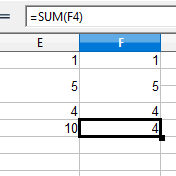
First fill E1 and F1 with 1, E2 and F2 with 2, E4 and F4 with 4, merge E2 and E3, merge F2 and F3
Select E1 to E4, hit AutoSum, 10 appears in E5 with formula "=SUM(E1:E4)"
Select cell F5, hit AutoSum, 4 appears in F5 with formula "=SUM(F4)"

It appears that AutoSum has a bottom-up approach, it goes through the cells above it from the cell right above it upwards.
When it hits a cell that does not have a numeric value it stops. In my view it should detect that it is a hidden and merged cell, and move on upwards, untill it reaches a non hidden cell that does not have a numeric value (or row 1 is reached ofcourse).

I get the feeling the logic behind merging cells goes back to merging column headers and has not much evolved since. Even now, when you merge 2 cells with numeric value, it askes you if the contents of the hidden cells should be moved into the first cell, and if you choose Yes, it converts the values to concatenated text in stead of giving you the option of summing the values, strange behavior for a spreadsheet in my opinion.
Apache Open Office 4.1.3, Microsoft Windows 10 Home
User avatar
Villeroy
Volunteer
Posts: 31365
Joined: Mon Oct 08, 2007 1:35 am
Location: Germany

Re: SUM does not work correctly if last cells summed are mer

Post by Villeroy »

ZjanPreijde wrote:I get the feeling the logic behind merging cells goes back to merging column headers and has not much evolved since. Even now, when you merge 2 cells with numeric value, it askes you if the contents of the hidden cells should be moved into the first cell, and if you choose Yes, it converts the values to concatenated text in stead of giving you the option of summing the values, strange behavior for a spreadsheet in my opinion.

Why not counting or showing the agerage? Some people think that this is the normal way how one concatenates cell text. I use it sometimes when I want to write a lot of text into a rectangle. But even then a text box from the drawing tool bar is better. Merging is just a cosmetical feature for a nicer layout of labels, e.g. for major labels spanning across multiple sub-labels. The top/left cell overlaps the others without erasing the contents of the now hidden cells.
Please, edit this topic's initial post and add "[Solved]" to the subject line if your problem has been solved.
Ubuntu 18.04 with LibreOffice 6.0, latest OpenOffice and LibreOffice
ZjanPreijde
Posts: 12
Joined: Mon Feb 06, 2017 3:08 pm

Re: SUM does not work correctly if last cells summed are mer

Post by ZjanPreijde »

Yes, it may satisfy textual needs. But it does not satisfy needs concerning numbers, I'd like a spreadsheet to focus on numbers, and make sure, in this case, merging also satisfies needs concerning numbers. It is not a word processor.

Edit : I am not complaining how Calc treats merging text type cells! Please read the OP. I'm talking numbers, and am only feeling it is a neglected field if numbers are concerned.
Last edited by ZjanPreijde on Mon Feb 06, 2017 11:12 pm, edited 1 time in total.
Apache Open Office 4.1.3, Microsoft Windows 10 Home
User avatar
karolus
Volunteer
Posts: 1252
Joined: Sat Jul 02, 2011 9:47 am

Re: SUM does not work correctly if last cells summed are mer

Post by karolus »

ZjanPreijde wrote:Yes, it may satisfy textual needs. But it does not satisfy needs concerning numbers, I'd like a spreadsheet to focus on numbers, and make sure, in this case, merging also satisfies needs concerning numbers. It is not a word processor.
So don't use it as Wordproceessor and stop merging cells and complaining about issues with …
Libreoffice 25.2… on Debian 13 (trixie) (on RaspberryPI5)
Libreoffice 25.8… flatpak on Debian 13 (trixie) (on RaspberryPI5)
ZjanPreijde
Posts: 12
Joined: Mon Feb 06, 2017 3:08 pm

Re: SUM does not work correctly if last cells summed are mer

Post by ZjanPreijde »

I am not using it as a word processor. I want it to sum numbers that in some cases span multiple rows within 1 column. I am complaining about issues this spreadsheet(!) program has with numbers.
Apache Open Office 4.1.3, Microsoft Windows 10 Home
User avatar
Villeroy
Volunteer
Posts: 31365
Joined: Mon Oct 08, 2007 1:35 am
Location: Germany

Re: SUM does not work correctly if last cells summed are mer

Post by Villeroy »

If this "feature" was not in MS Excel, it would not be in any other spreadsheet. Therefore it's the way it is.
Last edited by Villeroy on Mon Feb 06, 2017 11:42 pm, edited 1 time in total.
Please, edit this topic's initial post and add "[Solved]" to the subject line if your problem has been solved.
Ubuntu 18.04 with LibreOffice 6.0, latest OpenOffice and LibreOffice
User avatar
RusselB
Moderator
Posts: 6646
Joined: Fri Jan 03, 2014 7:31 am
Location: Sarnia, ON

Re: SUM does not work correctly if last cells summed are mer

Post by RusselB »

Attached is a quick spreadsheet with 3 columns.
The last number in each column is the SUM of the recognized numbers in each column
Each column has a descriptive heading for what is happening in the column.
Hopefully reviewing this will explain what is happening.
Attachments
Sum of merged cells.ods
(10 KiB) Downloaded 332 times
OpenOffice 4.1.7, LibreOffice 7.0.1.2 on Windows 7 Pro, Ultimate & Windows 10 Home (2004)
If you believe your problem has been resolved, please go to your first post in this topic, click the Edit button and add [Solved] to the beginning of the Subject line.
ZjanPreijde
Posts: 12
Joined: Mon Feb 06, 2017 3:08 pm

Re: SUM does not work correctly if last cells summed are mer

Post by ZjanPreijde »

Hi RusselB, the total of the first column shows the correct total, the second column shows a text value in B6-7 and an incorrect sum in B11, the total of column 3 does not correspond with the total of values shown in cells C2-C10. I am not sure what point you are making here, I am assuming you manually entered the SUM(x2:x10) formulas in row 11. It is not exactly addressing the issue in this post.
Apache Open Office 4.1.3, Microsoft Windows 10 Home
ZjanPreijde
Posts: 12
Joined: Mon Feb 06, 2017 3:08 pm

Re: SUM does not work correctly if last cells summed are mer

Post by ZjanPreijde »

Maybe you are trying to tell me something about the behaviour of Calc regarding hidden values? The header of column 3 mentions rows 6 & 7 not merged. But still they ARE merged and there is a hidden value that holds the value C7 (1523) and that value is not shown, but still included in the SUM?
Apache Open Office 4.1.3, Microsoft Windows 10 Home
User avatar
Villeroy
Volunteer
Posts: 31365
Joined: Mon Oct 08, 2007 1:35 am
Location: Germany

Re: SUM does not work correctly if last cells summed are mer

Post by Villeroy »

You can hide entire rows, columns and sheets. The values are still there and can be referenced and calcluated with.
Please, edit this topic's initial post and add "[Solved]" to the subject line if your problem has been solved.
Ubuntu 18.04 with LibreOffice 6.0, latest OpenOffice and LibreOffice
User avatar
RusselB
Moderator
Posts: 6646
Joined: Fri Jan 03, 2014 7:31 am
Location: Sarnia, ON

Re: SUM does not work correctly if last cells summed are mer

Post by RusselB »

The sum in column B of the spreadsheet I uploaded is correct for the numbers in the column. By merging the contents of rows 6 & 7, it becomes a string (aka text), which has a 0 value.
The total in column 3 does correspond with the numbers in the column, but not those shown, as the value for row 6 is still recognized by the formula, even though the data is not displayed.

I was trying to show that the values included in the SUM differ depending on how the information in the merged cells is handled.
When I merge the cells, I get a prompt asking me "Should the contents of the hidden cells be moved into the first cell?" with Yes, No and Cancel options.
The Yes option gives the results in column B of my spreadsheet, the No option give the results in column C, and the Cancel option gives the results in column A
OpenOffice 4.1.7, LibreOffice 7.0.1.2 on Windows 7 Pro, Ultimate & Windows 10 Home (2004)
If you believe your problem has been resolved, please go to your first post in this topic, click the Edit button and add [Solved] to the beginning of the Subject line.
ZjanPreijde
Posts: 12
Joined: Mon Feb 06, 2017 3:08 pm

Re: SUM does not work correctly if last cells summed are mer

Post by ZjanPreijde »

OK, thank you for explaining the result of the three options when merging cells with values. However, we are drifting away further and further from my original issue. And it also does not explain why Calc when merging and moving contents to the first cell, would convert numeric values into concatenated text without the option of converting the numeric values to their sum.

I merged 2 cells of which 1 had NO value. If this merged and hidden empty cell is in the last row (in my example cell C4) and I select cells C1:C3 (C3 and the hidden C4 are merged so C4 should be included) before pressing AutoSum, AutoSum stores the value in this hidden and merged cell C4, thus storing a value in a cell I left empty for a reason and hide for a reason and do not see any more, but IS being used in further calculations. In my opinion this is wrong, and AutoSum should store the value in the next VISIBLE cell of that column, C5.
Apache Open Office 4.1.3, Microsoft Windows 10 Home
User avatar
karolus
Volunteer
Posts: 1252
Joined: Sat Jul 02, 2011 9:47 am

Re: SUM does not work correctly if last cells summed are mer

Post by karolus »

ZjanPreijde wrote:And it also does not explain why Calc when merging and moving contents to the first cell, would convert numeric values into concatenated text…
because its the obvious way… there is no sensefull value for somthing like <number> some space> <number>

ZjanPreijde wrote:…without the option of converting the numeric values to their sum.
…and the day after tomorrow comes the next smart guy and wish the option to calculate the average instead the sum.

Again, let the cells unmerged and there's no reason anymore, complaining like a troll.
Libreoffice 25.2… on Debian 13 (trixie) (on RaspberryPI5)
Libreoffice 25.8… flatpak on Debian 13 (trixie) (on RaspberryPI5)
gerard24
Volunteer
Posts: 958
Joined: Sat Oct 30, 2010 5:12 pm
Location: France

Re: SUM does not work correctly if last cells summed are mer

Post by gerard24 »

Just for the record, LibreOffice 5.3 have a new dialog when merging cell.
An option to empty covered cell(s).

https://wiki.documentfoundation.org/Rel ... /5.3#Other
LibreOffice 6.4.5 on Windows 10
Post Reply