Something happened to a document that I have on my external hard drive in Open Office format. After retrieving the document from the external hard drive and working with it to make revisions, it was altered to a read only format and I cannot get it back to a regular document that I can revise. I must have done something to the document format, but I don't know what?
Also, is it recommended to upgrade to Open Office 4.1.1 - haven't done it yet. Will it alter any documents I currently have?
Converting a document from read only to modifiable
-
augustine19
- Posts: 4
- Joined: Sun Sep 13, 2015 4:20 pm
Converting a document from read only to modifiable
Open Office 4.1.0, Windows 8.1

Re: Converting a document from read only to modifiable
1) This is your computer, your external drive, your Windows system, your everything. OpenOffice has not the ability to change the status of a file on your file system. The file is on a read-only drive (CDRom) or in read-only folder, may be flagged as a read-only file by someone or belong to some system user other than you.
2) There is only one setting that tells OpenOffice that some document should be read-only although the file on the file system ist not. But I don't think you have used this setting.
3) Other office features may affect parts of a document (protected sections or frames).
The general solution to 1) is a single button on the standard toolbar. If you push it and are prompted for a password, then option 2) had been set.
If no password is required, then the document won't be linked to the read-only file anymore. It will be a new, unsaved document titled "Untitled 1" which you can edit and save elsewhere.
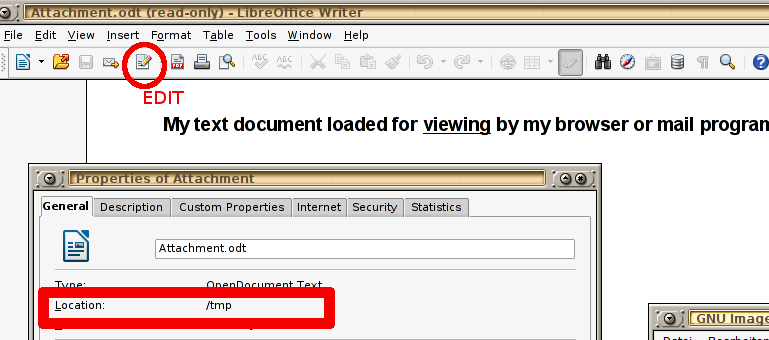
2) There is only one setting that tells OpenOffice that some document should be read-only although the file on the file system ist not. But I don't think you have used this setting.
3) Other office features may affect parts of a document (protected sections or frames).
The general solution to 1) is a single button on the standard toolbar. If you push it and are prompted for a password, then option 2) had been set.
If no password is required, then the document won't be linked to the read-only file anymore. It will be a new, unsaved document titled "Untitled 1" which you can edit and save elsewhere.
Please, edit this topic's initial post and add "[Solved]" to the subject line if your problem has been solved.
Ubuntu 18.04 with LibreOffice 6.0, latest OpenOffice and LibreOffice
Ubuntu 18.04 with LibreOffice 6.0, latest OpenOffice and LibreOffice
-
augustine19
- Posts: 4
- Joined: Sun Sep 13, 2015 4:20 pm
Re: Converting a document from read only to modifiable
Thank you for taking time to reply to my post, but I don't think the reply has helped me. I may need to retype the document from scratch again. I really dislike Open Office and would have been better served using the Microsoft Suite and we may go ahead and purchase that.
Open Office 4.1.0, Windows 8.1

Re: Converting a document from read only to modifiable
Start a new Writer document. Open your old (read-only) document and type Ctrl A (to select All). Then Ctrl C to copy the selection. Switch to the new blank document (/Window on the menu bar) Click your cursor in that document then Ctrl V to Paste the clipboard text into it. You should now have your text in editable form. /File /Save As but use a different name to the original file.
Apache OpenOffice 4.1.16 on Xubuntu 26.04.1 LTS
-
augustine19
- Posts: 4
- Joined: Sun Sep 13, 2015 4:20 pm
Re: Converting a document from read only to modifiable
Thank you, RoryOF. The document displays as a pdf file now (previously it was a regular document that I could amend). So I cannot copy and paste anything from it in its current format.
Open Office 4.1.0, Windows 8.1
Re: Converting a document from read only to modifiable
Using a PDF file, to select the text (if the PDF configuration parameters were set to allow this), you have to click and drag.
Apache OpenOffice 4.1.16 on Xubuntu 26.04.1 LTS
Re: Converting a document from read only to modifiable
Yes, please. But then I have a final plea: Would you please tell us how you edit a PDF in MS Word?I really dislike Open Office and would have been better served using the Microsoft Suite and we may go ahead and purchase that.
Please, edit this topic's initial post and add "[Solved]" to the subject line if your problem has been solved.
Ubuntu 18.04 with LibreOffice 6.0, latest OpenOffice and LibreOffice
Ubuntu 18.04 with LibreOffice 6.0, latest OpenOffice and LibreOffice
Re: Converting a document from read only to modifiable
There is a program some where I cont remember where I found it but it allows you to create an open office doc from a pdf file,
also if you have access to the open office doc and it is still in read only mode if you right click on the file in windows explorer and select properties there is a check box for read only make sure it is not selected and hit apply this may help.
also if you have access to the open office doc and it is still in read only mode if you right click on the file in windows explorer and select properties there is a check box for read only make sure it is not selected and hit apply this may help.
OpenOffice 4.1.1 ON WINDOWS 7 64
Re: Converting a document from read only to modifiable
its actually an extension in open office here is a YouTube video that explains how to find, install, and use to open a pdf in oo
http://www.google.com/url?sa=t&rct=j&q= ... sBJ1NAOSkg
http://www.google.com/url?sa=t&rct=j&q= ... sBJ1NAOSkg
OpenOffice 4.1.1 ON WINDOWS 7 64
Re: Converting a document from read only to modifiable
Some advanced PDF applications allow extraction and/or editing of the text of the PDF file. In default of one of these, one can OCR the PDF file and insert the output into a text editor.
There is an extension for OpenOffice that allows minor changes to be made to a PDF file; these are made in Draw and are the equivalent of pasting a patch over the entry to be changed - only a cosmetic change.
There is an extension for OpenOffice that allows minor changes to be made to a PDF file; these are made in Draw and are the equivalent of pasting a patch over the entry to be changed - only a cosmetic change.
Apache OpenOffice 4.1.16 on Xubuntu 26.04.1 LTS
Re: Converting a document from read only to modifiable
The problem is that too many Windows user don't know what they are talking about. They run a desktop system where some most important functions depend on file name extensions (.odt, .doc, .pdf, etc) while this important detail is hidden away by default. So they see a file with no clear indication about the actual file format. To make things worse, the file icon indicates the software product that is currently associated with this type of file rather than the type of file.
After 20 years (since Windows 95), too many Windows users are still completely clueless because their visual intuition is violated by a badly designed system so they never get their heads around the simple relation between their document files and their installed applications. I know office workers who stumble around with their misconceptions since 20 years. They may not even believe you when you demonstrate some dry facts right in front of their eyes.
After 20 years (since Windows 95), too many Windows users are still completely clueless because their visual intuition is violated by a badly designed system so they never get their heads around the simple relation between their document files and their installed applications. I know office workers who stumble around with their misconceptions since 20 years. They may not even believe you when you demonstrate some dry facts right in front of their eyes.
Please, edit this topic's initial post and add "[Solved]" to the subject line if your problem has been solved.
Ubuntu 18.04 with LibreOffice 6.0, latest OpenOffice and LibreOffice
Ubuntu 18.04 with LibreOffice 6.0, latest OpenOffice and LibreOffice
Re: Converting a document from read only to modifiable
augustine19 wrote:Something happened to a document that I have on my external hard drive in Open Office format. After retrieving the document from the external hard drive and working with it to make revisions, it was altered to a read only format and I cannot get it back to a regular document that I can revise. I must have done something to the document format, but I don't know what?
Saving an "Open Office format" file does NOT change the file to PDF format. It does not happen. There is no option to "Save as PDF". The only way to get a PDF file is to use the "Export as PDF" option. This creates an entirely new PDF file. This file does not replace the "Open Office format" file. You should have two files, one "Open Office format" file and one PDF file.augustine19 wrote:The document displays as a pdf file now (previously it was a regular document that I could amend). So I cannot copy and paste anything from it in its current format.
However, if you didn't save the edited "Open Office format" file, then the "Open Office format" file will not have the changes which appear in the PDF file. If you've already closed the "Open Office format" file without saving it (you should have been asked if you wanted to save the file when you closed it), then your only option is to reopen the "Open Office format" file and re-create the changes which are in the PDF file. If these changes are simple text, then you can copy the text from the PDF file and paste it in the "Open Office format" file. The edited "Open Office format" file can then be saved, not exported.
AOO 4.1.14 on Ubuntu MATE 22.04
Re: Converting a document from read only to modifiable
it may be as simple as windows has the file marked as read only check to make sure. im not sure if mac does read only files but if running a mac this could still be your issue also you can always saveas a read only file to make it editable again.
some timesa when copying a file from an external drive windows will mark the file read only by default.
open my computer locate the file right click on file and select properties there should be a check box for read only make sure it is not selected then click apply and ok
some timesa when copying a file from an external drive windows will mark the file read only by default.
open my computer locate the file right click on file and select properties there should be a check box for read only make sure it is not selected then click apply and ok
OpenOffice 4.1.1 ON WINDOWS 7 64
Re: Converting a document from read only to modifiable
If some office document opens in read-only mode, all it takes is pushing the edit button to resolve the problem one way or the other. augustine19 did not respond to this offered solution. Instead she reported that the file is a PDF. PDF is not an editable file format. OpenOffice can not load any PDF, not even for viewing. Therefore she double-clicks some assumed document file which is a PDF actually, some PDF viewer pops up and she blames OpenOffice for the PDF viewer not being able to edit a PDF document which is weird.
May be she had exported her office document to PDF and deleted the original document because she could not stand having 2 equally named files. Because Windows hides name extensions you never really know if you are dealing with MyDoc.odt, MyDoc.doc or MyDoc.pdf.
May be the document was opened for viewing by clicking on a web-link in a browser or mail client. In this case any decent software downloads a temporary copy of the requested document which needs to be read-only for good reasons.
Anyhow, if she opened that read-only document with OpenOffice, she propably has no idea where that file is stored, therefore she can not know if this is the same file she used to edit some other day. Without knowing the file location, she would lose her edits anyway, and since she refuses to hit the edit button I think that augustine19 may be a just a troll.
May be she had exported her office document to PDF and deleted the original document because she could not stand having 2 equally named files. Because Windows hides name extensions you never really know if you are dealing with MyDoc.odt, MyDoc.doc or MyDoc.pdf.
May be the document was opened for viewing by clicking on a web-link in a browser or mail client. In this case any decent software downloads a temporary copy of the requested document which needs to be read-only for good reasons.
Anyhow, if she opened that read-only document with OpenOffice, she propably has no idea where that file is stored, therefore she can not know if this is the same file she used to edit some other day. Without knowing the file location, she would lose her edits anyway, and since she refuses to hit the edit button I think that augustine19 may be a just a troll.
Please, edit this topic's initial post and add "[Solved]" to the subject line if your problem has been solved.
Ubuntu 18.04 with LibreOffice 6.0, latest OpenOffice and LibreOffice
Ubuntu 18.04 with LibreOffice 6.0, latest OpenOffice and LibreOffice
-
augustine19
- Posts: 4
- Joined: Sun Sep 13, 2015 4:20 pm
Re: Converting a document from read only to modifiable
Hi biller oh, what I mention was that Microsoft office is an overall better product in my opinion and I don't think I would have had a problem with the document converting somehow mysteriously to a read only format. Another bored member just posted mother option which I will try. Thank you .Villeroy wrote:Yes, please. But then I have a final plea: Would you please tell us how you edit a PDF in MS Word?I really dislike Open Office and would have been better served using the Microsoft Suite and we may go ahead and purchase that.
Open Office 4.1.0, Windows 8.1
Re: Converting a document from read only to modifiable
If you ever visit a computer course, show this topic to your teacher.
I'm confident it helps.
I'm confident it helps.
Please, edit this topic's initial post and add "[Solved]" to the subject line if your problem has been solved.
Ubuntu 18.04 with LibreOffice 6.0, latest OpenOffice and LibreOffice
Ubuntu 18.04 with LibreOffice 6.0, latest OpenOffice and LibreOffice
Re: Converting a document from read only to modifiable
There's nothing mysterious about it. OpenOffice exports PDF files when the USER tells it to do so. I've saved thousands of documents using OpenOffice and not one has ever converted mysteriously to "read-only" or to PDF format. If your version of MS Office can't export PDF files, then that's a deficiency in your version of MS Office.augustine19 wrote:...what I mention was that Microsoft office is an overall better product in my opinion and I don't think I would have had a problem with the document converting somehow mysteriously to a read only format.
AOO 4.1.14 on Ubuntu MATE 22.04
Re: Converting a document from read only to modifiable
augustine19 could you please attach a copy of this file in your post
OpenOffice 4.1.1 ON WINDOWS 7 64